

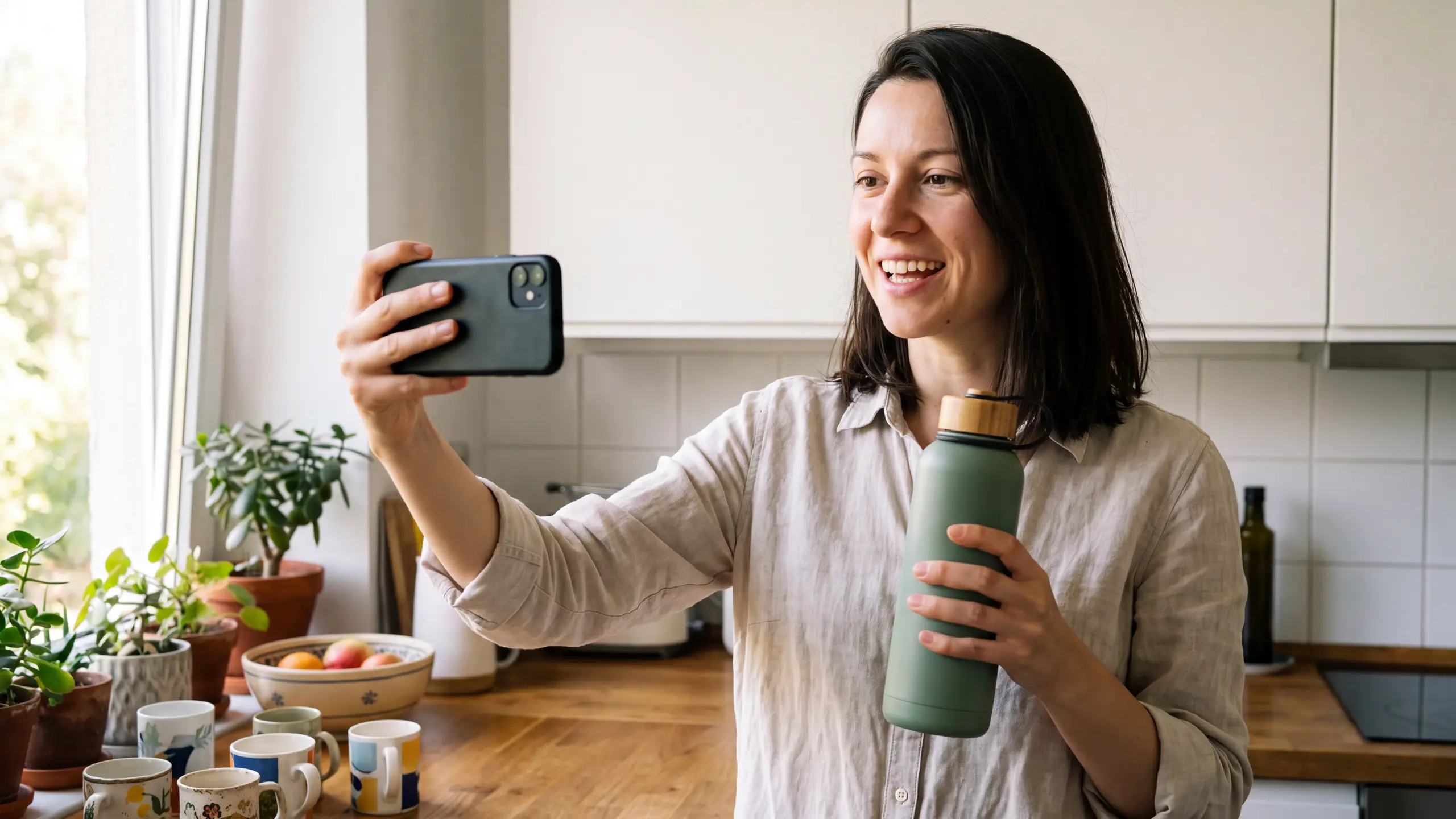
How to generate UGC videos with an API
Summary
Generating UGC videos with an API means sending a creator image, a product image and a brief, and getting back a vertical video of that creator presenting your product, speech included. The winning ad is rarely the first take, so the work is in variants at scale: hooks, languages and sizes. Runway Dev covers the whole ad on one API key: the Product UGC Recipe makes a finished take from one call, leading models make the rest, Workflows publish your chain as one endpoint and batches queue on their own.
What does a UGC video API have to produce?
A UGC video API has to return a finished ad: a vertical 9:16 video, usually 15 to 30 seconds long, that looks shot on a phone, with a creator presenting the product, a hook in the first two or three seconds and the speech already in it. It has to make that from inputs a program can supply, an image of the creator, an image of the product and a brief, and make it again for every hook, language and size you test, so one product becomes dozens of takes.
This guide covers presenter-led ads and the variants around them. For ads that show only the product, how to generate product videos with an API covers the pipeline.
What should a UGC video brief include?
A UGC video brief holds the product, the creator, the message and the versions, written so a program can build every request from it. Fill in this template once per product, and every take, hook and language version comes from the same source. The one-call Recipe section further down shows which request field each line becomes.
| Brief field | What to write |
|---|---|
| Product and brand | The name, what it is and what it does |
| Product photo | One sharp image of the product alone on a plain background: whatever it doesn’t show, the model invents |
| Creator | One waist-up image, face visible and hands empty, of a person who has consented or an AI-generated presenter |
| Audience | Who the ad is for, in one line |
| Tone and voice | How the creator sounds: casual, expert, excited |
| Hooks | Three to five first lines, each short enough to land in three seconds |
| Body | The script after the hook, the same in every take |
| Must-say points | The facts every version has to land |
| Never say or show | Off-limits claims and topics, including any result nobody has lived |
| Formats and shots | Which formats from the next section the ad needs |
| Length | 15 to 30 seconds for most UGC ads |
| Sizes | 9:16 first, then square or landscape feeds |
| Languages | The markets the winning hook will run in |
| Consent and usage | Where the ads run, for how long and in which countries |
Two of these lines carry rules: the creator’s consent has to cover AI generation and every use in the brief, and a creator, real or generated, can describe the product but can’t claim a personal experience. The FAQ covers both, and Can I use AI image and video generation commercially in my product? covers disclosure by platform and by law.
What UGC formats and shots can you generate with an API?
An API generates the parts of a UGC ad that show the product, and most of them start from a product photo. On Runway Dev, each format below is one or two calls on the same API key.
| Format | What it shows | How to make it on Runway Dev |
|---|---|---|
| Talking to camera | The creator presenting the product in their own words | A one-call Recipe, covered further down, or a reference-to-video model with speech such as Seedance 2.5 or Kling 4.0 |
| Try-on | The creator wearing the garment and showing the fit | A try-on still from the creator and garment images, then image to video |
| Tutorial or routine | The creator using the product step by step | The same, with each step written into the script |
| Hands-only unboxing | The product coming out of its box, no face on camera | Image to video from a key frame of the box |
| Point-of-view shot | The product in use through the viewer’s eyes | Image to video from a key frame of the scene |
| Close-ups and B-roll | Detail shots and cutaways: a desk, a gym bag, a trail | Image to video from key frames, then Aleph 2.0 to change the setting |
| Before and after | One scene in two states | A first and a last frame on Kling 4.0 or Wan 3.0 |
| Demo with voiceover | The product working, narrated | Image to video, then Eleven v3 or Eleven v4 for the narration |
| Captions and on-screen text | The hook and the offer as text, for viewers without sound | Added in your edit rather than generated, so every word stays exact |
| Hook variants | Three to five openings over the same body | One request per hook |
| Language versions | The ad in another market’s language | A new take with the script in that language, or dubbed narration for faceless ads |
| Customer testimonial | A real customer’s experience | Filmed, with generated shots cut around it |
A customer’s experience is the one part no API can generate, so many UGC ads cut a real person’s claim with generated shots around it. The same split turns one filmed take into a set of tests: add close-ups and B-roll from your product photos, restage the take in a new setting with Aleph 2.0 and open it on alternate hooks.
How do you generate a creator holding and presenting a product?
Generate the creator and the product together from reference images, with a video model that makes the speech in the same pass as the picture. Animating a still and adding a voice afterward leaves the mouth out of step with the words. By hand, that’s five steps:
- Build a reference sheet for the creator and one for the product, several angles each, so the face and the product hold when the creator turns.
- Write the script from the product facts, timed at roughly two to three spoken words a second, with the hook first.
- Turn the script into a shot prompt: each shot, a handheld camera at selfie distance, the setting, the action and the dialogue in quotes. Ordinary detail sells the take: a lived-in room, uneven window light, a little camera shake.
- Generate with both reference sheets attached, on a model that takes reference images and generates audio.
- Review the take for a face that drifts, a label that warps or lines out of sync, and run the first four steps again if it fails.
How do you test hooks with AI UGC videos?
To test hooks, hold everything but the first line. The creator image, the product image, the product facts and the body stay fixed, and each take opens on a question, a problem, a result or a point of view. A result line has to describe what the product does (“still ice-cold at 5 p.m.”), not something a person lived through. Three to five hooks per body is a common first test, and on Runway Dev it’s one request per hook, all submitted at once.
Give each take an id that carries its product, hook and language, then judge each hook on its hook rate, how many viewers are still watching three seconds in, and on cost per purchase. Make versions of the winner only: five hooks in three languages and two sizes is 30 files, while testing the hooks first and localizing the winner is ten.
Each request is a new generation, so the room and the cutaways change between takes while the references hold the creator and the product.
Prompt
Hook 1: Why does nobody talk about how loud water bottles are?
Hook 2: If your water bottle clangs every time you put it down, look at this.
Hook 3: POV: the bottle that finally fits your cup holder.

Body, the same in every take: This is the Verrow bottle. It has a soft silicone base, so it doesn't clang on the desk, a bamboo cap with a carry loop, and it keeps water cold for a full day. It fits a car cup holder too. Verrow, link below.
Which model should you use for each part of a UGC ad?
No single model covers a UGC ad. Talking to camera with the product in hand is a reference and audio problem, while a slow push-in on a bottle is a motion problem. A new backdrop on a shot you already approved needs an editor rather than a generator.
| Job | Models |
|---|---|
| A creator presenting the product, speaking | Seedance 2.5, Kling 4.0, Wan 3.0 |
| Faceless footage, close-ups and B-roll from a product shot | Seedance 2.5, Kling 4.0, MiniMax H3, Gemini Omni Flash 1.1, Wan 3.0 |
| Before and after, from a first and a last frame | Kling 4.0, Wan 3.0 |
| Reference sheets, key frames and try-on stills | Nano Banana Pro, Nano Banana 2.1, GPT Image 2.5, Seedream 5.0 |
| A new backdrop, light or aspect ratio on an existing shot | Aleph 2.0 |
| Narration voiceover | ElevenLabs Eleven v3 and Eleven v4 |
| Dubbing a voiceover into another language | ElevenLabs Voice Dubbing |
Every model in this table runs on Runway Dev behind one API key, one credit balance and one bill, so changing the model for one step is a one-line change. New models ship most weeks, which makes a hard-coded model id a judgment with an expiration date. Runway trains frontier models and serves the best from other labs, so we know which one wins which job, and when that changes. The Model Router packages that judgment: you set the priority between cost, quality and latency and the models it may use, then pass a config ID in place of a model name.
How do you make faceless UGC footage and B-roll of a product?
Faceless footage and B-roll start from a key frame: generate an image of the product in its scene from the product photo, then animate it with an image-to-video model, so the product’s shape and color are fixed before any motion is added. Review the hands closely, because a hand turning or opening a product is where takes most often go wrong.
To change the setting afterward, edit the shot instead of generating a new one. Aleph 2.0 on POST /v1/video_to_video changes the backdrop or the light and keeps the product, the framing and the camera move, and with targetAspectRatio it extends a vertical take to 1:1, 3:4 or 16:9 instead of cropping it.
Prompt
Change the setting to a snowy mountain trail at midday: the picnic table becomes a flat granite boulder dusted with snow, the lake becomes a snowfield with fir trees and distant peaks, light snow drifting in the air. Keep the sage-green bottle, the fleece, the book, the framing and the camera move exactly the same.Narration comes from Eleven v3 or Eleven v4 on POST /v1/text_to_speech, and how to generate product videos with an API covers the rest of the product footage pipeline.
How do you make AI try-on videos for clothing with an API?
An AI try-on video starts from a try-on still: an image model takes the creator image and the garment image as references and returns that person wearing that garment. An image-to-video model then animates the still, with the garment attached again so it holds while the creator moves. On Runway Dev that’s Nano Banana Pro on POST /v1/text_to_image, then Kling 4.0 on POST /v1/image_to_video, which generates the speech too. Give each reference one job in the prompt, the person for the face and build and the garment for the clothing.
Inputs
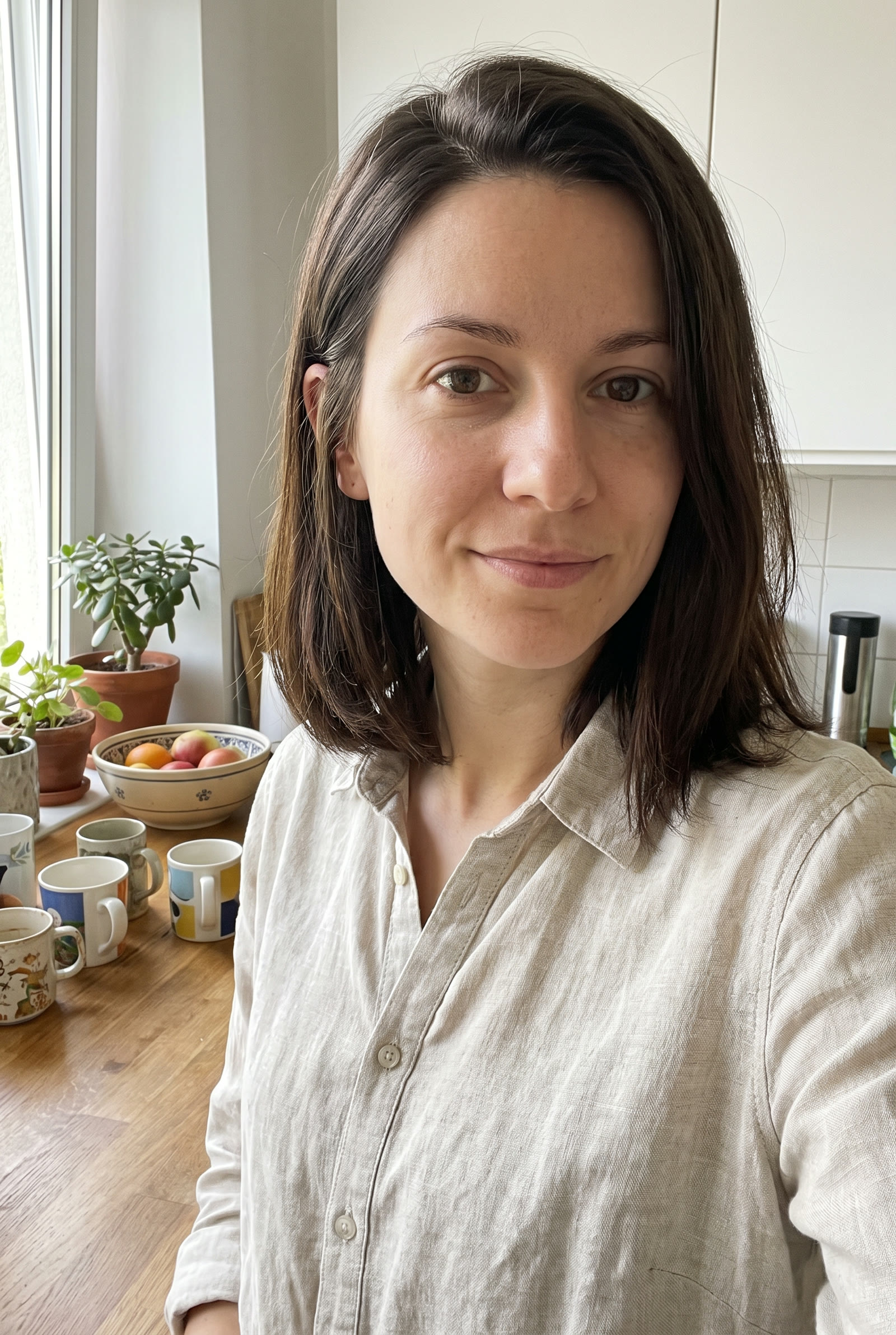 Creator image
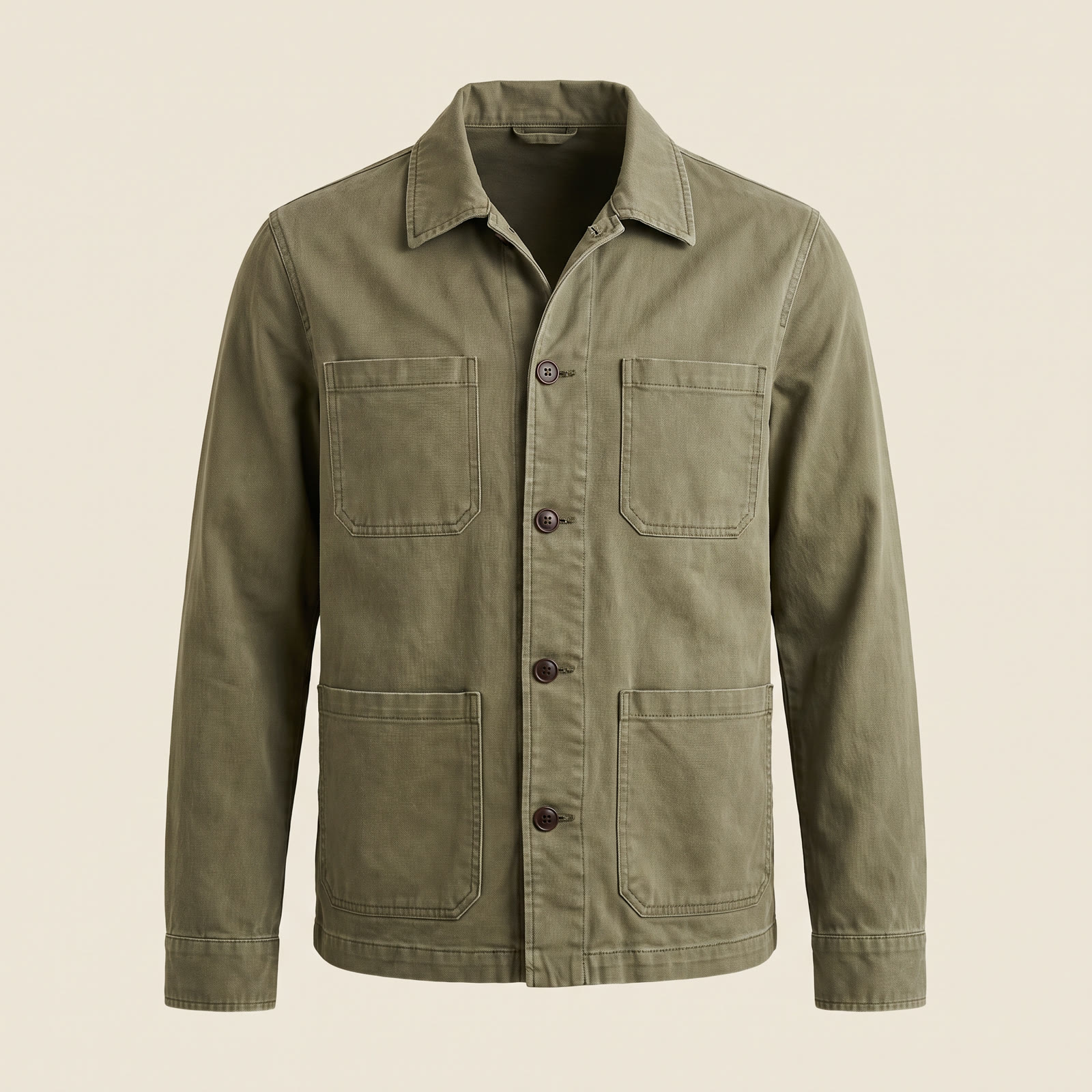 Garment image
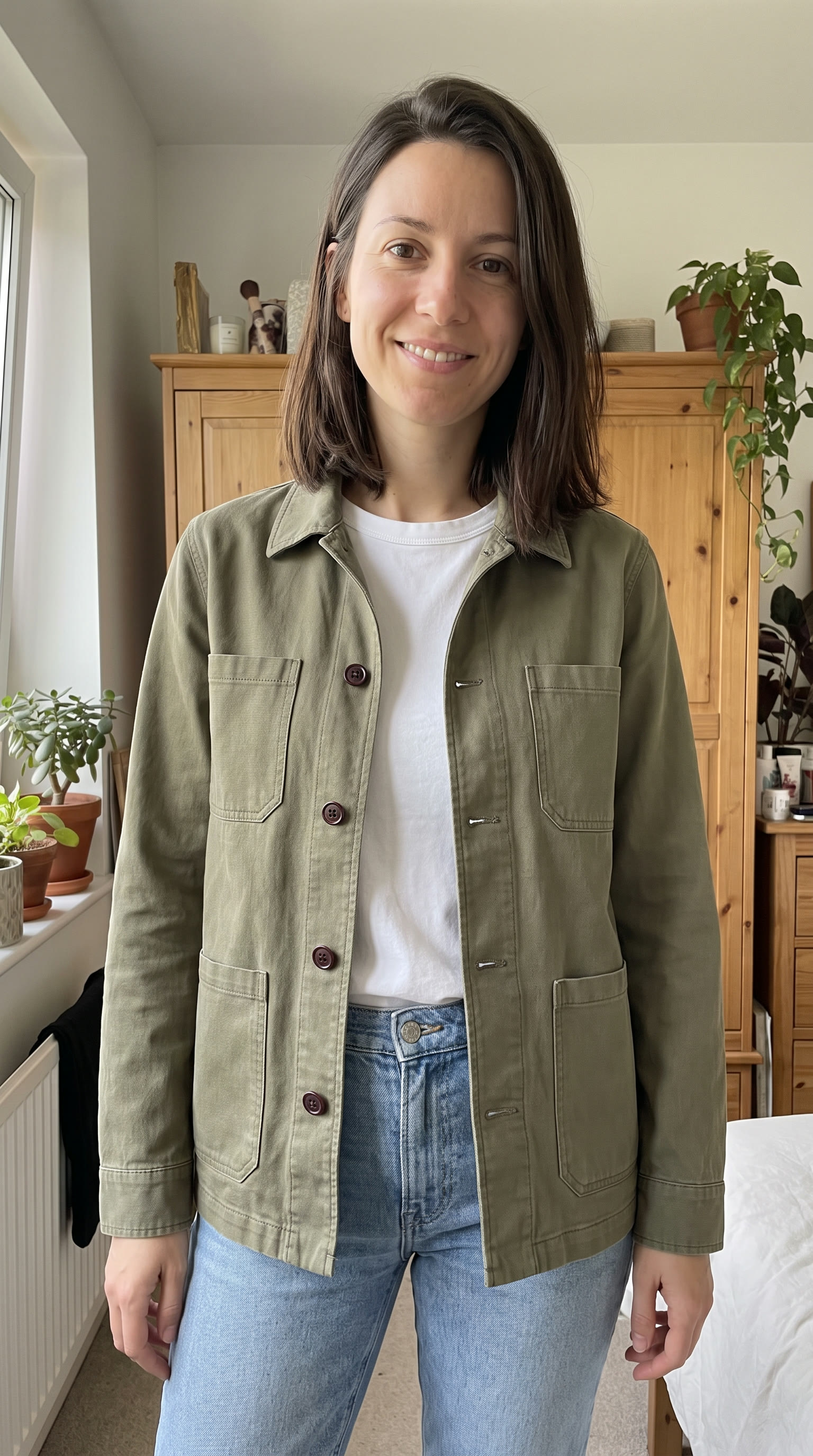 Try-on still
Prompt
Try-on still: Candid smartphone photo for a try-on video: the woman in @creator, with the same face, hair and build, now wearing the jacket in @garment open over a plain white T-shirt and light blue jeans, with exactly the same color, collar, pockets and buttons as @garment. She stands in a bright, lived-in bedroom in front of a wooden wardrobe, framed from the knees up, looking at the camera with a relaxed smile. Soft window light from the left, a little cluttered, natural colors. No mirror, no text, no logos.

Clip: Handheld phone video, the camera propped at chest height. She smooths the front of the jacket with both hands, turns her shoulders a little to the left to show the side, then turns back to the camera and says: "Here's the fit on the Verrow chore jacket. It's boxy through the body, the sleeves stop right at the wrist and it has four big pockets." Audio: her voice close to the phone, quiet room tone.
How do you localize a UGC ad into other languages?
How you localize a UGC ad depends on whether anyone speaks on camera. Runway Dev has no lip-sync endpoint, so for a creator on camera, generate a new take with the script written in the target language, which makes the speech with the picture. For narration over faceless footage, generate the translated script with Eleven v3 or Eleven v4, or send the audio track to ElevenLabs Voice Dubbing on POST /v1/voice_dubbing, which translates it into a language such as Spanish, French, German, Japanese or Hindi in the original voice.
Prompt
Casual handheld selfie video in her kitchen, friendly and matter-of-fact, holding the bottle up to the camera. She speaks Spanish and says, word for word: "¿Por qué nadie habla de lo ruidosas que son las botellas de agua? La botella Verrow tiene una base de silicona, así que no hace ruido sobre la mesa. Verrow, el enlace está abajo."How do you generate UGC videos at scale with an API?
Generating UGC videos at scale means turning one brief into a batch of requests, one per product, creator, hook and language, and running it without rate-limiting code, wasted credits or lost files. A catalog of 20 products with five hooks each is 100 takes before any translation, and on Runway Dev that batch uses the same calls as one take:
- Upload each image once.
POST /v1/uploadsreturns arunway://URI that every request in the batch can reuse for 24 hours, so the creator and product images aren’t fetched again for each take. - Run one take from a new brief before the batch. A prompt or image rejected by moderation is charged and shouldn’t be retried, and 100 copies of that request would fail the same way.
- Submit the whole batch at once. Runway Dev has no requests-per-minute limit: tasks past your concurrency limit wait as
THROTTLEDand start on their own, in about the order you sent them. Your usage tier caps generations per rolling 24 hours, returning429past it, and moves up automatically as your spend grows. Enterprise sets custom limits and guaranteed concurrency. - Download every video as it finishes. Poll the tasks with backoff and copy each output to your own storage, since output URLs expire within 24 to 48 hours. File each one under its product, creator, hook, language and consent record.
- Retry by failure code. Apart from inputs rejected by moderation, failed tasks are refunded, and each returns a
failureCode: retry codes starting withINTERNAL.BAD_OUTPUTafter fixing the prompt andTHIRD_PARTY.UNAVAILABLEafter a wait. AnASSET.INVALIDfailure needs a fixed input, not a retry. - Review every take, not a sample. Each request is a new generation, so one take passing says nothing about the next.
Built by hand, the pipeline behind each take grows with the batch too: two reference sheets, a script, a shot prompt and a generation, each a dependency with its own limits. Without a checkpoint per stage, a failed generation re-runs the sheets and the script you already paid for, and every model update means re-tuning the prompts. The next two sections take that code off your hands.
Can you publish a UGC pipeline as one endpoint?
Yes. Workflows on Runway Dev turn a multi-step UGC pipeline into one endpoint: you build it visually in the Runway app with no code, publish it as an endpoint and call it from Runway Dev. POST /v1/workflows/{id} takes nodeOutputs, which sets a node’s inputs for that run wherever no other node is wired into them, so the hook line, the creator image or the target language become parameters of one endpoint.
- Each published version keeps its own endpoint ID, so a run never changes under your code. After an edit, such as swapping in a model that shipped this morning, publish a new version and switch to its ID.
- Your creative team edits the pipeline in the app, and your code only changes the ID it calls.
- Billing is per step, from your Runway Dev credits. If a step fails, you pay for the steps that succeeded and are refunded for the failed one and everything after it, unless moderation rejected that step’s prompt or image, which stays charged.
Is there an API that generates a UGC video in one call?
Yes. The Product UGC Recipe on Runway Dev, POST /v1/recipes/product_ugc, takes a creator image, a product image and a brief and makes a vertical UGC video of that creator presenting the product, with speech, from one API call. The call returns a task id, and the video is the task’s output once it succeeds, which the SDK’s waitForTaskOutput() waits for. A take that holds the face and the product and lands its lines depends on model selection, prompt engineering and workflow design. Runway trains frontier models and our technical artists build these pipelines for a living, so a Recipe is that expertise packaged into an endpoint, and Runway updates it as better models ship while your code stays the same.
Each field of the request takes a line of the brief template:
| Request field | From the brief | What it takes |
|---|---|---|
characterImage |
Creator | One image, as an HTTPS URL, a Runway upload URI or a data URI, with a width-to-height ratio between 0.4 and 4 |
productImage |
Product photo | One image, in the same forms |
productInfo |
Product and brand, must-say points | Plain language, up to 2,500 characters |
userConcept |
Audience, tone and voice, hook, body | The tone, the voice register, a message or a full dialog script, up to 3,500 characters |
duration |
Length | 4 to 15 seconds per take, 15 by default |
ratio |
Sizes | 720:1280, the default, or 1080:1920: the output is always vertical |
audio |
On by default | |
version |
A dated version such as 2026-06, or unsafe-latest |
To keep cleared lines, quote them in userConcept word for word and check each take’s speech against them: the Recipe writes its own script from your direction and can trim or reword a line. Hooks and languages are one request each, other sizes go through Aleph 2.0, and a 30-second ad is two takes cut together or one Kling 4.0 or Wan 3.0 take. Pin 2026-06 to keep behavior identical, or pass unsafe-latest to track the newest stable version.
This loop turns the brief into one request per hook, each with the same images, product facts and body:
import RunwayML from '@runwayml/sdk';

const client = new RunwayML();

const brief = {
  creatorImage: 'https://example.com/creator.jpg',
  productImage: 'https://example.com/bottle.png',
  productInfo: 'Verrow insulated water bottle. Keeps water cold for 24 hours.',
  tone: 'Casual handheld selfie video in a kitchen, friendly and matter-of-fact.',
  hooks: [
    'Why does nobody talk about how loud water bottles are?',
    'If your water bottle clangs every time you put it down, look at this.',
    'POV: the bottle that finally fits your cup holder.',
  ],
  body: 'This is the Verrow bottle. It has a soft silicone base, so it never clangs.',
};

const results = await Promise.allSettled(
  brief.hooks.map(hook =>
    client.recipes.productUgc({
      version: '2026-06',
      characterImage: { uri: brief.creatorImage },
      productImage: { uri: brief.productImage },
      productInfo: brief.productInfo,
      userConcept: `${brief.tone} The creator says, word for word: "${hook} ${brief.body}"`,
    })
  )
);

// Store each accepted task id with its hook, then poll the tasks for the videos.
// A 429 past the daily cap started no task: retry it once you're back under.
// A timeout or dropped connection may have created the task, so don't
// resubmit those blindly.
console.log(
  results.map((result, i) =>
    result.status === 'fulfilled'
      ? { hook: brief.hooks[i], taskId: result.value.id }
      : { hook: brief.hooks[i], error: String(result.reason) }
  )
);
The same call in Python, waiting for one take:
from runwayml import RunwayML

client = RunwayML()

task = client.recipes.product_ugc(
    version='2026-06',
    character_image={'uri': 'https://example.com/creator.jpg'},
    product_image={'uri': 'https://example.com/bottle.png'},
    product_info='Insulated water bottle, sage-green steel, bamboo cap',
    user_concept='Casual selfie video in her kitchen. She says: "..."',
    duration=15,
).wait_for_task_output()
One call returned the take below, for a fictional brand and an AI-generated creator.
Inputs
- Creator image
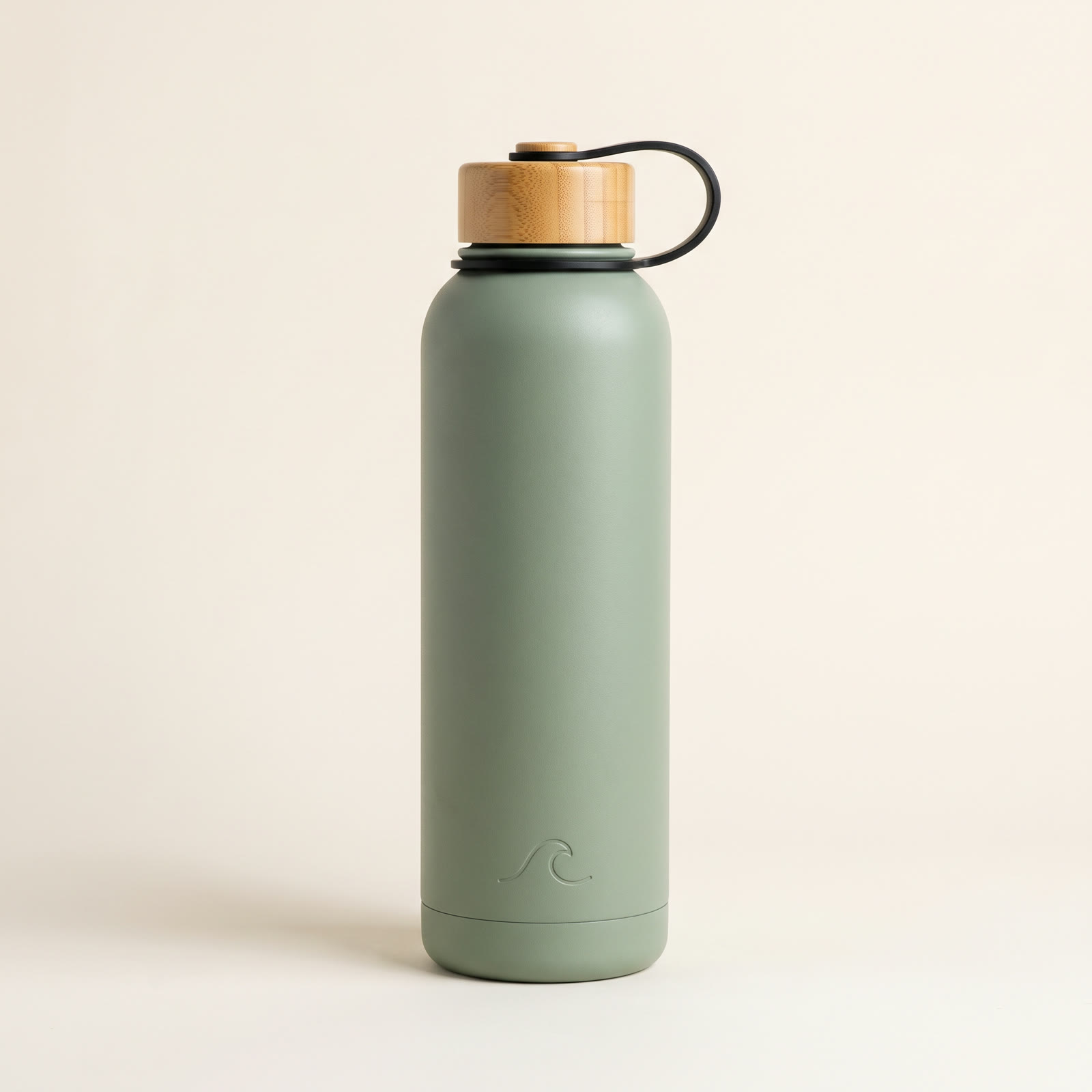 Product image
Prompt
productInfo: Verrow insulated water bottle, 20 oz. Matte sage-green stainless steel, double-wall vacuum insulation that keeps drinks cold for 24 hours. Bamboo screw cap with a silicone carry loop. A soft silicone base so it does not clang when you set it down. Fits standard car cup holders. Dishwasher-safe body.

userConcept: Casual handheld selfie video in her kitchen, friendly and matter-of-fact, holding the bottle up to the camera. She says, word for word: "Why does nobody talk about how loud water bottles are? This is the Verrow bottle. It has a soft silicone base, so it doesn't clang on the desk, a bamboo cap with a carry loop, and it keeps water cold for a full day. It fits a car cup holder too. Verrow, link below."
A second call swapped in another AI-generated creator and a face cream from the same fictional brand, at 10 seconds.
Inputs
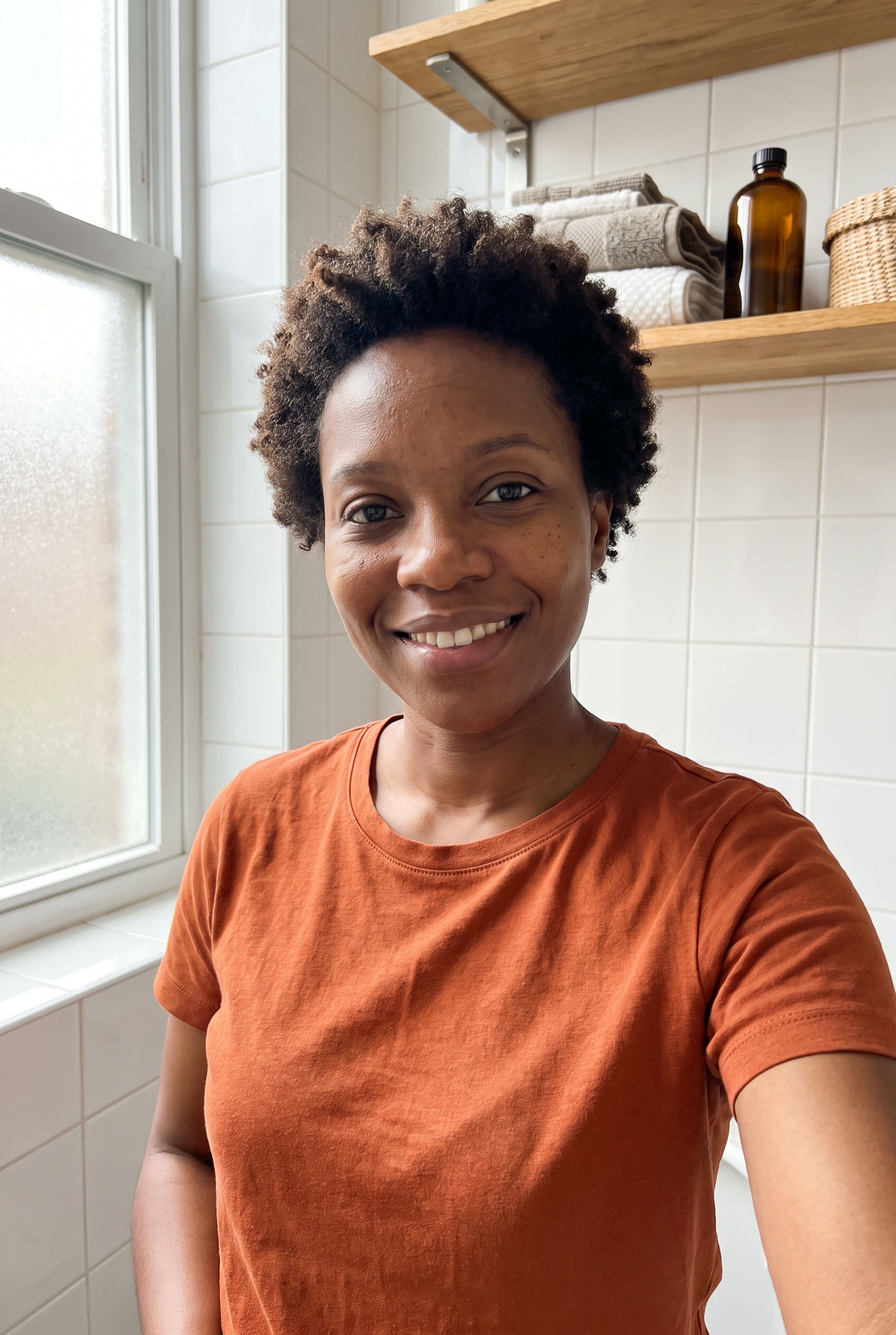 Creator image
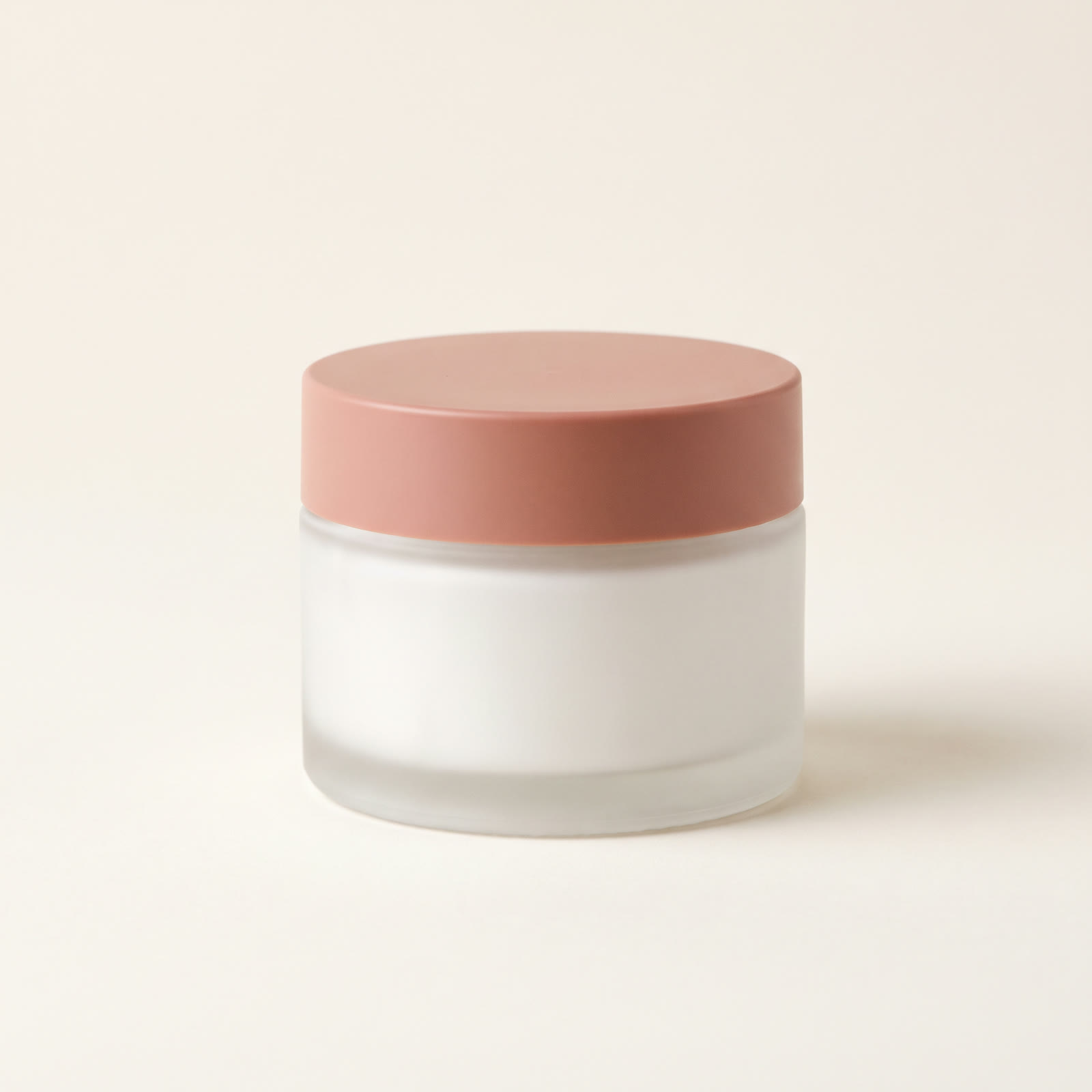 Product image
Prompt
productInfo: Verrow gel cream, 50 ml. A lightweight, fragrance-free gel moisturizer that sinks in fast. Frosted white glass jar with a matte clay-pink lid. The jar has no label and no printed text anywhere.

userConcept: One continuous handheld selfie shot in her bathroom, with no cutaways or close-ups: friendly and matter-of-fact, she holds the closed jar still beside her face the whole time. She says, word for word: "This is the Verrow gel cream. It's fragrance-free and it sinks in fast. One jar lasts about two months."
Three more Recipes fit a UGC program. Product Swap puts another product into a video that already performed, keeping its motion, light and scene, Multi-Shot Video cuts a faceless sequence of three to five shots and Product Ad makes a product-only ad from one to ten product photos.
What’s the best API for AI UGC videos?
For presenter-led UGC at volume, Runway Dev is built for the whole job, on one API key, one credit balance and one bill:
- A creator take in one call. The Product UGC Recipe makes a finished take from two images and a brief, built and tuned by Runway, which trains frontier video models.
- The leading models for every other shot. Seedance 2.5, Kling 4.0 and Wan 3.0 for B-roll, close-ups and try-ons, Nano Banana Pro and GPT Image 2.5 for key frames, Aleph 2.0 to change a setting or reframe, and ElevenLabs for voices and dubbing.
- Your own chain as one endpoint. Workflows publish the pipeline your creative team builds in the Runway app, with hooks, images and languages passed per call.
- Batches of hundreds without rate-limiting code, as generating UGC videos at scale covers.
- C2PA provenance. Runway Dev signs outputs with Content Credentials that record them as AI-generated. Signing is best-effort, so check the files you publish.
Which approach should you use to generate UGC videos?
Three approaches on Runway Dev, with the same API key and the same credits:
- The Product UGC Recipe is generally the way to go for presenter-led takes, unless you need a horizontal or square format, a take longer than 15 seconds, a specific model or your own shot structure.
- Workflows when you already know which models and prompts work for your ads and want full control of the chain, with hooks, images and languages passed per call.
- Calling the models directly, with a Model Router, for faceless footage, try-ons and voiceovers where you want to set cost or latency per call, or exclude certain models.
FAQ
Is there an API for AI UGC videos?
Yes. Runway Dev’s Product UGC Recipe, POST /v1/recipes/product_ugc, takes a creator image, a product image and a brief and makes a vertical video of that creator holding and presenting the product, with speech, from one API call, returned as the task’s output. Workflows publish a custom UGC pipeline as one endpoint.
Is there an API that turns a product photo into a video ad?
Yes, two on Runway Dev. The Product UGC Recipe adds a creator presenting the product, from a product photo and a creator image. The Product Ad Recipe turns one to ten product photos into a product-only ad, which how to generate product videos with an API covers.
How do I build an AI UGC ad generator app?
Collect a creator image, a product image and the product facts in your app, then send one request per take to the Product UGC Recipe or to your own published Workflow on Runway Dev, and serve each finished video from your own storage.
Can I generate a UGC ad from a product page URL?
Not in one step: Runway Dev requests take images and text, not a page address. Pull the product photo and the product facts from your page or catalog feed, then send them as productImage and productInfo, which also lets you check what the ad will say before it runs.
How do I automatically generate TikTok and YouTube Shorts videos with an API?
Generate vertical 9:16 video. On Runway Dev the Product UGC Recipe returns 720:1280 or 1080:1920, and most video models take the same ratios. Generation is the API’s part, and posting goes through each platform’s own publishing tools or API.
How much does it cost to generate a UGC video with an API?
On Runway Dev, the Product UGC Recipe is priced per second of output, with a 720p and a 1080p rate and a four-second minimum, listed on the pricing page. Each request returns estimatedCost, the most it can charge, before it runs. A hook variant costs what the first take cost, with the model and the prompts already chosen.
Can I use the same AI creator for different products?
Yes. Send the same creator image with each product’s image, and every take keeps that face, so a whole catalog can share one presenter. On Runway Dev the creator image is just the characterImage field, and the disclosure rules for AI-generated people apply to every ad it appears in.
Do I need a creator’s consent to use their face in AI UGC?
Yes. Use only images of people who have agreed to AI generation of their likeness and to the uses you plan, and write those uses into the contract: the markets, how long the ads run and whether you’ll generate new takes or a translated voice. On Runway Dev, you are responsible for the rights to any likeness you submit.
Can an AI-generated creator give a testimonial?
No. A creator, real or generated, can say what the product is and does, but a claim about personal experience is a testimonial, and FTC rules require it to come from someone who had that experience. Keep claims about results for real customers, and cut their footage with generated shots.
Are AI UGC ads allowed on TikTok and Meta?
Yes, labeled where they look real: Meta, TikTok and YouTube require labels on realistic synthetic people, and New York requires a conspicuous disclosure for AI-generated people in ads. A fabricated testimonial isn’t allowed, labeled or not.
Do AI-generated UGC videos carry C2PA Content Credentials?
On Runway Dev, outputs are signed with C2PA Content Credentials that record them as AI-generated, which Meta, TikTok and YouTube can read to label them. A task still succeeds when signing fails, and re-encoding, stitching or cropping can strip the credentials, as it did for the web copies on this page. Check the original file before you rely on a platform label, and upload it or carry the credentials through your edit.
How long can an AI UGC video be?
Most UGC ads run 15 to 30 seconds, with the hook in the first two or three seconds. TikTok recommends 21 to 34 seconds for in-feed ads, while Meta says Instagram feed videos under 15 seconds tend to perform best. On Runway Dev the Product UGC Recipe generates 4 to 15 seconds per take, and Kling 4.0 and Wan 3.0 up to 30 seconds in one pass.
What are Runway Workflows and Recipes?
A Workflow is a pipeline you build visually in the Runway app and publish as your own Runway Dev endpoint. A Recipe is a pipeline Runway built and maintains, such as Product UGC or Product Ad. Both are one API call.
Start building on Runway Dev
Related articles
 Use cases
How to generate product videos with an API, at scale
How to build an API pipeline that turns product photos into finished video ads, which model to use at each step, and what a product video costs.
 Concepts
Can I use AI image and video generation commercially in my product?
Provider terms, copyright, input rights, training and disclosure: what decides whether you can ship AI images and video commercially.
 Tutorials
Choosing the right model for your use case
Why video and image models are not interchangeable, and how to set up a Model Router that picks the best model for every request.