

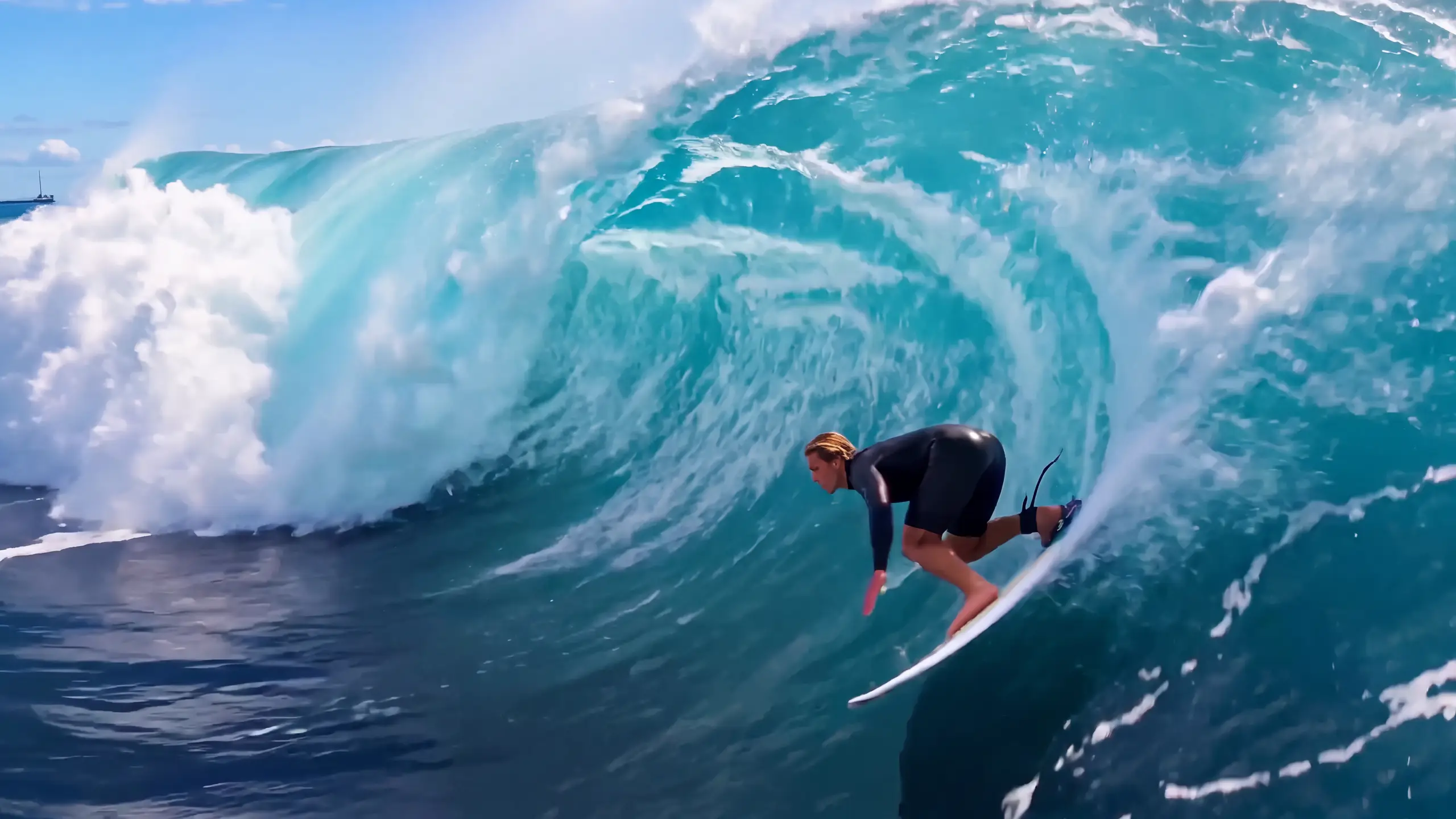
Wan 3.0 API: access, pricing and code
Summary
Runway Dev gives you the official Wan 3.0 API from Alibaba in two tiers: Wan 3.0 and Wan 3.0 Prime. Wan 3.0 is Alibaba’s video model for clips with native sound, made from a text prompt, a first and last frame, or image, video and audio references, up to 30 seconds in one generation. Prime is the tier Alibaba built for faster generation, with the same inputs. This page covers access, pricing, inputs and code, and how your coding agent can build the integration for you.
What is Wan 3.0?
Wan 3.0 is Alibaba’s video generation model for clips with sound. One model takes a text prompt, a still to animate or a set of image, video and audio references, and makes a clip of 2 to 30 seconds at 480p, 720p and 1080p and 30 frames per second, with speech, ambient sound and effects made in the same pass as the video. Every length up to the longest comes out of a single pass, with no shorter clips to stitch together. Alibaba introduced Wan 3.0 in August 2026.
Prompt
A drone tracks alongside a black steam locomotive pulling four red carriages across a curved stone viaduct high above a misty pine valley at sunrise. The camera holds level with the engine as it crosses the span, then rises slowly as the train reaches the far cliff and disappears into a tunnel, leaving white steam hanging over the arches. Twice on the crossing a jet of white steam shoots from the whistle as it sounds. Audio: the steady chuff of the engine, wheels clattering over the rail joints, two long whistle blasts timed to the steam, birds in the valley below. No people, no text.What is the difference between Wan 3.0 and Wan 3.0 Prime?
Wan 3.0 Prime takes the same endpoints, fields, durations, resolutions and references as Wan 3.0, and differs in how long a clip takes and what it costs. Prime is Alibaba’s high-speed version of the model, at 28 credits ($0.28) per second at 1080p, while Wan 3.0 is the tier with the lower rate, at 20 credits ($0.20) per second at 1080p. The time Prime saves grows with the length of the clip: on Runway it finishes a short clip about a quarter sooner, and the longest in well under half the time.
Median generation time at 1080p, from the start of generation to the finished clip, across the Wan 3.0 and Wan 3.0 Prime generations that succeeded on Runway in the 30 days to October 22, 2026:
| Clip length | Wan 3.0 | Wan 3.0 Prime |
|---|---|---|
| 5 seconds | 2 min 35 s | 2 min |
| 10 seconds | 4 min 3 s | 2 min 39 s |
| 15 seconds | 6 min 18 s | 3 min 36 s |
| 30 seconds | 14 min 19 s | 5 min 39 s |
Medians move with load, so read them as a guide rather than a guarantee. A request usually starts within seconds of being sent; the table times the generation after that.
Inputs
 First frame
Prompt
Locked-off shot of the sand dune at sunset: the wind lifts fine sand off the crest in long golden ribbons that drift across the frame, and grains skitter down the rippled slope in the low light. Audio: steady wind hissing over the sand, gusts rising and falling.To switch tiers, change model: every other field carries over.
What are the ways to use Wan 3.0 on Runway Dev?
Wan 3.0 runs on Runway Dev four ways, all from one account:
| Way in | Best for | What you need |
|---|---|---|
| Playground | Trying a prompt, then copying the request as code | A Runway Dev account |
| API and SDKs | Calling Wan 3.0 from your own code | An API key, plus the Node or Python SDK if you want one |
| Coding agent | Having Claude Code, Codex or Cursor build the API integration into your product, tool or pipeline | The Runway Dev MCP and skills, and an API key for live calls |
| Workflows | Wan 3.0 as one step with other models, run with one API call | A workflow built in the Runway app and published as an endpoint |
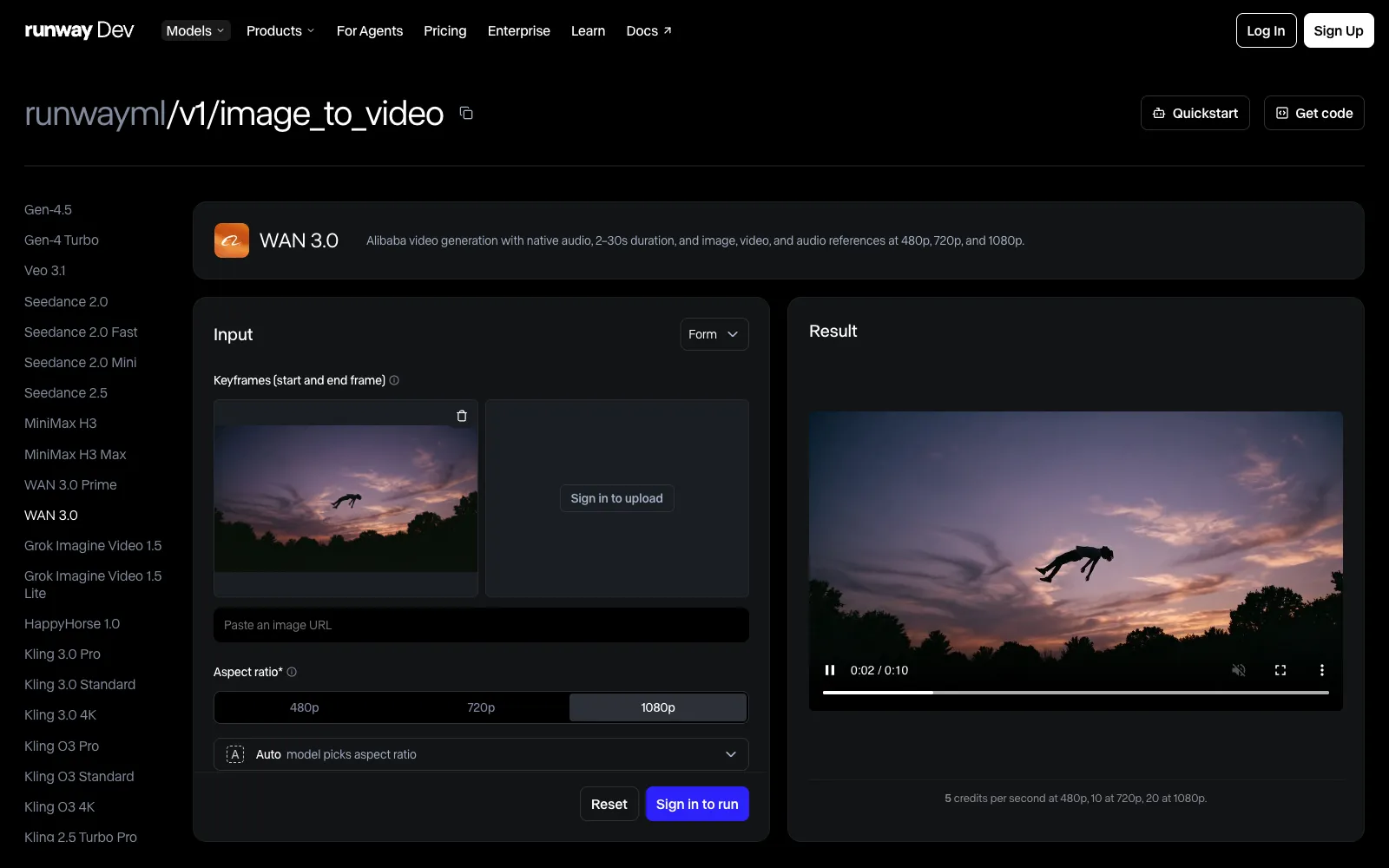
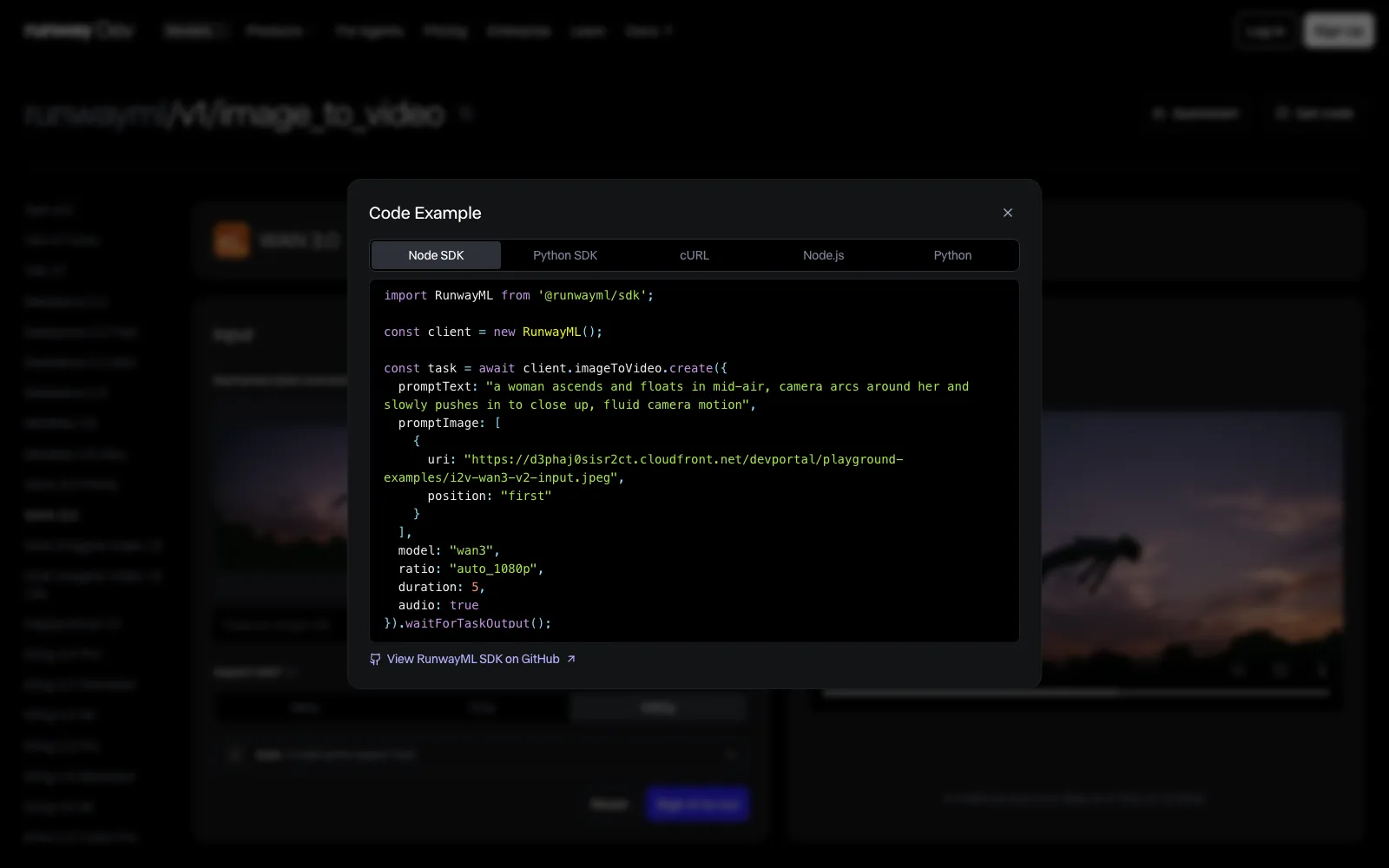
Wan 3.0 is also available in Model Router, a saved config you send with the request instead of a model ID. You set what to optimize for (cost, quality or latency), a maximum cost per generation and the models allowed, and the router picks one for each request sent to POST /v1/generate/video.
How do you get API access to Wan 3.0?
You get API access to Wan 3.0 with a Runway Dev account and an API key:
- Create an account at https://dev.runway.com.
- Create an API key in your project’s dashboard.
- Add credits to your project’s balance.
- Store the key in your environment as
RUNWAYML_API_SECRET. - Send a request with
"model": "wan3"(orwan3_prime) and theX-Runway-Versionheader to one of its endpoints. The code below is ready to run.
How much does the Wan 3.0 API cost?
The Wan 3.0 API on Runway Dev is billed per second of the video it makes, at a rate set by the tier and the output resolution: 20 credits ($0.20) per second at 1080p on Wan 3.0, with lower rates at lower resolutions and a higher rate on Prime.
WAN 3.0
| Resolution | Credits | USD |
|---|---|---|
| 480p | 5 credits per second | $0.05 per second |
| 720p | 10 credits per second | $0.10 per second |
| 1080p | 20 credits per second | $0.20 per second |
WAN 3.0 Prime
| Resolution | Credits | USD |
|---|---|---|
| 480p | 6.8 credits per second | $0.068 per second |
| 720p | 14 credits per second | $0.14 per second |
| 1080p | 28 credits per second | $0.28 per second |
Prices current as of October 22, 2026. 1 credit = $0.01.
How the billing works:
- Only the output is billed. Reference images, videos and audio add nothing to the price, and neither does the sound Wan 3.0 generates.
- You pay for the
durationyou send. Leave it out and the clip runs, and is billed, at the default length in the API reference. - A task that fails input moderation (
SAFETY.INPUT.*) is still charged. See task failures for what each failure means.
Every rate is also listed on Runway Dev pricing and in the docs pricing guide.
What inputs does Wan 3.0 accept?
Wan 3.0 accepts a prompt of up to 20,000 characters, which both endpoints require, a duration of 2 to 30 seconds, and images, video and audio as keyframes or references. Each endpoint uses them its own way.
On POST /v1/image_to_video you set the opening frame, and a closing one if you want, or pass images as references instead, never both in one request. A single promptImage URL is the first frame. For keyframes, send a list with a position of first, and last for a closing frame, which needs a first frame too. A keyframe request takes a ratio that starts with auto_, the default, because the clip’s shape follows the first frame. For references, send a list with no position on any image: up to 10 reference images go in promptImage, and that mode is the only one that takes referenceVideos and referenceAudio.
Inputs
 First frame
 Last frame
Prompt
Time-lapse from golden hour to night from a fixed viewpoint across the harbor: the sunlight fades off the houses, the sky deepens to blue, and lights come on in the windows and along the quay, their reflections stretching across the water. Audio: gulls fading away, water lapping against the boats, a church bell in the distance.On POST /v1/text_to_video a prompt can be steered by up to 10 images, 5 videos and 5 audio clips, to keep a character, a product, a place or a sound consistent across the clip. Reference videos share one combined length cap and reference audio has its own, both in the API reference. The prompt names each reference by its kind and its place in the list: the first entry in references is Image 1, the first in referenceVideos is Video 1 and the first in referenceAudio is Audio 1.
Inputs
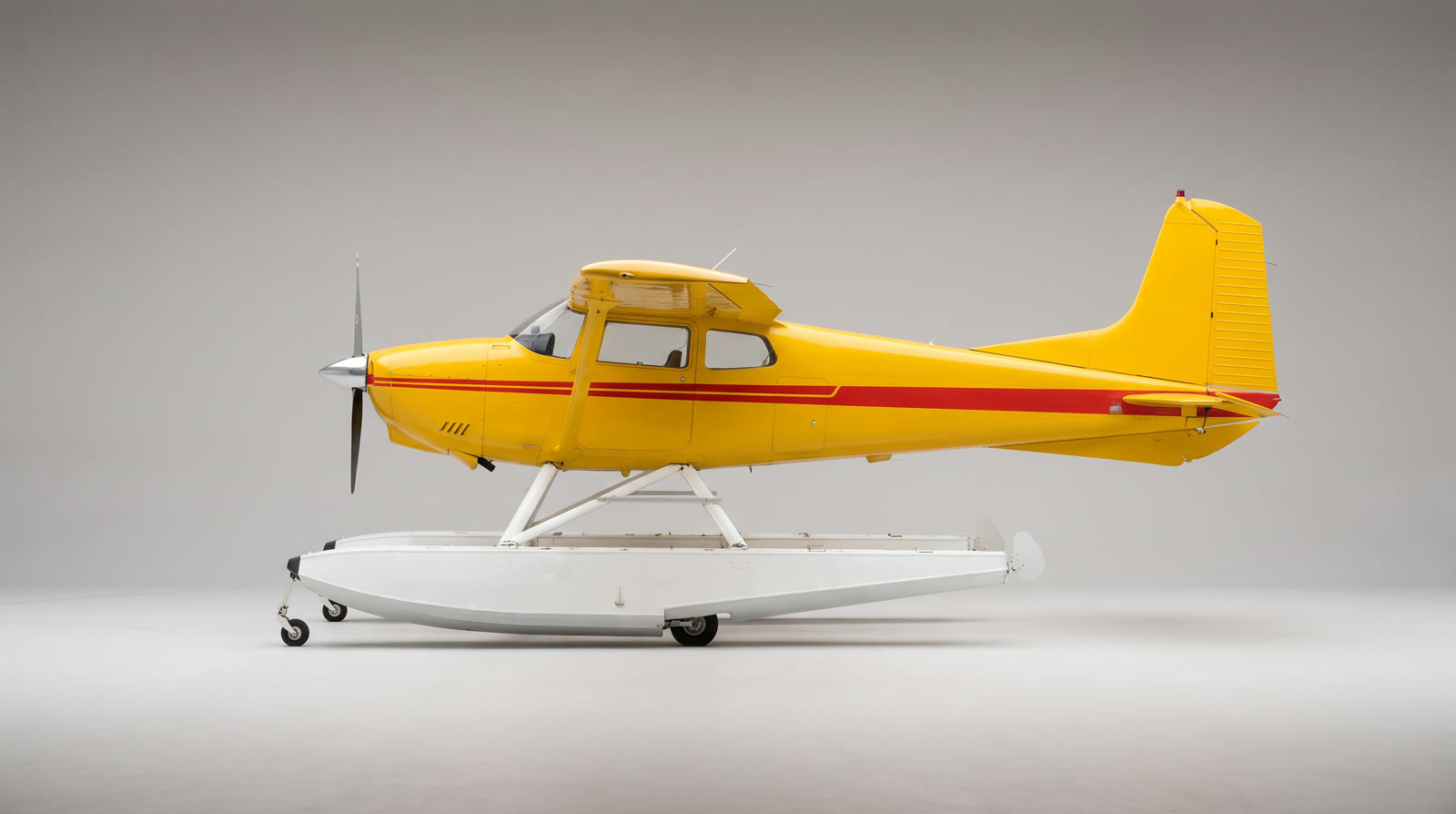 Image 1
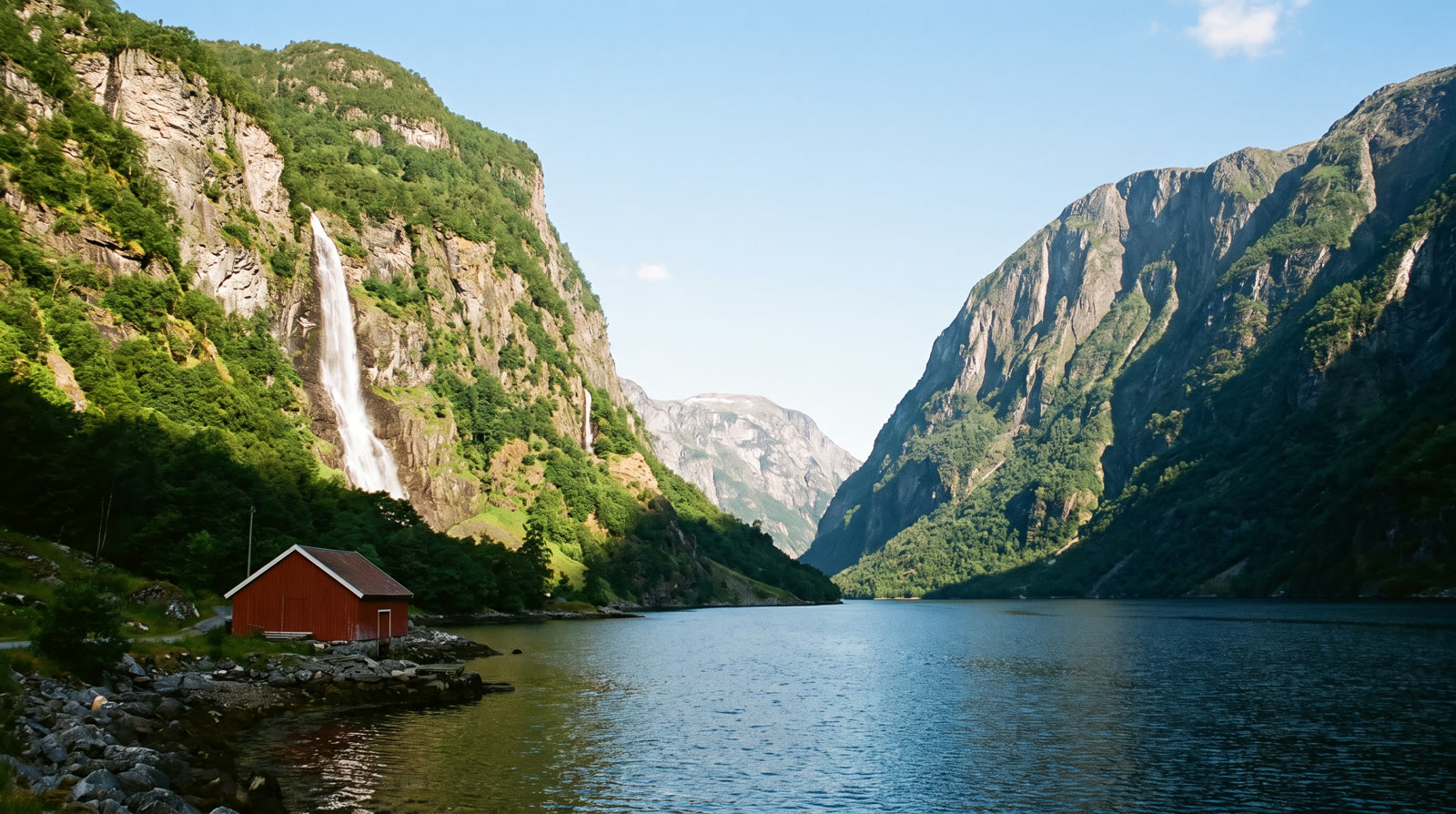 Image 2
Prompt
Locked-off wide shot from the near shore of the fjord from Image 2: the yellow seaplane from Image 1 flies in low over the camera, touches down on the water and slows as it moves away toward the far end of the fjord, its two floats cutting long white wakes. The plane keeps its yellow paint and red stripe, and the cliffs, the waterfall and the red boathouse stay in place. Audio: the propeller roaring overhead, then fading, the floats hissing through the water, the waterfall in the distance. No text, no logos.Here is every field, by tier and endpoint:
WAN 3.0
POST /v1/image_to_video
| Field | Accepts |
|---|---|
model (required) |
wan3 |
promptImage (required) |
One image |
promptText (required) |
Text, 1 to 20,000 characters |
audio |
true or false |
duration |
Whole number from 2 to 30 |
ratio |
One of 832:480, 720:544, 624:624, 544:720, 480:832, 1280:720, 1104:832, 960:960, 832:1104, 720:1280, 1920:1080, 1648:1248, 1440:1440, 1248:1648, 1080:1920, auto_480p, auto_720p or auto_1080p |
referenceVideos |
A list of up to 5 videos |
referenceAudio |
A list of up to 5 audio clips |
POST /v1/text_to_video
| Field | Accepts |
|---|---|
model (required) |
wan3 |
promptText (required) |
Text, 1 to 20,000 characters |
audio |
true or false |
duration |
Whole number from 2 to 30 |
ratio |
One of 832:480, 720:544, 624:624, 544:720, 480:832, 1280:720, 1104:832, 960:960, 832:1104, 720:1280, 1920:1080, 1648:1248, 1440:1440, 1248:1648, 1080:1920, auto_480p, auto_720p or auto_1080p |
references |
A list of up to 10 images |
referenceVideos |
A list of up to 5 videos |
referenceAudio |
A list of up to 5 audio clips |
WAN 3.0 Prime
POST /v1/image_to_video
| Field | Accepts |
|---|---|
model (required) |
wan3_prime |
promptImage (required) |
One image |
promptText (required) |
Text, 1 to 20,000 characters |
audio |
true or false |
duration |
Whole number from 2 to 30 |
ratio |
One of 832:480, 720:544, 624:624, 544:720, 480:832, 1280:720, 1104:832, 960:960, 832:1104, 720:1280, 1920:1080, 1648:1248, 1440:1440, 1248:1648, 1080:1920, auto_480p, auto_720p or auto_1080p |
referenceVideos |
A list of up to 5 videos |
referenceAudio |
A list of up to 5 audio clips |
POST /v1/text_to_video
| Field | Accepts |
|---|---|
model (required) |
wan3_prime |
promptText (required) |
Text, 1 to 20,000 characters |
audio |
true or false |
duration |
Whole number from 2 to 30 |
ratio |
One of 832:480, 720:544, 624:624, 544:720, 480:832, 1280:720, 1104:832, 960:960, 832:1104, 720:1280, 1920:1080, 1648:1248, 1440:1440, 1248:1648, 1080:1920, auto_480p, auto_720p or auto_1080p |
references |
A list of up to 10 images |
referenceVideos |
A list of up to 5 videos |
referenceAudio |
A list of up to 5 audio clips |
Images, videos and audio go in as an HTTPS URL, a runway:// URI from an upload or a data URI; inputs lists sizes and formats. Each table shows what a field accepts on its own. Rules that combine fields are checked when the task is submitted, and the API reference has them in full.
Two more rules change what you send:
ratiosets the resolution as well as the shape. A ratio in pixels fixes both; anauto_ratio keeps the shape of your input at the resolution it names.- Audio is generated unless you turn it off.
audiodefaults totrue; sendfalsefor a silent clip, at the same price.
How do you call Wan 3.0 from curl, Node and Python?
You call Wan 3.0 by sending wan3 as the model to one of its endpoints. This request animates a still image with POST /v1/image_to_video, and the other fields keep their defaults:
curl
curl -X POST https://api.dev.runwayml.com/v1/image_to_video \
  -H "Authorization: Bearer $RUNWAYML_API_SECRET" \
  -H "X-Runway-Version: 2024-11-06" \
  -H "Content-Type: application/json" \
  -d '{
    "model": "wan3",
    "promptImage": "https://d3phaj0sisr2ct.cloudfront.net/devportal/learn/images/wan-3-0-api/campfire-099a66a0.jpg",
    "promptText": "A log settles into the campfire and a burst of sparks rises into the dusk as the flames flare up. Audio: the fire crackling, a sharp pop as the log shifts, crickets in the pines."
  }'

# The response carries the task id. Poll the task until it finishes:
curl https://api.dev.runwayml.com/v1/tasks/$TASK_ID \
  -H "Authorization: Bearer $RUNWAYML_API_SECRET" \
  -H "X-Runway-Version: 2024-11-06"
Node.js
import RunwayML, { TaskFailedError } from '@runwayml/sdk';

// Reads your API key from RUNWAYML_API_SECRET.
const client = new RunwayML();

try {
  const task = await client.imageToVideo
    .create({
      model: 'wan3',
      promptImage: 'https://d3phaj0sisr2ct.cloudfront.net/devportal/learn/images/wan-3-0-api/campfire-099a66a0.jpg',
      promptText: 'A log settles into the campfire and a burst of sparks rises into the dusk as the flames flare up. Audio: the fire crackling, a sharp pop as the log shifts, crickets in the pines.',
    })
    .waitForTaskOutput();
  console.log(task.output);
} catch (error) {
  if (error instanceof TaskFailedError) {
    console.error(error.taskDetails);
  } else {
    throw error;
  }
}
Python
from runwayml import RunwayML, TaskFailedError

# Reads your API key from RUNWAYML_API_SECRET.
client = RunwayML()

try:
    task = client.image_to_video.create(
        model="wan3",
        prompt_image="https://d3phaj0sisr2ct.cloudfront.net/devportal/learn/images/wan-3-0-api/campfire-099a66a0.jpg",
        prompt_text="A log settles into the campfire and a burst of sparks rises into the dusk as the flames flare up. Audio: the fire crackling, a sharp pop as the log shifts, crickets in the pines.",
    ).wait_for_task_output()
    print(task.output)
except TaskFailedError as error:
print(error.task_details)Inputs
 First frame
To call Prime, send wan3_prime as the model. The rest of the request stays the same.
Generation is asynchronous:
- The create request returns a task ID right away, and the video is made in the background.
- Poll
GET /v1/tasks/{id}with backoff until the status isSUCCEEDED,FAILEDorCANCELLED.THROTTLEDmeans the task is waiting in a queue, not rejected. - Output URLs are temporary, so download the video when the task succeeds. See outputs.
- The SDKs poll for you.
waitForTaskOutput()andwait_for_task_output()raiseTaskFailedErrorwith the task’s details when it fails. They also stop waiting after a default timeout while the task keeps running, so for long clips pass a longer timeout or keep polling the task ID. - To use your own rules instead of one fixed model, send a Model Router’s
configIdtoPOST /v1/generate/videoin place of the model. AdddryRunto see which model it picks without creating a task.
Why does a Wan 3.0 API request fail?
A Wan 3.0 request fails either at once, with a validation error on the request, or later, with a failure code on the task. The common ones:
SAFETY.INPUT.*: content moderation rejected an input. The suffix hints at which one but may not match. The task is charged and shouldn’t be retried as is: change the inputs first.SAFETY.OUTPUT.*: the generated video was rejected by moderation. Change the prompt or references before you try again.ASSET.INVALID: an input file’s dimensions, duration or another property is outside what the model takes. Check it against inputs and fix it before retrying.INTERNAL.BAD_OUTPUT.01: the output failed a quality check, often because of logos, watermarks or text in the input images. Remove them and retry.THIRD_PARTY.UNAVAILABLE: the model’s provider didn’t return the video, because of an outage or load. Wait, then retry.- An error saying keyframe images can’t be combined with references: a request mixed a
firstorlastframe with reference images, videos or audio. Use one mode, and for references sendpromptImageas a list with noposition. - An error asking for an
auto_ratio: a keyframe request sent a ratio in pixels. Sendauto_480p,auto_720porauto_1080p, or leaveratioout. - A validation error on
promptImagepositions: a list mixed images with and without aposition, repeated one, or set alastframe without afirst. - A request rejected for a missing prompt: Wan 3.0 needs
promptTexton both endpoints, even when you send a first frame or references. - A reference video rejected for its length, size or frame rate: the clips together run past the combined cap, or one is below the minimum resolution or outside the frame rates in the API reference. Trim or re-export it.
- A validation error on
ratioorduration: values copied from another model can be outside Wan 3.0’s lists. Take them from the inputs above. - An output link that stopped working: output URLs expire. Download the video when the task succeeds.
What does Runway Dev add when you call Wan 3.0?
Runway Dev serves Wan 3.0 next to Runway’s own models and other labs’ models, behind one API key and one credit balance: you build with a single key and pay a single bill, instead of an account, a key and an invoice per lab.
A coding agent can do the Wan 3.0 integration for you on Runway Dev, end to end. Connect the Runway Dev MCP and the agent works from your live account: the models your project can call with their current prices and input limits, your credit balance and the record behind any task. It writes the integration against what the API accepts today, and when a task fails it looks up the reason and fixes it. The Runway Dev skills show the agent how to integrate with the official SDKs and how to build with models, Model Routers, Recipes and Workflows.
With Workflows, Wan 3.0 becomes one step of a larger pipeline: chain it with Runway’s own models and other labs’ models, for images, video and audio, and run the whole pipeline with a single API call. Workflows don’t need to be built by a developer. A creative or marketing teammate builds and tests one visually in the Runway app (how Workflows work), then publishes it as an endpoint that your code calls. When the team updates the workflow, your code keeps calling the same endpoint.
FAQ
Is there a hosted API for Wan 3.0?
Wan 3.0 has hosted APIs, and Runway Dev serves the official Wan 3.0 and Wan 3.0 Prime models from Alibaba on POST /v1/image_to_video and POST /v1/text_to_video. You call them with a Runway Dev API key, with no GPUs or model weights to manage, and pay per second of video from the same credit balance as every other model on Runway Dev.
How do I get API access to Wan 3.0?
Create a Runway Dev account at dev.runway.com, make an API key and add credits. Then send wan3 or wan3_prime as the model to any of its endpoints: POST /v1/image_to_video and POST /v1/text_to_video. To have a coding agent write the integration instead, connect the Runway Dev MCP and install the Runway Dev skills: the agent builds it from your live account, with the prices and input limits your project has today.
How much does the Wan 3.0 API cost?
On Runway Dev, Wan 3.0 costs 20 credits ($0.20) per second at 1080p, 10 credits ($0.10) per second at 720p and 5 credits ($0.05) per second at 480p, and Wan 3.0 Prime costs 28 credits ($0.28) per second at 1080p, 14 credits ($0.14) per second at 720p and 6.8 credits ($0.068) per second at 480p. Reference media and generated audio add no charge. Prices are current as of October 22, 2026.
Is the Wan 3.0 API on Runway Dev the official model?
Runway Dev’s Wan 3.0 API runs the official Wan 3.0 models from Alibaba, Prime included. You call them with your Runway Dev API key and the model IDs wan3 and wan3_prime, like every other model on Runway Dev.
Can I run Wan 3.0 myself?
Alibaba hasn’t released Wan 3.0’s weights: as of October 22, 2026, the newest Wan model you can download and run on your own GPUs is Wan 2.2, published on Hugging Face under the Apache 2.0 license. Wan 3.0 runs through hosted APIs, Alibaba’s own Model Studio and Runway Dev among them.
Can I use Wan 3.0 without writing code?
You can use Wan 3.0 on Runway Dev without writing code yourself. The playground sends a request from a form and gives it back as code, and a coding agent connected to the Runway Dev MCP writes the integration for you. A creative or marketing teammate can also build a workflow around Wan 3.0 in the Runway app and publish it as an endpoint your app calls.
Does the same Runway Dev API key work for Wan 3.0 and other models?
One Runway Dev API key calls Wan 3.0 and every other model your project can use, Runway’s own and other labs’, with the same SDKs, task flow and credit balance. Switching models means changing the model field, or the rules of a Model Router.
How much faster is Wan 3.0 Prime than Wan 3.0?
Wan 3.0 Prime finishes sooner, and the gap grows with the clip: across Wan 3.0 and Prime generations on Runway in the 30 days to October 22, 2026, the median 5-second clip at 1080p took 2 min on Prime and 2 min 35 s on Wan 3.0, and the median 30-second clip 5 min 39 s against 14 min 19 s. Prime costs 28 credits ($0.28) per second at 1080p, Wan 3.0 20 credits ($0.20) per second at 1080p.
What are the Wan 3.0 model IDs on Runway Dev?
The model IDs are wan3 for Wan 3.0 and wan3_prime for Wan 3.0 Prime. Both work on the same endpoints: POST /v1/image_to_video and POST /v1/text_to_video.
How long can a Wan 3.0 video be, and at what resolutions?
A Wan 3.0 clip on Runway Dev runs 2 to 30 seconds, in one generation, at 480p, 720p and 1080p. The ratio you send sets the resolution, and each resolution has its own rate: 20 credits ($0.20) per second at 1080p, 10 credits ($0.10) per second at 720p and 5 credits ($0.05) per second at 480p. Prime takes the same durations and ratios.
Does Wan 3.0 generate audio through the API?
Wan 3.0 generates audio with the video by default, on both tiers and endpoints. Send audio: false for a silent clip, or add clips in referenceAudio to steer the sound.
How many references can Wan 3.0 use through the API?
Wan 3.0 takes up to 10 images, 5 videos and 5 audio clips as references on POST /v1/text_to_video. On POST /v1/image_to_video, reference images go in promptImage as a list with no position (a single URL is read as the first frame), and the request can add up to 5 videos and 5 audio clips. Prime takes the same.
Why did my Wan 3.0 request fail with SAFETY.INPUT.TEXT?
SAFETY.INPUT.TEXT means content moderation rejected an input of your request; the suffix hints at the prompt but may not match. The task is charged and shouldn’t be retried as is, so change the prompt or inputs before you send it again.
Can I switch from Wan 3.0 to another video model without changing my code?
A Model Router lets you change models without touching your code. Send its configId to POST /v1/generate/video, and change the models it may use, its priority or its cost cap in the router.
Start building on Runway Dev
Related articles
 Tutorials
Choosing the right model for your use case
Why video and image models are not interchangeable, and how to set up a Model Router that picks the best model for every request.
 Concepts
Can I use AI image and video generation commercially in my product?
Provider terms, copyright, input rights, training and disclosure: what decides whether you can ship AI images and video commercially.
 Tutorials
How to build a generative media integration with your coding agent
Let a coding agent build a video, image or audio generation integration end to end, with Runway Dev MCP giving it live account access.