


Nano Banana 2.1 API: access, pricing and code
Summary
Runway Dev gives you the official Nano Banana 2.1 API from Google. Nano Banana 2.1 is Google’s image generation and editing model: it creates images from a prompt, edits a photo you send and combines several reference images into one picture, with legible text and a thinking level you set per request. It is built to follow a detailed brief closely. This page covers access, pricing, inputs and code, and how your coding agent can build the integration for you.
What is Nano Banana 2.1?
Nano Banana 2.1 is Google’s image generation and editing model, built on Gemini 3.6 Flash, and Google’s own name for it is Gemini Nano Banana 2.1. It takes a text prompt and up to 14 images as references, and returns images at 1K, 2K and 4K, in square, portrait and landscape shapes and in panoramic ones much wider or taller than a photo.
It is built to follow a detailed brief: text inside the image comes out legible, an edit changes what the prompt names and leaves the rest of the photo as it was, and a product or a person keeps its look across references. A thinking level sets how much the model reasons about the prompt before it generates.
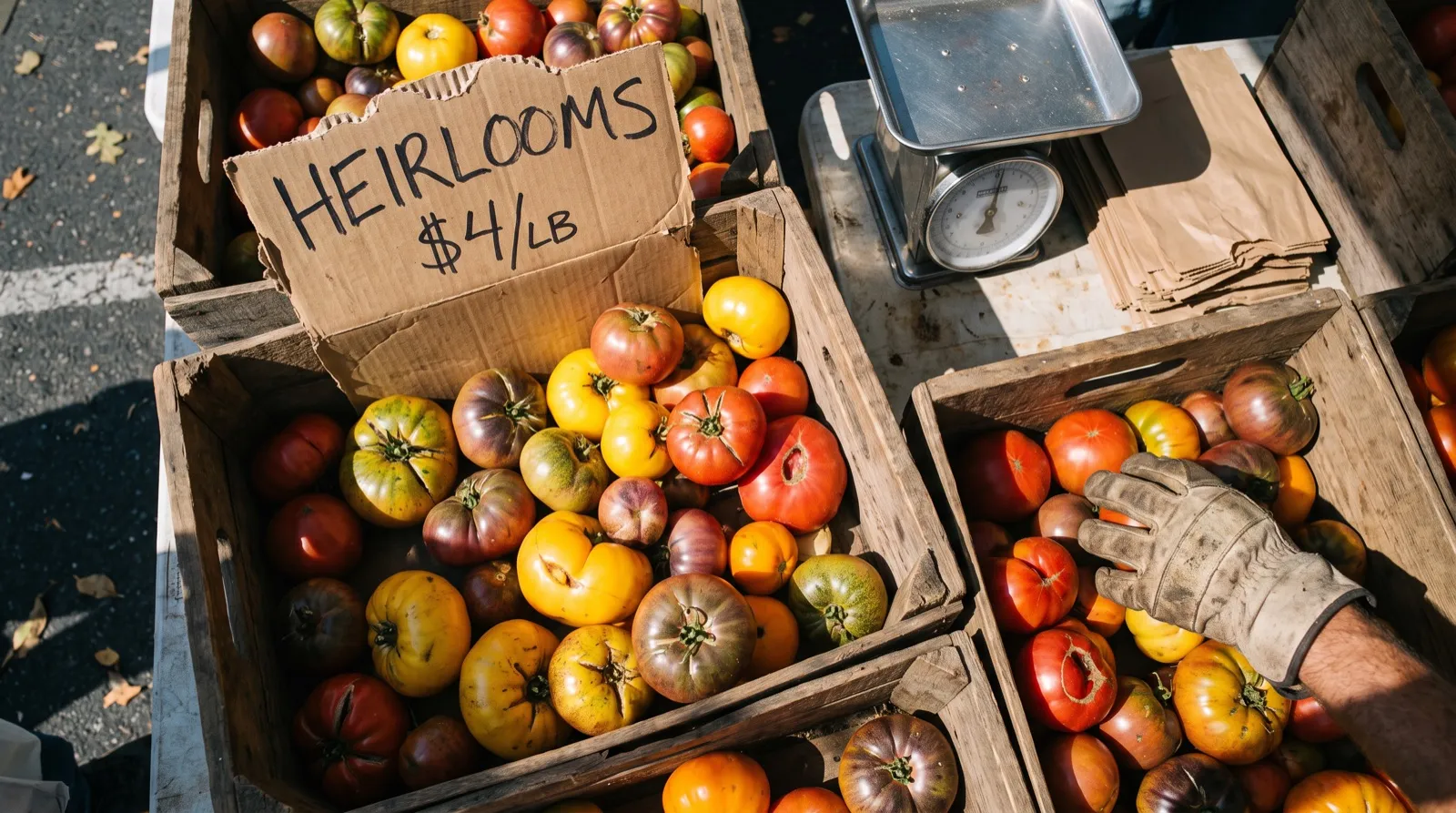
Prompt
An overhead photograph of a farmers market stall on a sunny Saturday morning: wooden crates of heirloom tomatoes in red, yellow and green, a few split and imperfect, a steel scale, paper bags, and a torn piece of cardboard propped in the front crate with 'HEIRLOOMS $4/LB' written in black marker. A vendor's hand in a work glove reaches in from the edge of the frame. Harsh midday light with hard shadows, shot from above with a 35mm lens, natural color, documentary feel.Where can you use Nano Banana 2.1?
You can use Nano Banana 2.1 on Runway Dev four ways, all from one account:
| Way in | Best for | What you need |
|---|---|---|
| Playground | Trying a prompt or an edit, then copying the request as code | A Runway Dev account |
| API and SDKs | Calling Nano Banana 2.1 from your own code | An API key, plus the Node or Python SDK if you want one |
| Coding agent | Having Claude Code, Codex or Cursor build the API integration into your product, tool or pipeline | The Runway Dev MCP and skills, and an API key for live calls |
| Workflows | Nano Banana 2.1 as one step with other models, run with one API call | A workflow built in the Runway app and published as an endpoint |
Nano Banana 2.1 is also available in Model Router, a saved config you send with the request instead of a model ID. You set what to optimize for (cost, quality or latency), a maximum cost per generation and the models allowed, and the router picks one for each request sent to POST /v1/generate/image.
How do you get API access to Nano Banana 2.1?
You get API access to Nano Banana 2.1 with a Runway Dev account and an API key:
- Create an account at https://dev.runway.com.
- Create an API key in your project’s dashboard.
- Add credits to your project’s balance.
- Store the key in your environment as
RUNWAYML_API_SECRET. - Send a request with
"model": "nano_banana_2.1"and theX-Runway-Versionheader toPOST /v1/text_to_image. The code below is ready to run.
How much does the Nano Banana 2.1 API cost?
The Nano Banana 2.1 API on Runway Dev is billed per image it returns, at a rate set by the output size: 12 credits ($0.12) per image at 4K, with lower rates at smaller sizes.
| Resolution | Credits | USD |
|---|---|---|
| 1K | 4 credits per image | $0.04 per image |
| 2K | 6 credits per image | $0.06 per image |
| 4K | 12 credits per image | $0.12 per image |
Prices current as of October 22, 2026. 1 credit = $0.01.
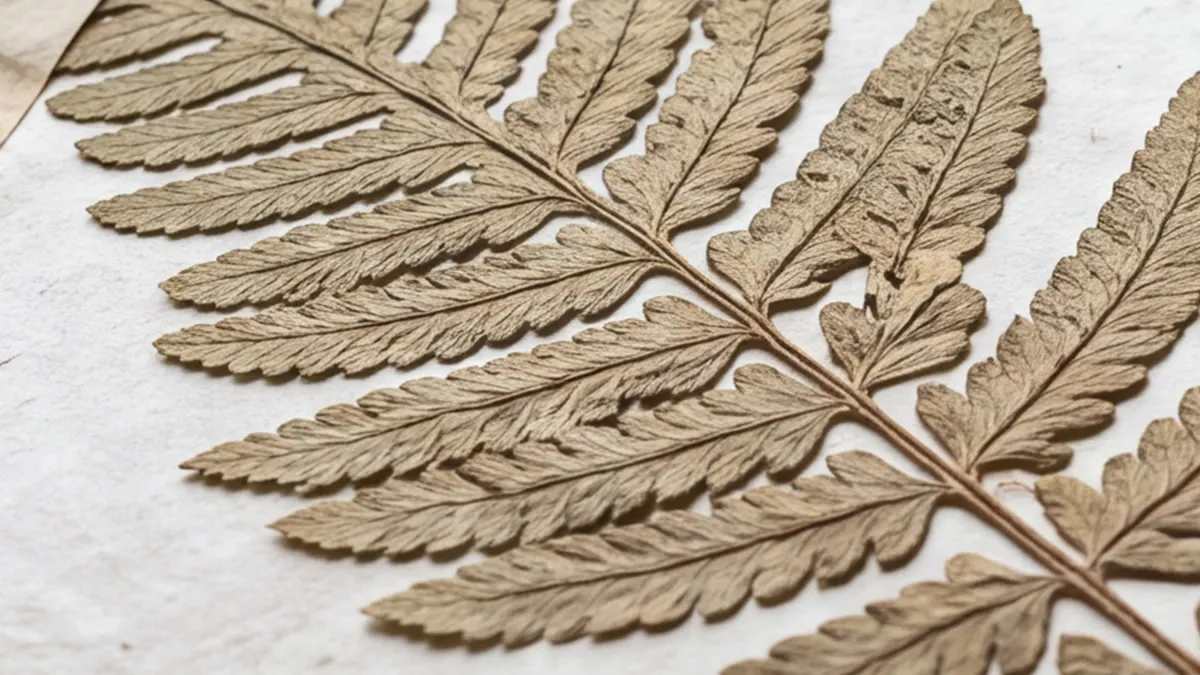
Prompt
A naturalist's field notebook lies open on a weathered wooden desk: on the left page a pressed fern frond held down with strips of paper tape, on the right page handwritten notes in brown ink beside a small pencil sketch of the same fern. Soft daylight from a window, fine paper grain and fiber, every vein of the fern visible.How the billing works:
- You pay for each image returned.
outputCountmultiplies the charge, so a request for several images is billed for each one. - Reference images and thinking add nothing. The price is the same with or without references, and at every
thinkingLevel. - The
ratioyou send sets the size, and with it the rate. - A task that fails input moderation (
SAFETY.INPUT.*) is still charged. See task failures for what each failure means.
Every rate is also listed in the docs pricing guide and on Runway Dev pricing.
What inputs does Nano Banana 2.1 accept?
Nano Banana 2.1 accepts a prompt of up to 5,500 characters and up to 14 images as references, all on POST /v1/text_to_image. What it does depends on what you send.
With a prompt alone, Nano Banana 2.1 creates a new image, as in the market stall above and the request in the code below.
With one reference image, the prompt describes a change and the model makes it in that image: swap a material, add an object or change the light, and the rest of the photo stays as it was.


Prompt
Change the sofa to deep green velvet and put a tall fiddle-leaf fig in a terracotta pot in the empty corner to the left of the sofa. Keep everything else in the photo exactly the same: the walls, window, curtains, rug, coffee table, cushions, floor, light and camera angle.With several reference images, Nano Banana 2.1 combines them into one picture: a product placed in a scene, a person in a new setting or several objects in one shot. The model reads the references in the order you send them, so the prompt can point to each one by its place in the list or by what it shows.

Inputs
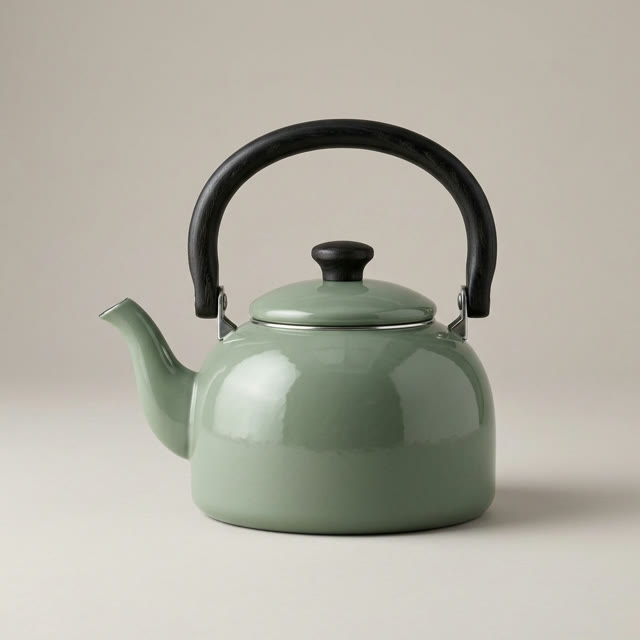 Image 1
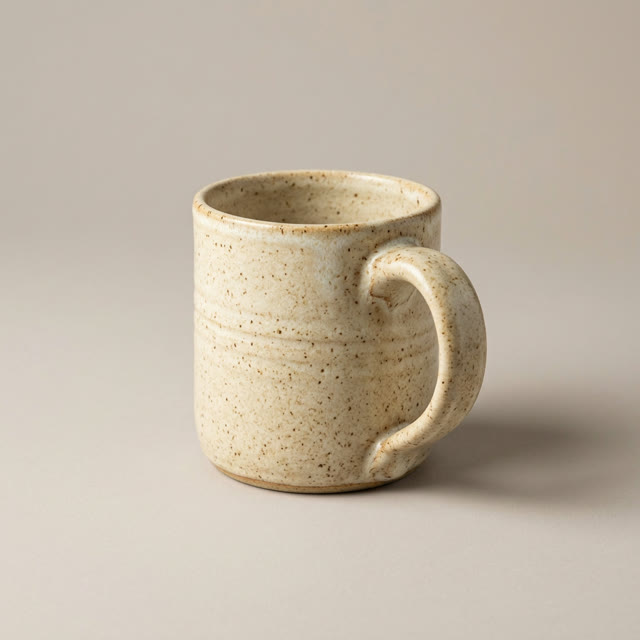 Image 2
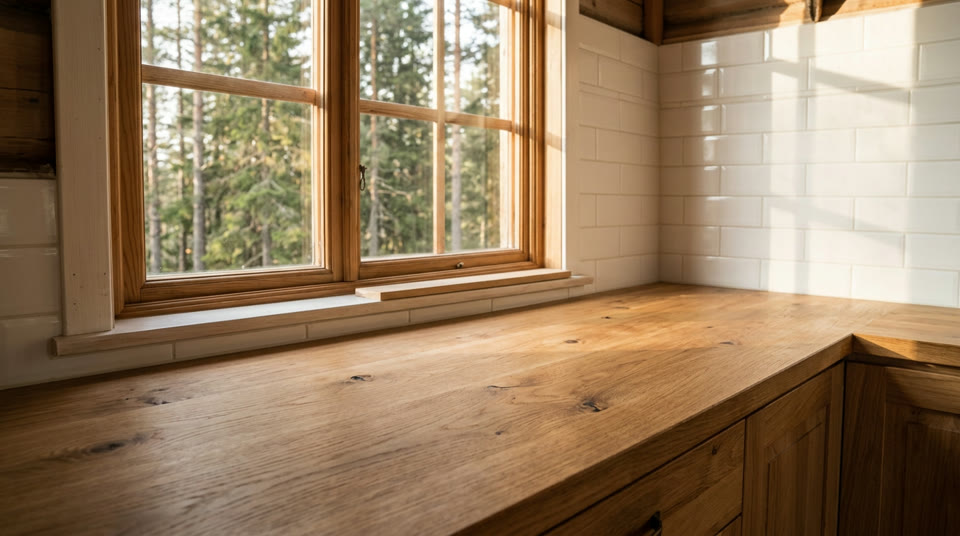 Image 3
Prompt
Place the kettle from the first image and the mug from the second image on the oak counter in the third image: the kettle toward the back by the window, the mug in front of it in the morning sun. Keep the kettle, the mug and the kitchen exactly as they look in their images, with natural shadows on the counter.Each reference goes in referenceImages as an object with the image in uri, in the order the prompt refers to them:
"referenceImages": [
  { "uri": "https://example.com/kettle.jpg" },
  { "uri": "https://example.com/mug.jpg" },
  { "uri": "https://example.com/kitchen.jpg" }
]
Here is every field:
POST /v1/text_to_image
| Field | Accepts |
|---|---|
model (required) |
nano_banana_2.1 |
promptText (required) |
Text, 1 to 5,500 characters |
ratio (required) |
One of 1024:1024, 848:1264, 1264:848, 896:1200, 1200:896, 928:1152, 1152:928, 768:1376, 1376:768, 1584:672, 512:2064, 2064:512, 352:2928, 2928:352, 2048:2048, 1696:2528, 2528:1696, 1792:2400, 2400:1792, 1856:2304, 2304:1856, 1536:2752, 2752:1536, 3168:1344, 1024:4128, 4128:1024, 704:5856, 5856:704, 4096:4096, 3392:5056, 5056:3392, 3584:4800, 4800:3584, 3712:4608, 4608:3712, 3072:5504, 5504:3072, 6336:2688, 2048:8256, 8256:2048, 1408:11712 or 11712:1408 |
thinkingLevel |
One of minimal, medium or high |
referenceImages |
A list of up to 14 images |
outputCount |
Whole number from 1 to 4 |
Images go in as an HTTPS URL, a runway:// URI from an upload or a data URI; inputs lists sizes and formats. Each table shows what a field accepts on its own. Rules that combine fields are checked when the task is submitted, and the API reference has them in full.
A few more rules change what you send:
ratiosets the size, the shape and the price at once. Each value is the exact width and height in pixels that comes back. Nano Banana 2 and Nano Banana Pro take a different list of sizes: many of their values work here too, but not all, so check a copiedratioagainst the table above.- Reference images are checked before the task starts. Each image’s width-to-height ratio has to fall inside the range in inputs, or the request is rejected with a validation error and nothing is charged.
thinkingLevelchanges how much the model reasons before it generates, not the price. Leave it out to keep the default level.outputCountreturns several images from one request, and each one is billed.- There is no
seed, so the same request can return a different image each time. - The request is strict. Fields from other models, such as
seedor Nano Banana Pro’s per-referencesubject, are rejected instead of ignored.
How do you call Nano Banana 2.1 from curl, Node and Python?
You call Nano Banana 2.1 by sending nano_banana_2.1 as the model to POST /v1/text_to_image. This request creates an image from a prompt, and the other fields keep their defaults:
curl
curl -X POST https://api.dev.runwayml.com/v1/text_to_image \
  -H "Authorization: Bearer $RUNWAYML_API_SECRET" \
  -H "X-Runway-Version: 2024-11-06" \
  -H "Content-Type: application/json" \
  -d '{
    "model": "nano_banana_2.1",
    "promptText": "A red vintage bicycle leans against a pale blue wall on a quiet cobbled street in the morning, a wicker basket of lemons on its front rack, soft sunlight",
    "ratio": "1024:1024"
  }'

# The response carries the task id. Poll the task until it finishes:
curl https://api.dev.runwayml.com/v1/tasks/$TASK_ID \
  -H "Authorization: Bearer $RUNWAYML_API_SECRET" \
  -H "X-Runway-Version: 2024-11-06"
Node.js
import RunwayML, { TaskFailedError } from '@runwayml/sdk';

// Reads your API key from RUNWAYML_API_SECRET.
const client = new RunwayML();

try {
  const task = await client.textToImage
    .create({
      model: 'nano_banana_2.1',
      promptText: 'A red vintage bicycle leans against a pale blue wall on a quiet cobbled street in the morning, a wicker basket of lemons on its front rack, soft sunlight',
      ratio: '1024:1024',
    })
    .waitForTaskOutput();
  console.log(task.output);
} catch (error) {
  if (error instanceof TaskFailedError) {
    console.error(error.taskDetails);
  } else {
    throw error;
  }
}
Python
from runwayml import RunwayML, TaskFailedError

# Reads your API key from RUNWAYML_API_SECRET.
client = RunwayML()

try:
    task = client.text_to_image.create(
        model="nano_banana_2.1",
        prompt_text="A red vintage bicycle leans against a pale blue wall on a quiet cobbled street in the morning, a wicker basket of lemons on its front rack, soft sunlight",
        ratio="1024:1024",
    ).wait_for_task_output()
    print(task.output)
except TaskFailedError as error:
    print(error.task_details)
ratio is required, so the sample sends its first allowed value. It takes 1024:1024, 848:1264, 1264:848, 896:1200, 1200:896, 928:1152, 1152:928, 768:1376, 1376:768, 1584:672, 512:2064, 2064:512, 352:2928, 2928:352, 2048:2048, 1696:2528, 2528:1696, 1792:2400, 2400:1792, 1856:2304, 2304:1856, 1536:2752, 2752:1536, 3168:1344, 1024:4128, 4128:1024, 704:5856, 5856:704, 4096:4096, 3392:5056, 5056:3392, 3584:4800, 4800:3584, 3712:4608, 4608:3712, 3072:5504, 5504:3072, 6336:2688, 2048:8256, 8256:2048, 1408:11712 or 11712:1408.

Prompt
A red vintage bicycle leans against a pale blue wall on a quiet cobbled street in the morning, a wicker basket of lemons on its front rack, soft sunlightGeneration is asynchronous:
- The create request returns a task ID right away, and the image is made in the background.
- Poll
GET /v1/tasks/{id}with backoff until the status isSUCCEEDED,FAILEDorCANCELLED.THROTTLEDmeans the task is waiting in a queue, not rejected. - A
SUCCEEDEDtask carriesoutput, a list with one URL per image. The URLs are temporary, so download the images you keep. See outputs. - The SDKs poll for you.
waitForTaskOutput()andwait_for_task_output()raiseTaskFailedErrorwith the task’s details when it fails. - To use your own rules instead of one fixed model, send a Model Router’s
configIdtoPOST /v1/generate/imagein place of the model. The routed request takesaspectRatioandresolutionin place ofratio, anddryRunshows which model it picks without creating a task.
Why does a Nano Banana 2.1 API request fail?
A Nano Banana 2.1 request fails in one of two places: with a validation error when you create the task, or as a task that ends with a failure code. The common ones:
SAFETY.INPUT.*: content moderation rejected an input, the prompt or a reference image. The suffix hints at which one but may not match. The task is charged and shouldn’t be retried as is: change the inputs first.SAFETY.OUTPUT.*: the generated image was rejected by moderation. Change the prompt or references before you try again.ASSET.INVALID: a reference image can’t be used, for example because of its format. Check it against inputs and fix it before retrying.- An
Invalid asset aspect ratiomessage: a reference image is too narrow or too wide. Crop it into the range in inputs. THIRD_PARTY.UNAVAILABLE: the model’s provider didn’t return the image, because of an outage or load. Wait, then retry.- A validation error on
ratio: the value was copied from another model, Seedance 2.5 or another Nano Banana included, and isn’t in Nano Banana 2.1’s list. Take it from the inputs above. - A validation error on another field: the request carries a field Nano Banana 2.1 doesn’t take, such as
seed, or anoutputCountoutside its range. - An output link that stopped working: output URLs expire. Download the image when the task succeeds.
What does Runway Dev add when you call Nano Banana 2.1?
Runway Dev serves Nano Banana 2.1 next to Runway’s own models and other labs’ models, behind one API key and one credit balance: you build with a single key and pay a single bill, instead of an account, a key and an invoice per lab.
A coding agent can do the Nano Banana 2.1 integration for you on Runway Dev, end to end. Connect the Runway Dev MCP and the agent works from your live account: the models your project can call with their current prices and input limits, your credit balance and the record behind any task. It writes the integration against what the API accepts today, and when a task fails it looks up the reason and fixes it. The Runway Dev skills show the agent how to integrate with the official SDKs and how to build with models, Model Routers, Recipes and Workflows.
With Workflows, Nano Banana 2.1 becomes one step of a larger pipeline: make a product shot with it, animate that shot with a video model and add a voiceover, then run the whole pipeline with a single API call. Workflows don’t need to be built by a developer. A creative or marketing teammate builds and tests one visually in the Runway app (how Workflows work), then publishes it as an endpoint that your code calls. When the team updates the workflow, your code keeps calling the same endpoint.
FAQ
How do I get API access to Nano Banana 2.1?
Create a Runway Dev account at dev.runway.com, make an API key and add credits. Then send nano_banana_2.1 as the model to POST /v1/text_to_image. To have a coding agent write the integration instead, connect the Runway Dev MCP and install the Runway Dev skills: the agent builds it from your live account, with the prices and input limits your project has today.
How much does the Nano Banana 2.1 API cost?
On Runway Dev, Nano Banana 2.1 costs 12 credits ($0.12) per image at 4K, 6 credits ($0.06) per image at 2K and 4 credits ($0.04) per image at 1K. outputCount multiplies the charge, and reference images and thinkingLevel add nothing. Prices are current as of October 22, 2026.
Is the Nano Banana 2.1 API on Runway Dev the official model?
Runway Dev’s Nano Banana 2.1 API runs the official Nano Banana 2.1 model from Google, which Google calls Gemini Nano Banana 2.1. You call it with your Runway Dev API key and the model ID nano_banana_2.1, like every other model on Runway Dev.
Can I use Nano Banana 2.1 without writing code?
You can use Nano Banana 2.1 on Runway Dev without writing code yourself. The playground sends a request from a form and gives it back as code, and a coding agent connected to the Runway Dev MCP writes the integration for you. A creative or marketing teammate can also build a workflow around Nano Banana 2.1 in the Runway app and publish it as an endpoint your app calls.
Does the same Runway Dev API key work for Nano Banana 2.1 and other models?
One Runway Dev API key calls Nano Banana 2.1 and every other model your project can use, Runway’s own and other labs’, with the same SDKs, task flow and credit balance. Switching models means changing the model field, or the rules of a Model Router.
What is the Nano Banana 2.1 model ID on Runway Dev?
The model ID is nano_banana_2.1, sent as model to POST /v1/text_to_image. Google’s own API uses gemini-nano-banana-2.1, which Runway Dev doesn’t take.
Can Nano Banana 2.1 edit images through the API?
Nano Banana 2.1 edits images on the same endpoint it generates them on. Send the photo as { "uri": "<image URL>" } in referenceImages on POST /v1/text_to_image and describe the change in promptText; the rest of the photo stays as it was. There is no separate edit endpoint.
How many reference images can Nano Banana 2.1 use through the API?
Nano Banana 2.1 takes up to 14 images as references in one request, read in the order you list them. Each one is an object with the image in uri, as an HTTPS URL, a runway:// upload or a data URI, and its width-to-height ratio has to fall inside the range in the input requirements.
What sizes and aspect ratios does Nano Banana 2.1 support?
Nano Banana 2.1 returns images at 1K, 2K and 4K, in square, portrait, landscape and panoramic shapes. Each ratio value is an exact width and height in pixels, and the inputs table on this page lists every one.
What does thinkingLevel do on Nano Banana 2.1?
thinkingLevel sets how much Nano Banana 2.1 reasons about the prompt before it generates, and it doesn’t change the price. Values: One of minimal, medium or high. Leave the field out to keep the default level.
What is the difference between Nano Banana 2.1, Nano Banana 2 and Nano Banana Pro on the API?
They are separate Google models with their own model IDs: nano_banana_2.1, gemini_image3.1_flash for Nano Banana 2 and gemini_image3_pro for Nano Banana Pro, with gemini_image3.1_flash_lite for Nano Banana 2 Lite. Nano Banana 2.1 is the only one that takes thinkingLevel. Nano Banana 2 also renders a smaller size, and Nano Banana Pro takes a per-reference subject for people and objects. All of them run on POST /v1/text_to_image with your Runway Dev key.
Why did my Nano Banana 2.1 request fail with SAFETY.INPUT.TEXT?
SAFETY.INPUT.TEXT means content moderation rejected an input of your request; the suffix hints at the prompt but may not match. The task is charged and shouldn’t be retried as is, so change the prompt or inputs before you send it again.
Can I switch from Nano Banana 2.1 to another image model without changing my code?
A Model Router lets you change models without touching your code. Send its configId to POST /v1/generate/image, and change the models it may use, its priority or its cost cap in the router.
Start building on Runway Dev
Related articles
 Tutorials
Choosing the right model for your use case
Why video and image models are not interchangeable, and how to set up a Model Router that picks the best model for every request.
 Concepts
Can I use AI image and video generation commercially in my product?
Provider terms, copyright, input rights, training and disclosure: what decides whether you can ship AI images and video commercially.
 Tutorials
How to build a generative media integration with your coding agent
Let a coding agent build a video, image or audio generation integration end to end, with Runway Dev MCP giving it live account access.