


Nano Banana 2 (Gemini 3.1 Flash Image) API: access, pricing and code
Summary
Runway Dev gives you the official Nano Banana 2 and Nano Banana 2 Lite APIs from Google. Nano Banana 2, Gemini 3.1 Flash Image in Google’s API, is Google’s fast image generation and editing model: it creates images from a prompt, edits a photo and combines several references into one picture, from small drafts to large images. Nano Banana 2 Lite is its lightweight tier for high-volume work at one size. This page covers access, pricing, inputs and code, and how your coding agent can build the integration for you.
What is Nano Banana 2?
Nano Banana 2 is Google’s image generation and editing model, and Gemini 3.1 Flash Image is its name in Google’s own API. It takes a text prompt and up to 14 images as references, and returns images at 1K, 2K and 4K and at a smaller draft size, in square, portrait and landscape shapes and in panoramic ones much wider or taller than a photo. Nano Banana 2 Lite, Gemini 3.1 Flash Lite Image in Google’s API, takes the same inputs and returns images at 1K only.
Nano Banana 2 is built for speed: a prompt-only request, an edit and a combination of references all run on the same endpoint, and text written into the prompt comes out legible in the image. Google has since released Nano Banana 2.1, an update to Nano Banana 2 with its own model ID and page.
Prompt
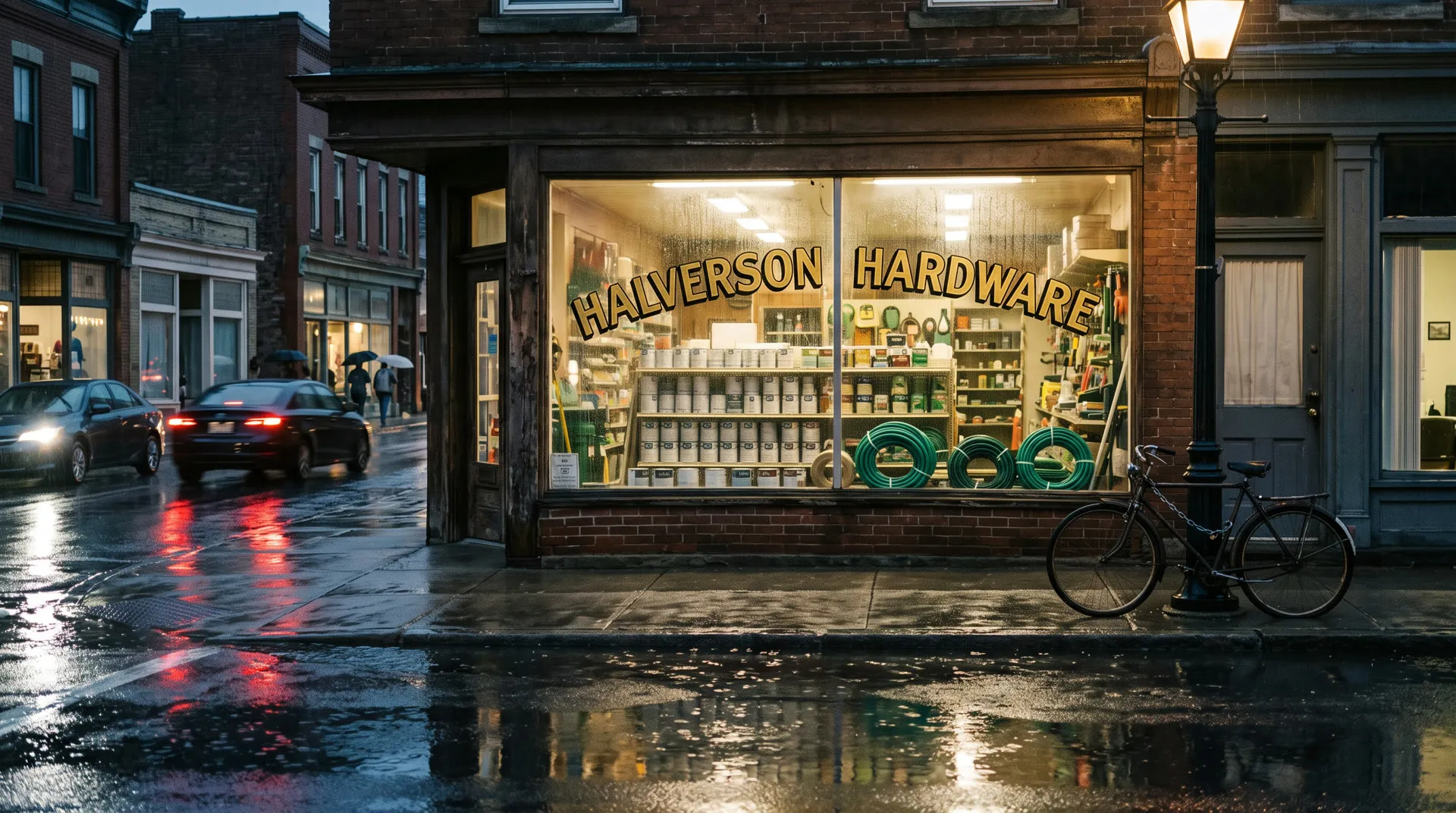
A wide photograph of a small hardware store's front window on a rainy evening, seen from across a wet street: hand-painted gold lettering on the glass reads 'HALVERSON HARDWARE' and nothing else, shelves of plain unbranded paint cans and coiled garden hoses behind it, a bicycle chained to a lamppost in front, the shop's warm light and passing car lights reflected in the puddles. No logos or other signs. Shot on a 35mm lens, natural color, slight film grain, documentary feel.Where can you use Nano Banana 2?
You can use Nano Banana 2 and Nano Banana 2 Lite on Runway Dev four ways, all from one account:
| Way in | Best for | What you need |
|---|---|---|
| Playground | Trying a prompt or an edit, then copying the request as code | A Runway Dev account |
| API and SDKs | Calling Nano Banana 2 from your own code | An API key, plus the Node or Python SDK if you want one |
| Coding agent | Having Claude Code, Codex or Cursor build the API integration into your product, tool or pipeline | The Runway Dev MCP and skills, and an API key for live calls |
| Workflows | Nano Banana 2 as one step with other models, run with one API call | A workflow built in the Runway app and published as an endpoint |
Nano Banana 2 and Nano Banana 2 Lite are also available in Model Router, a saved config you send with the request instead of a model ID. You set what to optimize for (cost, quality or latency), a maximum cost per generation and the models allowed, and the router picks one for each request sent to POST /v1/generate/image. A routed request doesn’t take subject, so every reference counts as an object and the object cap sets how many it can carry.
How do you get API access to Nano Banana 2?
You get API access to Nano Banana 2 with a Runway Dev account and an API key:
- Create an account at https://dev.runway.com.
- Create an API key in your project’s dashboard.
- Add credits to your project’s balance.
- Store the key in your environment as
RUNWAYML_API_SECRET. - Send a request with
"model": "gemini_image3.1_flash", or"gemini_image3.1_flash_lite"for Lite, and theX-Runway-Versionheader toPOST /v1/text_to_image. The code below is ready to run.
How much does the Nano Banana 2 API cost?
The Nano Banana 2 API on Runway Dev is billed per image it returns, at a rate set by the output size: 7 credits ($0.07) per image at 1K, with a lower rate at the smallest size and higher rates at the larger ones. Nano Banana 2 Lite costs 4 credits ($0.04) per image at 1K.
Nano Banana 2
| Option | Credits | USD |
|---|---|---|
| 512px | 5 credits per image | $0.05 per image |
| 1K | 7 credits per image | $0.07 per image |
| 2K | 11 credits per image | $0.11 per image |
| 4K | 16 credits per image | $0.16 per image |
Nano Banana 2 Lite
| Resolution | Credits | USD |
|---|---|---|
| 1K | 4 credits per image | $0.04 per image |
Prices current as of October 22, 2026. 1 credit = $0.01.
Prompt
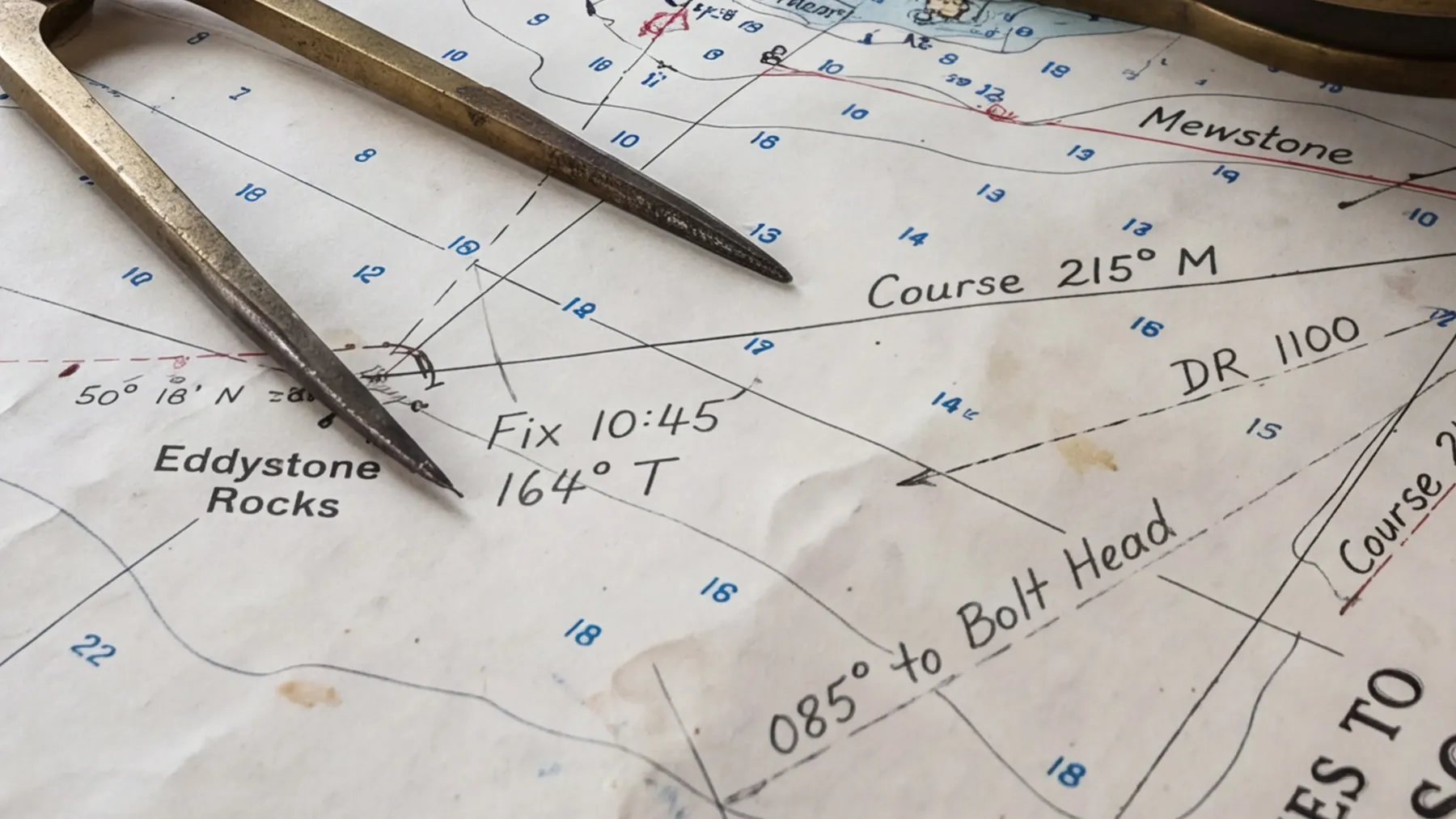
A weathered nautical chart spread on a wooden chart table, a brass navigation compass and a pair of brass dividers resting on it, faded blue depth soundings, fine handwritten pencil bearings and a coffee ring stain, soft daylight from a porthole, every printed line and pencil mark crisp.How the billing works:
- You pay for each image returned.
outputCountmultiplies the charge, so a request for several images is billed for each one. - Reference images add nothing. The price is the same with or without them.
- The
ratioyou send sets the size, and with it the rate. - A task that fails input moderation (
SAFETY.INPUT.*) is still charged. See task failures for what each failure means.
Every rate is also listed in the docs pricing guide and on Runway Dev pricing.
What inputs does Nano Banana 2 accept?
Nano Banana 2 accepts a prompt of up to 5,500 characters and up to 14 images as references, all on POST /v1/text_to_image, and Nano Banana 2 Lite takes the same fields. What the model does depends on what you send.
With a prompt alone, Nano Banana 2 creates a new image, as in the hardware store above and the request in the code below.
With one reference image, the prompt describes a change and the model makes it in that image: add an object, swap a material or change the light, and the rest of the photo stays as it was.


Prompt
Fill both terracotta planters with red geraniums in bloom and hang a string of warm bulb lights along the railing, switched on. Keep everything else in the photo exactly the same: the railing, the chair, the brick wall, the tiles, the rooftops, the light and the camera angle.With several reference images, Nano Banana 2 combines them into one picture: a product placed in a scene, a person in a new setting or several objects in one shot. The model reads the references in the order you send them, so the prompt can point to each one by its place in the list or by what it shows.

Inputs
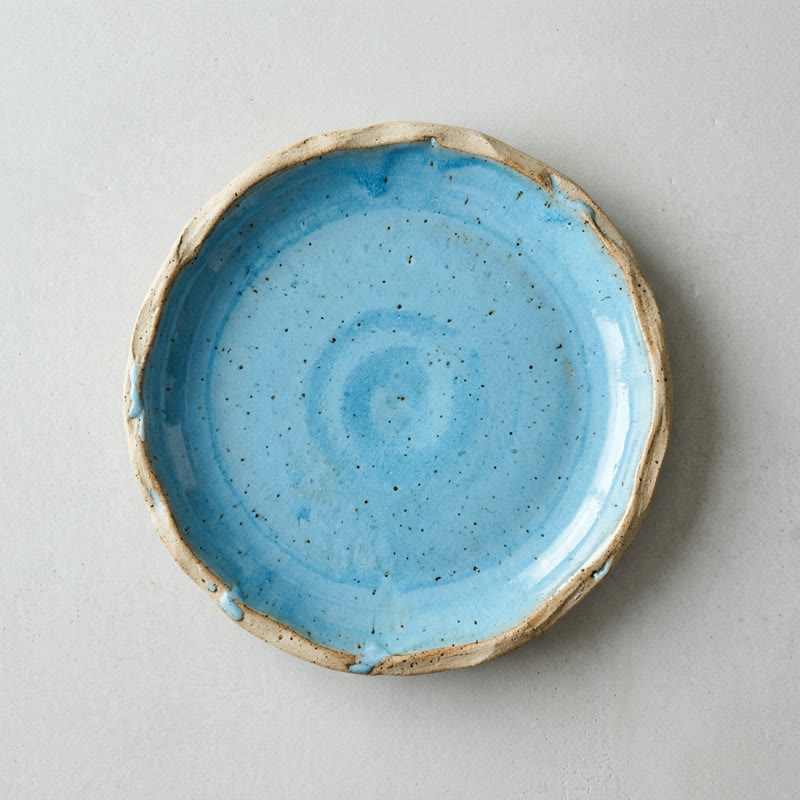 Image 1
 Image 2
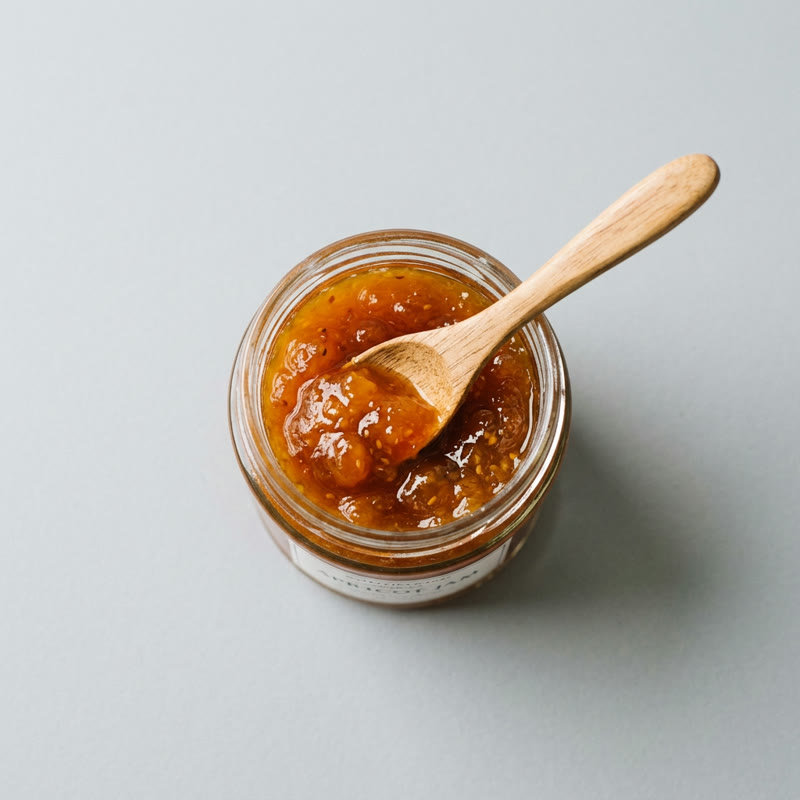 Image 3
 Image 4
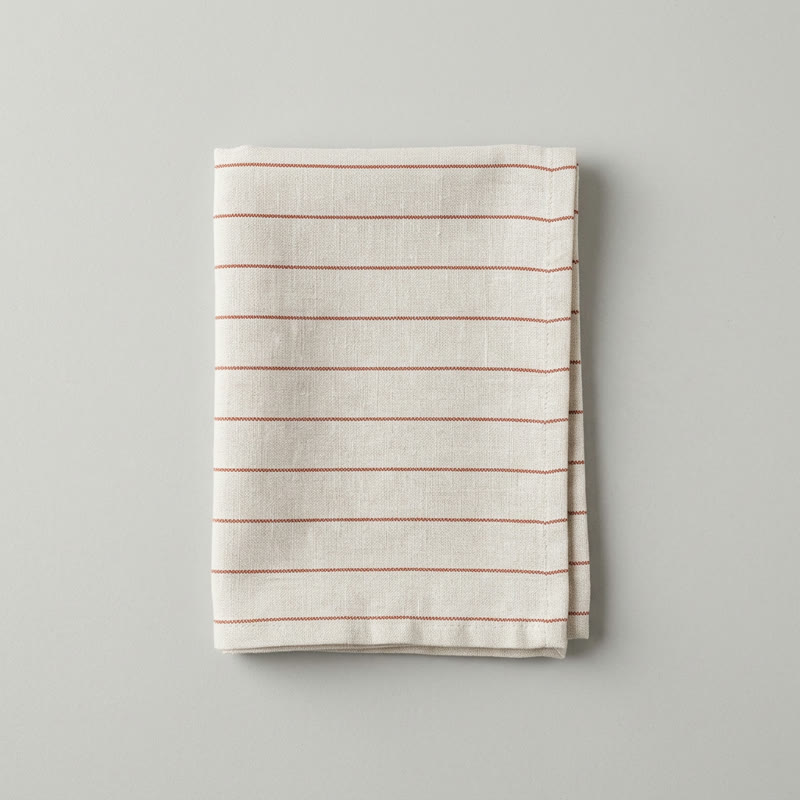 Image 5
 Image 6
Prompt
An overhead photograph of a breakfast table, shot from directly above: on the oak table from the sixth image, the blue plate from the first image with the croissant from the second image on it, the jar of jam from the third image beside the plate, the espresso cup and saucer from the fourth image at the top right and the striped napkin from the fifth image folded at the left. Keep every object exactly as it looks in its image, at its real size. Morning window light from the left with soft natural shadows, a few croissant flakes on the wood, natural color.Each reference goes in referenceImages as an object with the image in uri, in the order the prompt refers to them:
"referenceImages": [
  { "uri": "https://example.com/plate.jpg" },
  { "uri": "https://example.com/croissant.jpg" },
  { "uri": "https://example.com/jam.jpg" },
  { "uri": "https://example.com/cup.jpg" },
  { "uri": "https://example.com/napkin.jpg" },
  { "uri": "https://example.com/table.jpg" }
]
Here is every field, for both models:
Nano Banana 2
POST /v1/text_to_image
| Field | Accepts |
|---|---|
model (required) |
gemini_image3.1_flash |
promptText (required) |
Text, 1 to 5,500 characters |
ratio (required) |
One of 512:512, 416:624, 624:416, 432:592, 592:432, 448:576, 576:448, 384:672, 672:384, 768:336, 256:1024, 1024:256, 176:1408, 1408:176, 1024:1024, 832:1248, 1248:832, 864:1184, 1184:864, 896:1152, 1152:896, 768:1344, 1344:768, 1536:672, 512:2048, 2048:512, 352:2816, 2816:352, 2048:2048, 1696:2528, 2528:1696, 1792:2400, 2400:1792, 1856:2304, 2304:1856, 1536:2752, 2752:1536, 3168:1344, 1024:4096, 4096:1024, 704:5632, 5632:704, 4096:4096, 3392:5056, 5056:3392, 3584:4800, 4800:3584, 3712:4608, 4608:3712, 3072:5504, 5504:3072, 6336:2688, 2048:8192, 8192:2048, 1408:11264 or 11264:1408 |
referenceImages |
A list of up to 14 images |
outputCount |
One of 1 or 4 |
Nano Banana 2 Lite
POST /v1/text_to_image
| Field | Accepts |
|---|---|
model (required) |
gemini_image3.1_flash_lite |
promptText (required) |
Text, 1 to 5,500 characters |
ratio (required) |
One of 1024:1024, 848:1264, 1264:848, 896:1200, 1200:896, 928:1152, 1152:928, 768:1376, 1376:768 or 1584:672 |
referenceImages |
A list of up to 14 images |
outputCount |
One of 1 or 4 |
Images go in as an HTTPS URL, a runway:// URI from an upload or a data URI; inputs lists sizes and formats. Each table shows what a field accepts on its own. Rules that combine fields are checked when the task is submitted, and the API reference has them in full.
A few more rules change what you send:
ratiosets the size, the shape and the price at once. Each value is a width and height in pixels, and an image can come back a few pixels off it. Nano Banana 2 Lite takes its own list of sizes, which differs from Nano Banana 2’s list at the same size, so take a Literatiofrom the Lite table.subjectmarks a reference as a person (human) or an object (object), and each kind has its own cap within the total. Leave it out and the reference counts as an object.- Reference images are checked before the task starts. Each image’s width-to-height ratio has to fall inside the range in inputs, or the request is rejected with a validation error and nothing is charged.
outputCountreturns several images from one request, and each one is billed.- There is no
seed, so the same request can return a different image each time. - Fields from other models are dropped, not rejected. A
seedor Nano Banana 2.1’sthinkingLevelis removed before the task starts, so the request succeeds without that setting.
What is the difference between Nano Banana 2 and Nano Banana 2 Lite?
Nano Banana 2 Lite is the lightweight tier of Nano Banana 2, Gemini 3.1 Flash Lite Image in Google’s API, built for high-volume work where generation speed and cost per image matter most: drafts, thumbnails and large batches of variations. It returns images at 1K only. It takes the same fields as Nano Banana 2, up to 14 images as references included, but Google doesn’t tune it for many references at once or for edit after edit on the same image, so larger sizes, the draft size and reference-heavy work stay on Nano Banana 2.
Google also names Nano Banana 2 Lite as the upgrade from the original Nano Banana, Gemini 2.5 Flash Image, which Runway Dev serves as gemini_2.5_flash.
| Nano Banana 2 | Nano Banana 2 Lite | |
|---|---|---|
| Model ID | gemini_image3.1_flash |
gemini_image3.1_flash_lite |
| Name in Google’s API | Gemini 3.1 Flash Image | Gemini 3.1 Flash Lite Image |
| Sizes | 1K, 2K and 4K, plus a smaller draft size | 1K |
| Price at the shared size | 7 credits ($0.07) per image at 1K | 4 credits ($0.04) per image at 1K |
| References | Up to 14 images | Up to 14 images |
| Images per request | One of 1 or 4 |
One of 1 or 4 |
| Built for | Larger sizes, world knowledge and keeping a product or person consistent across references | Speed and volume at one size |
Switching between them means changing model and taking ratio from that model’s list. Here is one prompt sent to each:


Prompt
A small glass greenhouse in the early morning: rows of seedlings in terracotta pots on weathered wooden benches, condensation beading on the glass panes, a galvanized watering can on the gravel floor, soft low sunlight through the mist. No text. Shot on a 35mm lens, natural color, documentary feel.How do you call Nano Banana 2 from curl, Node and Python?
You call Nano Banana 2 by sending gemini_image3.1_flash as the model to POST /v1/text_to_image. This request creates an image from a prompt, and the other fields keep their defaults:
curl
curl -X POST https://api.dev.runwayml.com/v1/text_to_image \
  -H "Authorization: Bearer $RUNWAYML_API_SECRET" \
  -H "X-Runway-Version: 2024-11-06" \
  -H "Content-Type: application/json" \
  -d '{
    "model": "gemini_image3.1_flash",
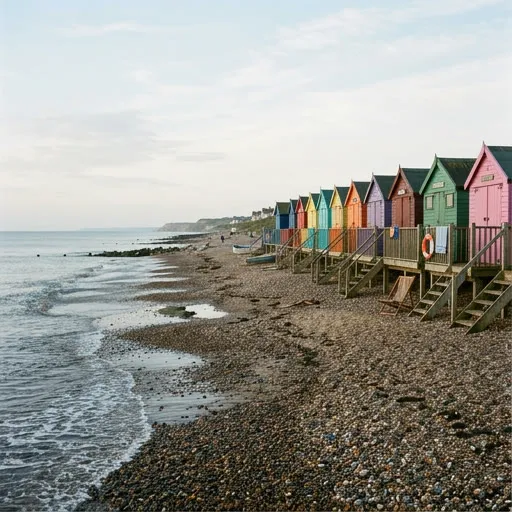
    "promptText": "A row of colorful wooden beach huts on a pebble beach under a pale morning sky, the tide going out",
    "ratio": "512:512"
  }'

# The response carries the task id. Poll the task until it finishes:
curl https://api.dev.runwayml.com/v1/tasks/$TASK_ID \
  -H "Authorization: Bearer $RUNWAYML_API_SECRET" \
  -H "X-Runway-Version: 2024-11-06"
Node.js
import RunwayML, { TaskFailedError } from '@runwayml/sdk';

// Reads your API key from RUNWAYML_API_SECRET.
const client = new RunwayML();

try {
  const task = await client.textToImage
    .create({
      model: 'gemini_image3.1_flash',
      promptText: 'A row of colorful wooden beach huts on a pebble beach under a pale morning sky, the tide going out',
      ratio: '512:512',
    })
    .waitForTaskOutput();
  console.log(task.output);
} catch (error) {
  if (error instanceof TaskFailedError) {
    console.error(error.taskDetails);
  } else {
    throw error;
  }
}
Python
from runwayml import RunwayML, TaskFailedError

# Reads your API key from RUNWAYML_API_SECRET.
client = RunwayML()

try:
    task = client.text_to_image.create(
        model="gemini_image3.1_flash",
        prompt_text="A row of colorful wooden beach huts on a pebble beach under a pale morning sky, the tide going out",
        ratio="512:512",
    ).wait_for_task_output()
    print(task.output)
except TaskFailedError as error:
    print(error.task_details)
ratio is required, so the sample sends its first allowed value. It takes 512:512, 416:624, 624:416, 432:592, 592:432, 448:576, 576:448, 384:672, 672:384, 768:336, 256:1024, 1024:256, 176:1408, 1408:176, 1024:1024, 832:1248, 1248:832, 864:1184, 1184:864, 896:1152, 1152:896, 768:1344, 1344:768, 1536:672, 512:2048, 2048:512, 352:2816, 2816:352, 2048:2048, 1696:2528, 2528:1696, 1792:2400, 2400:1792, 1856:2304, 2304:1856, 1536:2752, 2752:1536, 3168:1344, 1024:4096, 4096:1024, 704:5632, 5632:704, 4096:4096, 3392:5056, 5056:3392, 3584:4800, 4800:3584, 3712:4608, 4608:3712, 3072:5504, 5504:3072, 6336:2688, 2048:8192, 8192:2048, 1408:11264 or 11264:1408.
Prompt
A row of colorful wooden beach huts on a pebble beach under a pale morning sky, the tide going outTo call Nano Banana 2 Lite instead, send gemini_image3.1_flash_lite as the model and a ratio from its list.
Generation is asynchronous:
- The create request returns a task ID right away, and the image is made in the background.
- Poll
GET /v1/tasks/{id}with backoff until the status isSUCCEEDED,FAILEDorCANCELLED.THROTTLEDmeans the task is waiting in a queue, not rejected. - A
SUCCEEDEDtask carriesoutput, a list with one URL per image. The URLs are temporary, so download the images you keep. See outputs. - The SDKs poll for you.
waitForTaskOutput()andwait_for_task_output()raiseTaskFailedErrorwith the task’s details when it fails. - To use your own rules instead of one fixed model, send a Model Router’s
configIdtoPOST /v1/generate/imagein place of the model. The routed request takesaspectRatioandresolutionin place ofratio, anddryRunshows which model it picks without creating a task.
Why does a Nano Banana 2 API request fail?
A Nano Banana 2 request fails in one of two places: with a validation error when you create the task, or as a task that ends with a failure code. The common ones:
SAFETY.INPUT.*: content moderation rejected an input, the prompt or a reference image. The suffix hints at which one but may not match. The task is charged and shouldn’t be retried as is: change the inputs first.SAFETY.OUTPUT.*: the generated image was rejected by moderation. Change the prompt or references before you try again.ASSET.INVALID: a reference image can’t be used, for example because of its format. Check it against inputs and fix it before retrying.- An
Invalid asset aspect ratiomessage: a reference image is too narrow or too wide. Crop it into the range in inputs. THIRD_PARTY.UNAVAILABLE: the model’s provider didn’t return the image, because of an outage or load. Wait, then retry.- A validation error on
ratio: the value was copied from another model, Nano Banana 2 Lite, Nano Banana 2.1 or Nano Banana Pro included, and isn’t in this model’s list. Take it from the inputs above. - A validation error on
referenceImages: too many references in total, or too many of onesubjectkind. - A validation error on
outputCount: the value isn’t one Nano Banana 2 accepts. Fields Nano Banana 2 doesn’t take at all, such asseed, raise no error: they’re dropped. - An output link that stopped working: output URLs expire. Download the image when the task succeeds.
What does Runway Dev add when you call Nano Banana 2?
Runway Dev serves Nano Banana 2 next to Runway’s own models and other labs’ models, behind one API key and one credit balance: you build with a single key and pay a single bill, instead of an account, a key and an invoice per lab.
A coding agent can do the Nano Banana 2 integration for you on Runway Dev, end to end. Connect the Runway Dev MCP and the agent works from your live account: the models your project can call with their current prices and input limits, your credit balance and the record behind any task. It writes the integration against what the API accepts today, and when a task fails it looks up the reason and fixes it. The Runway Dev skills show the agent how to integrate with the official SDKs and how to build with models, Model Routers, Recipes and Workflows.
With Workflows, Nano Banana 2 or Nano Banana 2 Lite becomes one step of a larger pipeline: draft a scene with it, animate the pick with a video model and add a voiceover, then run the whole pipeline with a single API call. Workflows don’t need to be built by a developer. A creative or marketing teammate builds and tests one visually in the Runway app (how Workflows work), then publishes it as an endpoint that your code calls. When the team updates the workflow, your code keeps calling the same endpoint.
FAQ
How do I get API access to Nano Banana 2?
Create a Runway Dev account at dev.runway.com, make an API key and add credits. Then send gemini_image3.1_flash as the model to POST /v1/text_to_image, or gemini_image3.1_flash_lite for Nano Banana 2 Lite. To have a coding agent write the integration instead, connect the Runway Dev MCP and install the Runway Dev skills: the agent builds it from your live account, with the prices and input limits your project has today.
How much does the Nano Banana 2 API cost?
On Runway Dev, Nano Banana 2 costs 5 credits ($0.05) per image (512px), 7 credits ($0.07) per image at 1K, 11 credits ($0.11) per image at 2K and 16 credits ($0.16) per image at 4K, and Nano Banana 2 Lite costs 4 credits ($0.04) per image at 1K. outputCount multiplies the charge, and reference images add nothing. Prices are current as of October 22, 2026.
Is the Nano Banana 2 API on Runway Dev the official model?
Runway Dev’s Nano Banana 2 API runs the official Nano Banana 2 model from Google, which Google calls Gemini 3.1 Flash Image, and Nano Banana 2 Lite runs Google’s Gemini 3.1 Flash Lite Image. You call them with your Runway Dev API key and the model IDs gemini_image3.1_flash and gemini_image3.1_flash_lite, like every other model on Runway Dev.
Can I use Nano Banana 2 without writing code?
You can use Nano Banana 2 on Runway Dev without writing code yourself. The playground sends a request from a form and gives it back as code, and a coding agent connected to the Runway Dev MCP writes the integration for you. A creative or marketing teammate can also build a workflow around Nano Banana 2 in the Runway app and publish it as an endpoint your app calls.
Does the same Runway Dev API key work for Nano Banana 2 and other models?
One Runway Dev API key calls Nano Banana 2, Nano Banana 2 Lite and every other model your project can use, Runway’s own and other labs’, with the same SDKs, task flow and credit balance. Switching models means changing the model field, or the rules of a Model Router.
How do I get API access to Nano Banana 2 Lite?
Nano Banana 2 Lite runs on the same Runway Dev account, API key and credits as Nano Banana 2. Send gemini_image3.1_flash_lite as the model to POST /v1/text_to_image, with a ratio from the Lite list, or try it from a form in the playground.
How much does the Nano Banana 2 Lite API cost?
On Runway Dev, Nano Banana 2 Lite costs 4 credits ($0.04) per image at 1K, its only size. outputCount multiplies the charge, and reference images add nothing. Prices are current as of October 22, 2026.
Is Nano Banana 2 Lite the same as Nano Banana 2.1?
Nano Banana 2 Lite and Nano Banana 2.1 are two different Google models. Nano Banana 2 Lite (gemini_image3.1_flash_lite) is the lightweight tier of Nano Banana 2 and renders at 1K only. Nano Banana 2.1 (nano_banana_2.1) is Google’s update to Nano Banana 2: it renders at larger sizes too and takes thinkingLevel. It has its own Nano Banana 2.1 API page.
What is the Nano Banana 2 model ID on Runway Dev?
The model ID is gemini_image3.1_flash for Nano Banana 2 and gemini_image3.1_flash_lite for Nano Banana 2 Lite, sent as model to POST /v1/text_to_image. Google’s own API names them gemini-3.1-flash-image and gemini-3.1-flash-lite-image, which Runway Dev doesn’t take.
Can Nano Banana 2 edit images through the API?
Nano Banana 2 edits images on the same endpoint it generates them on. Send the photo as { "uri": "<image URL>" } in referenceImages on POST /v1/text_to_image and describe the change in promptText; the rest of the photo stays as it was. Nano Banana 2 Lite edits the same way, and there is no separate edit endpoint.
What sizes and aspect ratios does Nano Banana 2 support?
Nano Banana 2 returns images at 1K, 2K and 4K and at a smaller draft size, in square, portrait, landscape and panoramic shapes, and Nano Banana 2 Lite at 1K. Each ratio value is a width and height in pixels, and the inputs tables on this page list every one.
What is the difference between Nano Banana 2, Nano Banana 2.1 and Nano Banana Pro on the API?
They are separate Google models with their own model IDs: gemini_image3.1_flash for Nano Banana 2, gemini_image3.1_flash_lite for Nano Banana 2 Lite, nano_banana_2.1 for Nano Banana 2.1 and gemini_image3_pro for Nano Banana Pro. Nano Banana 2.1 is Google’s update to Nano Banana 2 and the only one of them that takes thinkingLevel; it has its own Nano Banana 2.1 API page. All of them run on POST /v1/text_to_image with your Runway Dev key.
Why did my Nano Banana 2 request fail with SAFETY.INPUT.TEXT?
SAFETY.INPUT.TEXT means content moderation rejected an input of your request; the suffix hints at the prompt but may not match. The task is charged and shouldn’t be retried as is, so change the prompt or inputs before you send it again.
Can I switch from Nano Banana 2 to another image model without changing my code?
A Model Router lets you change models without touching your code. Send its configId to POST /v1/generate/image, and change the models it may use, its priority or its cost cap in the router.
Start building on Runway Dev
Related articles
 Model guides
Nano Banana 2.1 API: access, pricing and code
Get the official Nano Banana 2.1 API from Google on Runway Dev: model ID, price per image, image editing with references and code in curl, Node and Python.
 Tutorials
Choosing the right model for your use case
Why video and image models are not interchangeable, and how to set up a Model Router that picks the best model for every request.
 Concepts
Can I use AI image and video generation commercially in my product?
Provider terms, copyright, input rights, training and disclosure: what decides whether you can ship AI images and video commercially.