


GPT Image 2.6 API: access, pricing and code
Summary
Runway Dev gives you the official GPT Image 2.6 APIs from OpenAI in both variants: Flare, built for fast iteration, and Sunburst, for detailed visual work.
GPT Image 2.6 creates images from a prompt and edits them from reference images.
Both variants can return a PNG with a transparent background, ready for stickers, logos, product cutouts and overlays.
They can also return an animated GIF or an SVG vector file from a prompt.
This page covers access, pricing, inputs, transparent backgrounds, GIFs, SVGs and code, and how your coding agent can build the integration for you.
What is GPT Image 2.6?
GPT Image 2.6 is OpenAI’s image generation and editing model, released through OpenAI’s API in November 2026 as two variants: GPT Image 2.6 Flare and GPT Image 2.6 Sunburst. It takes a text prompt of up to 32,000 characters and up to 16 images as references, and returns PNG images in square, portrait, landscape and wide shapes at three sizes, or at a size the model picks. From a prompt alone, it can also return a short animated GIF or an SVG.
GPT Image 2.6 writes legible text into an image, and one endpoint handles a new image, an edit of a photo and a combination of references. Its background field returns a cut-out subject on transparent pixels, so an image can go straight onto a web page, a catalog or a design without a background-removal step. Flare is built for interactive work where turnaround matters, and Sunburst for detailed visual work.
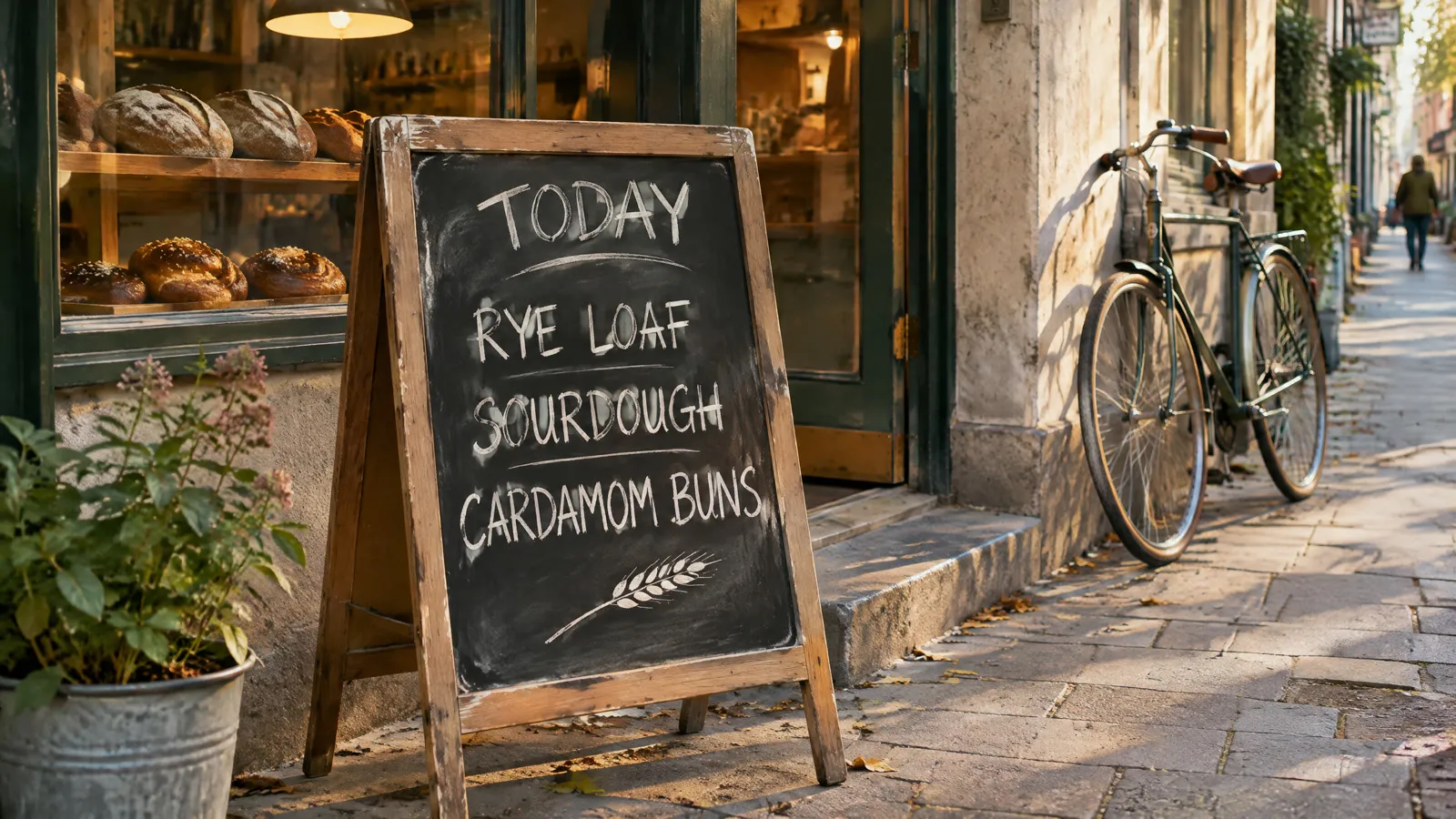
Prompt
A photograph of a hand-lettered chalkboard sign on the sidewalk outside a small bakery in the morning. The chalk lettering reads exactly: TODAY / RYE LOAF / SOURDOUGH / CARDAMOM BUNS, with a small drawing of a wheat stalk. Warm light from the shop window behind it, a bicycle leaning on the wall, natural color, 35mm documentary feel.What are the ways to use GPT Image 2.6 on Runway Dev?
You can use GPT Image 2.6 Flare and Sunburst on Runway Dev four ways, all from one account:
| Way in | Best for | What you need |
|---|---|---|
| Playground | Trying a prompt, then copying the request as code | A Runway Dev account |
| API and SDKs | Calling GPT Image 2.6 from your own code | An API key, plus the Node or Python SDK if you want one |
| Coding agent | Having Claude Code, Codex or Cursor build the API integration into your product, tool or pipeline | The Runway Dev MCP and skills, and an API key for live calls |
| Workflows | GPT Image 2.6 as one step with other models, run with one API call | A workflow built in the Runway app and published as an endpoint |
GPT Image 2.6 Flare and Sunburst are also available in Model Router, a saved config you send with the request instead of a model ID. You set what to optimize for (cost, quality or latency), a maximum cost per generation and the models allowed, and the router picks one for each request sent to POST /v1/generate/image. Quality, reasoning effort and background are set when you call a GPT Image 2.6 model ID directly.
How do you get API access to GPT Image 2.6?
You get API access to GPT Image 2.6 with a Runway Dev account and an API key:
- Create an account at https://dev.runway.com.
- Create an API key in your project’s dashboard.
- Add credits to your project’s balance.
- Store the key in your environment as
RUNWAYML_API_SECRET. - Send a request with
"model": "gpt_image_2_6_sunburst", or"gpt_image_2_6_flare"for Flare, and theX-Runway-Versionheader toPOST /v1/text_to_image. The code below is ready to run.
How much does the GPT Image 2.6 API cost?
The GPT Image 2.6 API on Runway Dev is billed per image it returns, at a rate set by the quality and the size: 4 credits ($0.04) per image (Medium, 2K) and 5 credits ($0.05) per image (Medium, 4K), with other rates for low and high quality. Flare and Sunburst cost the same.
GPT Image 2.6 Sunburst
| Option | Credits | USD |
|---|---|---|
| Low, 1K | 2 credits per image | $0.02 per image |
| Low, 2K | 2 credits per image | $0.02 per image |
| Low, 4K | 3 credits per image | $0.03 per image |
| Medium, 1K | 3 credits per image | $0.03 per image |
| Medium, 2K | 4 credits per image | $0.04 per image |
| Medium, 4K | 5 credits per image | $0.05 per image |
| High, 1K | 11 credits per image | $0.11 per image |
| High, 2K | 16 credits per image | $0.16 per image |
| High, 4K | 19 credits per image | $0.19 per image |
- Each reference image, per generated image: +1 credit ($0.01).
- Rates are for 1:1 images; other aspect ratios cost less.
- Auto resolution bills at the 4K rate.
GPT Image 2.6 Flare
| Option | Credits | USD |
|---|---|---|
| Low, 1K | 2 credits per image | $0.02 per image |
| Low, 2K | 2 credits per image | $0.02 per image |
| Low, 4K | 3 credits per image | $0.03 per image |
| Medium, 1K | 3 credits per image | $0.03 per image |
| Medium, 2K | 4 credits per image | $0.04 per image |
| Medium, 4K | 5 credits per image | $0.05 per image |
| High, 1K | 11 credits per image | $0.11 per image |
| High, 2K | 16 credits per image | $0.16 per image |
| High, 4K | 19 credits per image | $0.19 per image |
- Each reference image, per generated image: +1 credit ($0.01).
- Rates are for 1:1 images; other aspect ratios cost less.
- Auto resolution bills at the 4K rate.
Prices current as of November 10, 2026. 1 credit = $0.01.
How the billing works:
- You pay for each image returned.
outputCountmultiplies the charge, so a request for several images is billed for each one. qualityandratioset the rate. The tables list square images, and wider or taller shapes at the same size cost less.reasoningEffortdoesn’t change the price. A higher effort plans longer before rendering at the same rate.- Each reference image adds a charge per generated image, listed under the table.
- A GIF is priced by its frame count and quality, and an SVG adds a charge for writing the vector file on top of the image’s rate. The docs pricing guide lists both.
- A task that fails input moderation (
SAFETY.INPUT.*) is still charged. See task failures for what each failure means.
Every rate is also listed in the docs pricing guide and on Runway Dev pricing.
What inputs does GPT Image 2.6 accept?
GPT Image 2.6 accepts a prompt of up to 32,000 characters and up to 16 images as references, all on POST /v1/text_to_image, and Flare takes the same fields as Sunburst. What the model does depends on what you send.
With a prompt alone, GPT Image 2.6 creates a new image, as in the bakery sign above.
With reference images, the prompt describes what to do with them: edit a photo, combine several objects in one scene or pull one subject out of its picture. The model reads the references in the order you send them, so the prompt can point to each one by its place in the list (“the first image”). Each reference goes in referenceImages as an object with the image in uri:
"referenceImages": [{ "uri": "https://example.com/teapot.jpg" }]Here is every field, for both variants:
GPT Image 2.6 Sunburst
POST /v1/text_to_image
| Field | Accepts |
|---|---|
model (required) |
gpt_image_2_6_sunburst |
outputFormat |
One of png, gif or svg. Default png |
frameCount |
Whole number from 2 to 16 |
frameDurationMs |
Whole number from 20 to 2,000 |
promptText (required) |
Text, 1 to 32,000 characters |
ratio (required) |
One of 2048:880, 1920:1088, 1920:1280, 1920:1440, 1920:1536, 1920:1920, 1536:1920, 1440:1920, 1280:1920, 1088:1920, 2912:1248, 2560:1440, 2560:1712, 2560:1920, 2560:2048, 2560:2560, 2048:2560, 1920:2560, 1712:2560, 1440:2560, 3840:1648, 3840:2160, 3504:2336, 3264:2448, 3200:2560, 2880:2880, 2560:3200, 2448:3264, 2336:3504, 2160:3840 or auto |
quality |
One of low, medium or high |
reasoningEffort |
One of low, medium or high |
background |
One of transparent, opaque or auto |
referenceImages |
A list of up to 16 images |
outputCount |
Whole number from 1 to 10 |
GPT Image 2.6 Flare
POST /v1/text_to_image
| Field | Accepts |
|---|---|
model (required) |
gpt_image_2_6_flare |
outputFormat |
One of png, gif or svg. Default png |
frameCount |
Whole number from 2 to 16 |
frameDurationMs |
Whole number from 20 to 2,000 |
promptText (required) |
Text, 1 to 32,000 characters |
ratio (required) |
One of 2048:880, 1920:1088, 1920:1280, 1920:1440, 1920:1536, 1920:1920, 1536:1920, 1440:1920, 1280:1920, 1088:1920, 2912:1248, 2560:1440, 2560:1712, 2560:1920, 2560:2048, 2560:2560, 2048:2560, 1920:2560, 1712:2560, 1440:2560, 3840:1648, 3840:2160, 3504:2336, 3264:2448, 3200:2560, 2880:2880, 2560:3200, 2448:3264, 2336:3504, 2160:3840 or auto |
quality |
One of low, medium or high |
reasoningEffort |
One of low, medium or high |
background |
One of transparent, opaque or auto |
referenceImages |
A list of up to 16 images |
outputCount |
Whole number from 1 to 10 |
Images go in as an HTTPS URL, a runway:// URI from an upload or a data URI; inputs lists sizes and formats. Each table shows what a field accepts on its own. Rules that combine fields are checked when the task is submitted, and the API reference has them in full.
A few more rules change what you send:
ratiosets the size, the shape and the price at once. Each value is a width and height in pixels.autolets the model pick the size and shape for the prompt.qualitysets how much detail the model renders (low,mediumorhigh), and with it the rate. Left out, it ishigh.reasoningEffortsets how much the model plans before it renders (low,mediumorhigh). Left out, it ishigh.backgrounddecides what fills the space around the subject:transparent,opaqueorauto, the default, which lets the model choose. The next section shows it.outputCountreturns several images from one request, and each one is billed.outputFormatsets the file the task returns:png, the default,giffor an animated GIF orsvgfor a vector file. GIF and SVG work from a prompt alone, without reference images.
How do you generate images with a transparent background with the GPT Image 2.6 API?
You generate an image with a transparent background on GPT Image 2.6 by sending "background": "transparent" with the request. The model returns a PNG whose alpha channel is clear everywhere outside the subject, so the image drops onto any color, photo or layout with no background-removal step. It works on Flare and Sunburst, from a prompt alone or from reference images, and costs the same as an opaque image of the same size.
Say in the prompt what the subject is and that it stands alone (“a die-cut sticker”, “a product cutout”, “a logo on a transparent background”), as in the request in the code below.
To cut a subject out of a photo you already have, send the photo as a reference with "background": "transparent" and describe the subject to keep. GPT Image 2.6 redraws that subject on transparent pixels, gaps such as a handle’s loop included:
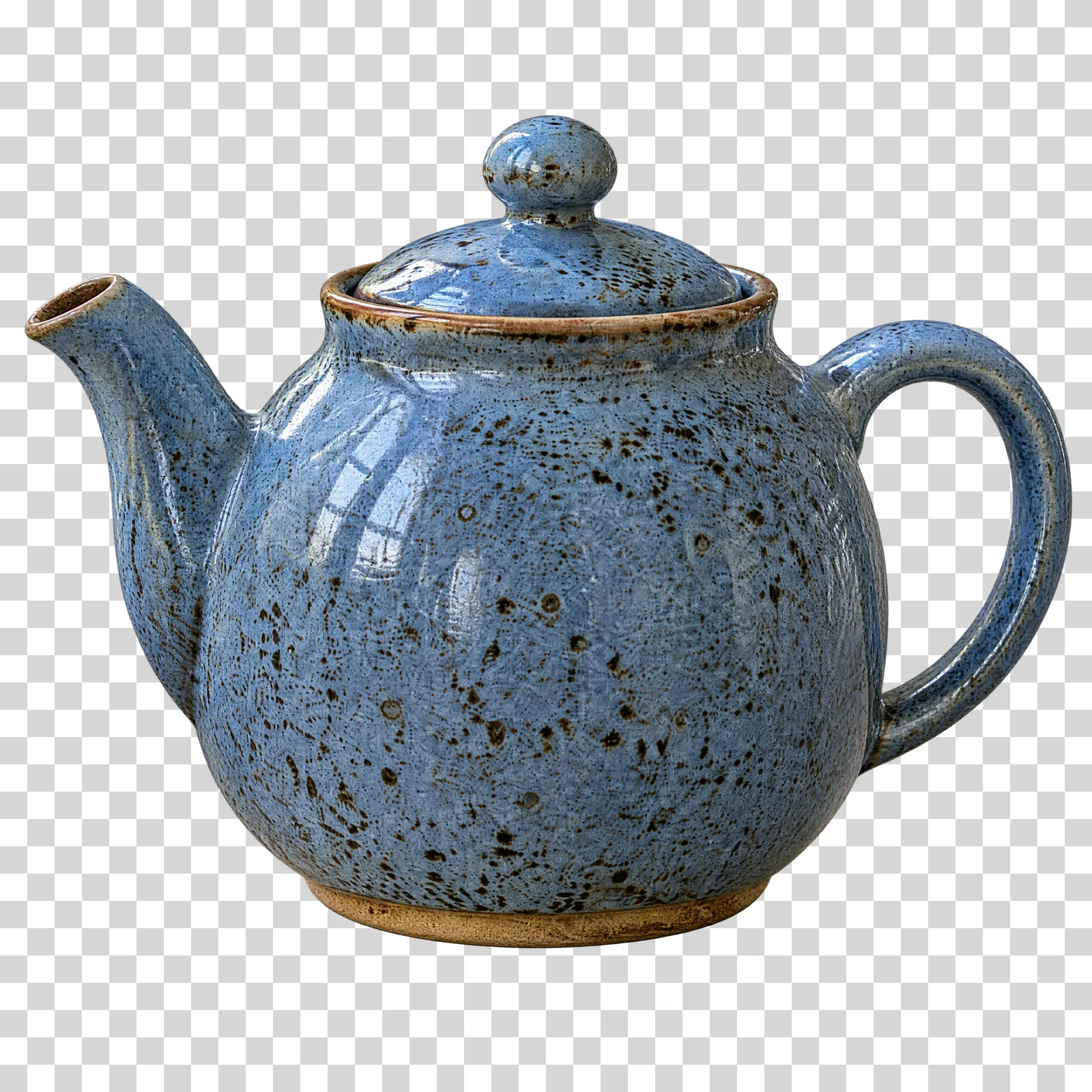
Inputs
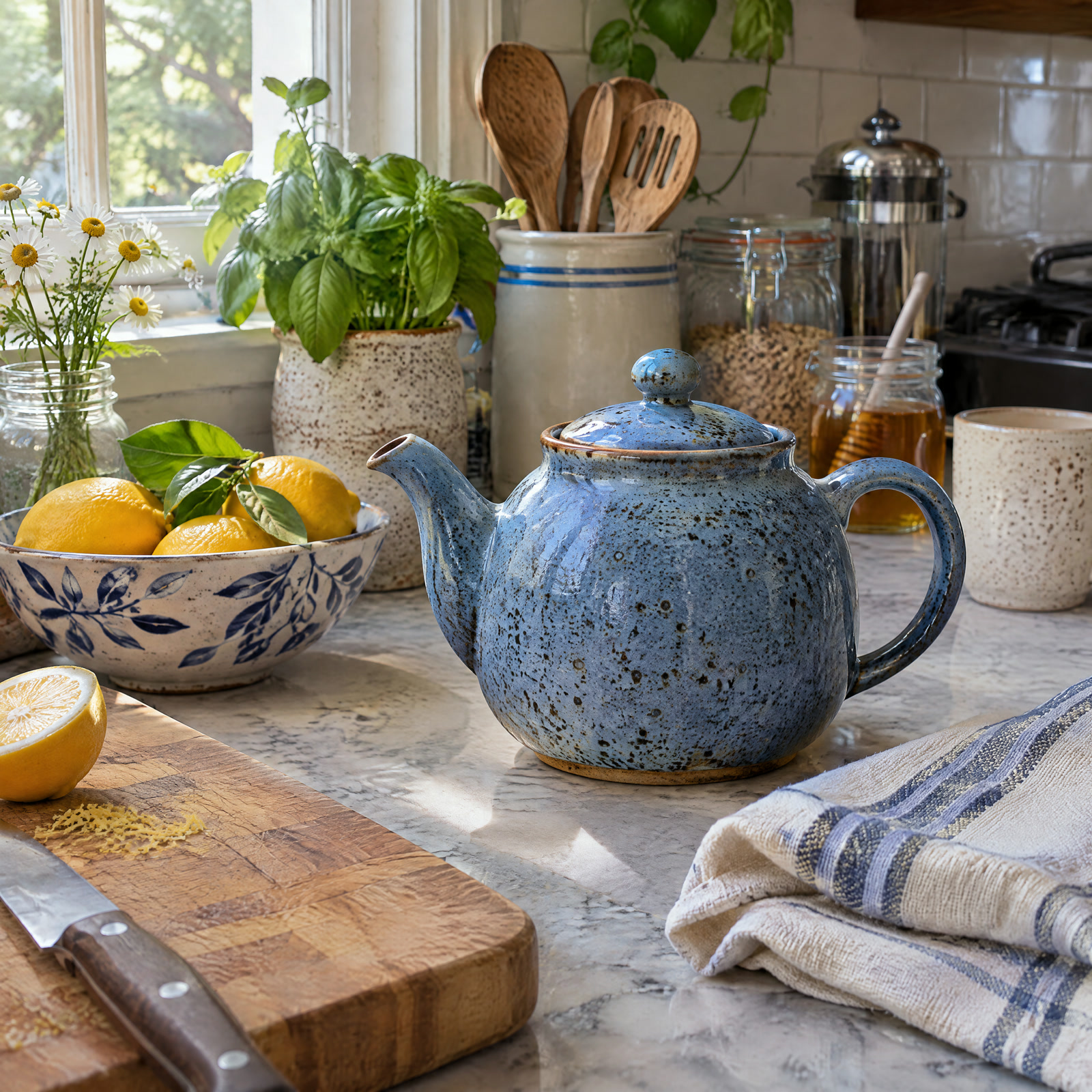 Image 1
Prompt
Cut out the teapot from the first image on a transparent background. Keep its exact shape, speckled blue glaze, lid and handle, with nothing else from the counter.How do you generate animated GIFs with the GPT Image 2.6 API?
You generate an animated GIF on GPT Image 2.6 by sending "outputFormat": "gif" with "ratio": "auto". The task returns one GIF file that loops through its frames, ready for a chat sticker, a loading animation, a reaction image or a small motion on a product page. It works on Flare and Sunburst, from a prompt alone.
Two optional fields shape the animation:
frameCountsets how many frames the GIF holds, from 2 to 16. Left out, it is 9.frameDurationMssets how long each frame shows, from 20 to 2000 milliseconds. Left out, it is 200.
Describe the motion as a short loop in the prompt: what changes from frame to frame, and that the last frame leads back into the first, as in this request:
{
  "model": "gpt_image_2_6_sunburst",
  "promptText": "A flat illustrated sunflower life cycle in a terracotta pot on a cream background: a seed sprouts, the stem grows tall, the flower opens wide and turns toward a small rising sun, then its petals fall and one seed drops back into the pot, ending exactly where it started. Bold simple shapes, warm yellows, greens and terracotta.",
  "ratio": "auto",
  "outputFormat": "gif",
  "frameCount": 12,
  "frameDurationMs": 150
}
Prompt
A flat illustrated sunflower life cycle in a terracotta pot on a cream background: a seed sprouts, the stem grows tall, the flower opens wide and turns toward a small rising sun, then its petals fall and one seed drops back into the pot, ending exactly where it started. Bold simple shapes, warm yellows, greens and terracotta.A few rules apply to GIF requests:
ratiohas to beauto. Every frame is drawn at the same small size on one sheet, so the model picks the size.- References don’t apply. A GIF request takes a prompt, without
referenceImages. - The price follows the frame count and quality, not the size, as the billing notes above say.
How do you generate SVG images with the GPT Image 2.6 API?
You generate an SVG on GPT Image 2.6 by sending "outputFormat": "svg" with the request. The task returns a vector file instead of pixels, so a logo, an icon or a flat illustration scales to any size without blurring and opens as editable shapes in Figma, Illustrator or a browser. It works on Flare and Sunburst, from a prompt alone.
Describe a scene that reads well as flat shapes, and name the colors you want, as in this request:
{
  "model": "gpt_image_2_6_sunburst",
  "promptText": "A papercut-style vector illustration of a humpback whale swimming through layered ocean waves, a tiny island with a white lighthouse and one pine tree on its back, the lighthouse beam drawn as a soft cone. Four colors only: deep navy, teal, sand and coral. Clean flat shapes, no text.",
  "ratio": "auto",
  "outputFormat": "svg"
}
Prompt
A papercut-style vector illustration of a humpback whale swimming through layered ocean waves, a tiny island with a white lighthouse and one pine tree on its back, the lighthouse beam drawn as a soft cone. Four colors only: deep navy, teal, sand and coral. Clean flat shapes, no text.A few rules apply to SVG requests:
- References don’t apply. An SVG request takes a prompt, without
referenceImages. - An SVG takes longer than a PNG, because the model renders the image and then writes it as vector paths. Poll the task with backoff as usual.
- The price is the image’s rate plus a charge for writing the vector file, as the billing notes above say.
What is the difference between GPT Image 2.6 Flare and GPT Image 2.6 Sunburst?
GPT Image 2.6 Flare and GPT Image 2.6 Sunburst are two variants of the same OpenAI model, with the same fields, sizes and prices. OpenAI builds Flare for fast iteration and interactive editing, and Sunburst for detailed visual work, so a Sunburst image takes longer to come back.
| GPT Image 2.6 Sunburst | GPT Image 2.6 Flare | |
|---|---|---|
| Model ID | gpt_image_2_6_sunburst |
gpt_image_2_6_flare |
| Built for | Detailed visual work | Fast iteration and interactive editing |
| Price | 4 credits ($0.04) per image (Medium, 2K) | 4 credits ($0.04) per image (Medium, 2K) |
| References | Up to 16 images | Up to 16 images |
| Images per request | Whole number from 1 to 10 | Whole number from 1 to 10 |
| Background | One of transparent, opaque or auto |
One of transparent, opaque or auto |
Switching between them means changing model. Here is one prompt sent to each:
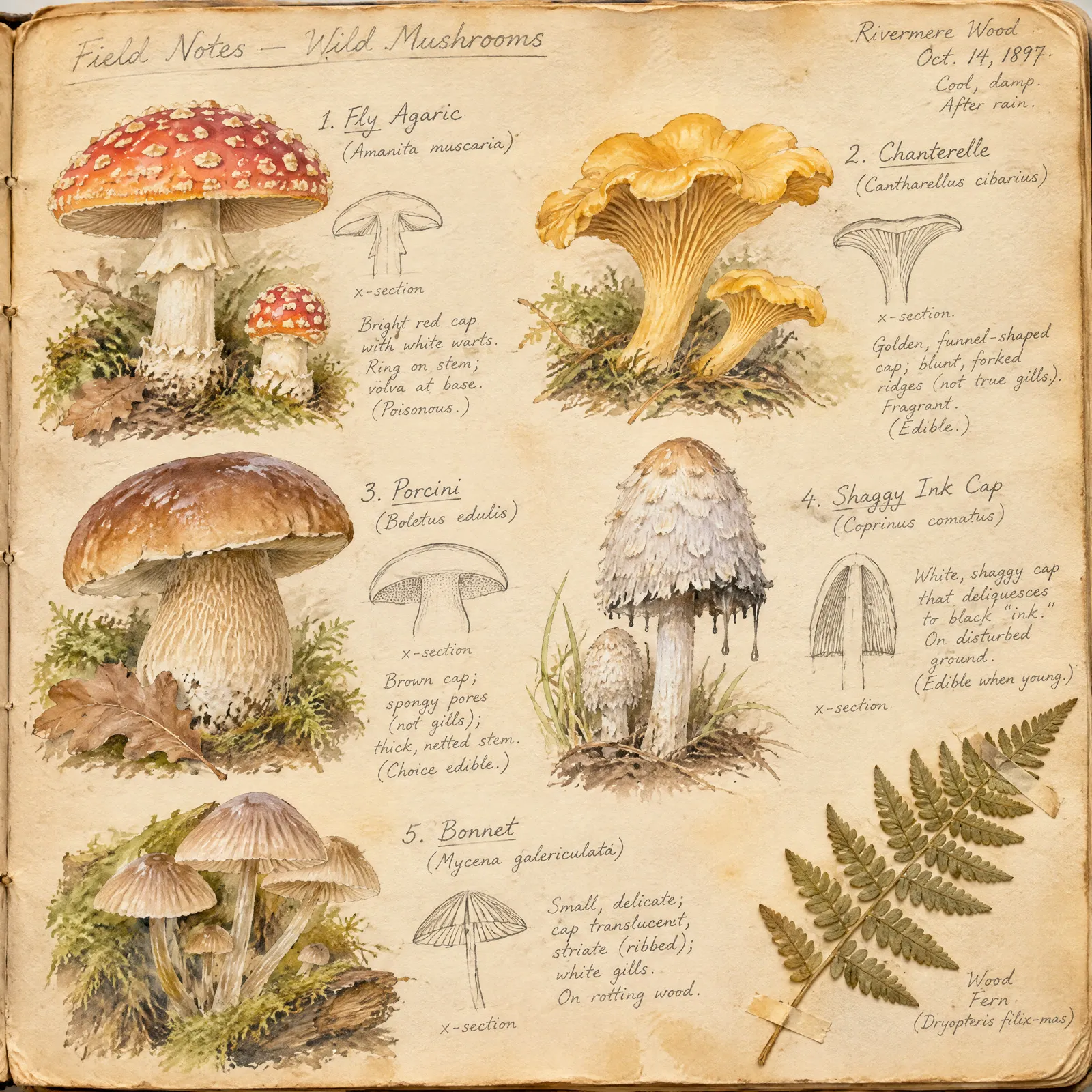
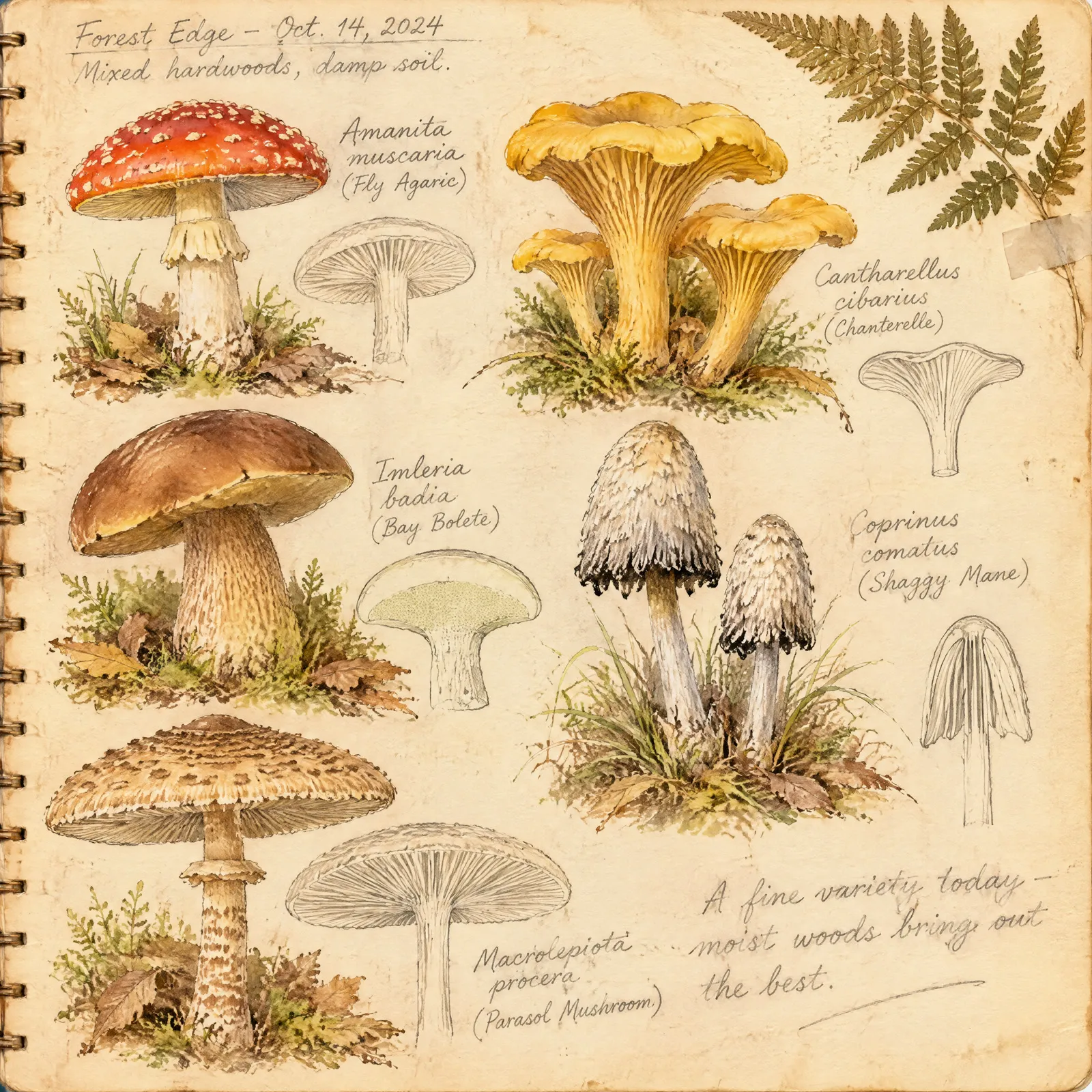
Prompt
A page from a naturalist's field notebook: watercolor studies of five wild mushroom species, each with a handwritten pencil label and a small cross-section sketch, a pressed fern at the corner, the paper slightly yellowed.How do you use the GPT Image 2.6 API?
You use the GPT Image 2.6 API by sending gpt_image_2_6_sunburst as the model to POST /v1/text_to_image. This example request, in curl, Node and Python, creates a sticker on a transparent background at medium quality:
curl
curl -X POST https://api.dev.runwayml.com/v1/text_to_image \
  -H "Authorization: Bearer $RUNWAYML_API_SECRET" \
  -H "X-Runway-Version: 2024-11-06" \
  -H "Content-Type: application/json" \
  -d '{
    "model": "gpt_image_2_6_sunburst",
    "promptText": "A die-cut sticker of a cheerful cartoon lemon wearing round sunglasses, thick white border around the shape, flat bold colors, on a transparent background",
    "ratio": "2560:2560",
    "quality": "medium",
    "background": "transparent"
  }'

# The response carries the task id. Poll the task until it finishes:
curl https://api.dev.runwayml.com/v1/tasks/$TASK_ID \
  -H "Authorization: Bearer $RUNWAYML_API_SECRET" \
  -H "X-Runway-Version: 2024-11-06"
Node.js
import RunwayML, { TaskFailedError } from '@runwayml/sdk';

// Reads your API key from RUNWAYML_API_SECRET.
const client = new RunwayML();

try {
  const task = await client.textToImage
    .create({
      model: 'gpt_image_2_6_sunburst',
      promptText: 'A die-cut sticker of a cheerful cartoon lemon wearing round sunglasses, thick white border around the shape, flat bold colors, on a transparent background',
      ratio: '2560:2560',
      quality: 'medium',
      background: 'transparent',
    })
    .waitForTaskOutput();
  console.log(task.output);
} catch (error) {
  if (error instanceof TaskFailedError) {
    console.error(error.taskDetails);
  } else {
    throw error;
  }
}
Python
from runwayml import RunwayML, TaskFailedError

# Reads your API key from RUNWAYML_API_SECRET.
client = RunwayML()

try:
    task = client.text_to_image.create(
        model="gpt_image_2_6_sunburst",
        prompt_text="A die-cut sticker of a cheerful cartoon lemon wearing round sunglasses, thick white border around the shape, flat bold colors, on a transparent background",
        ratio="2560:2560",
        quality="medium",
        background="transparent",
    ).wait_for_task_output()
    print(task.output)
except TaskFailedError as error:
    print(error.task_details)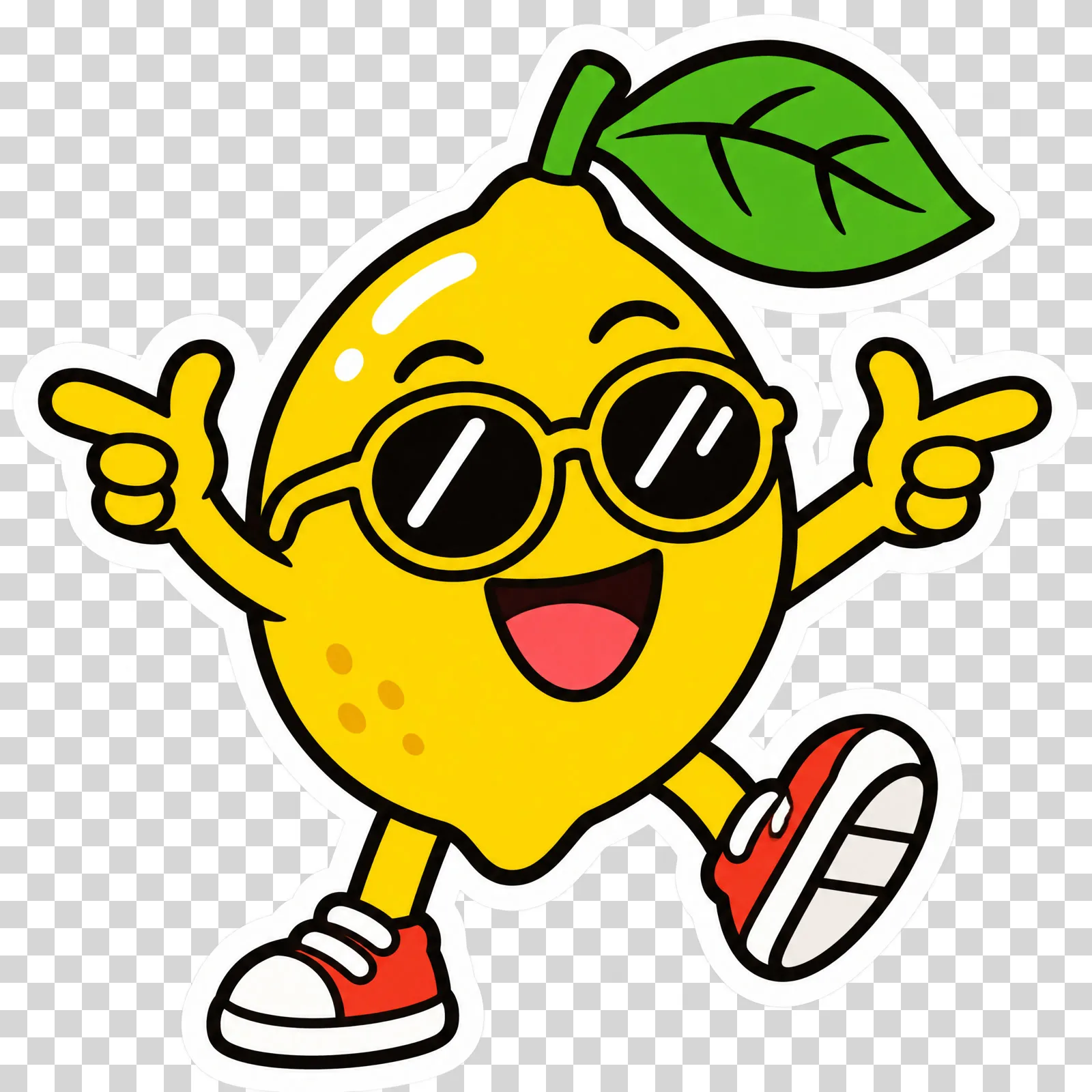
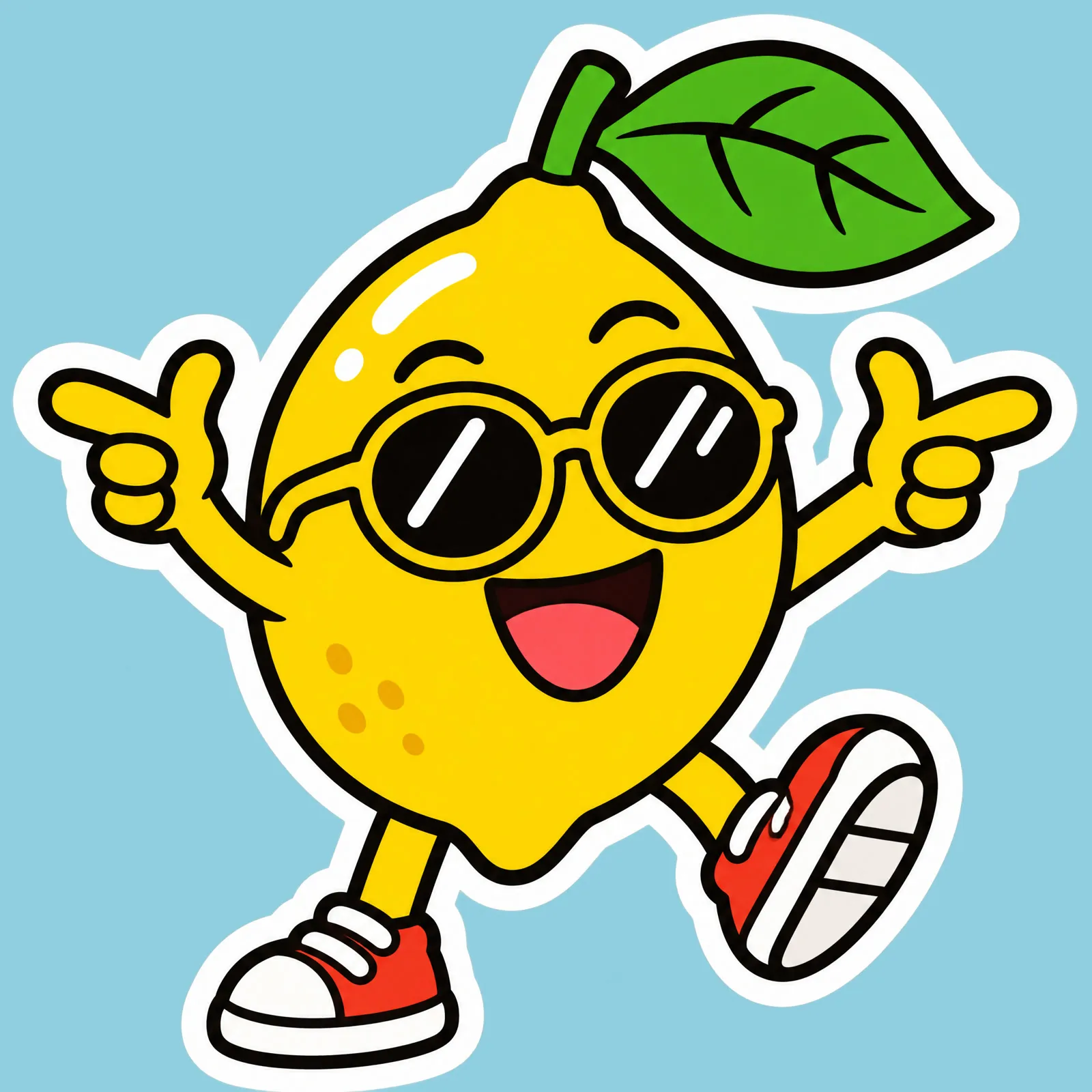
The PNG as the API returned it keeps its alpha channel, so you can open it in any editor and check the transparency yourself.
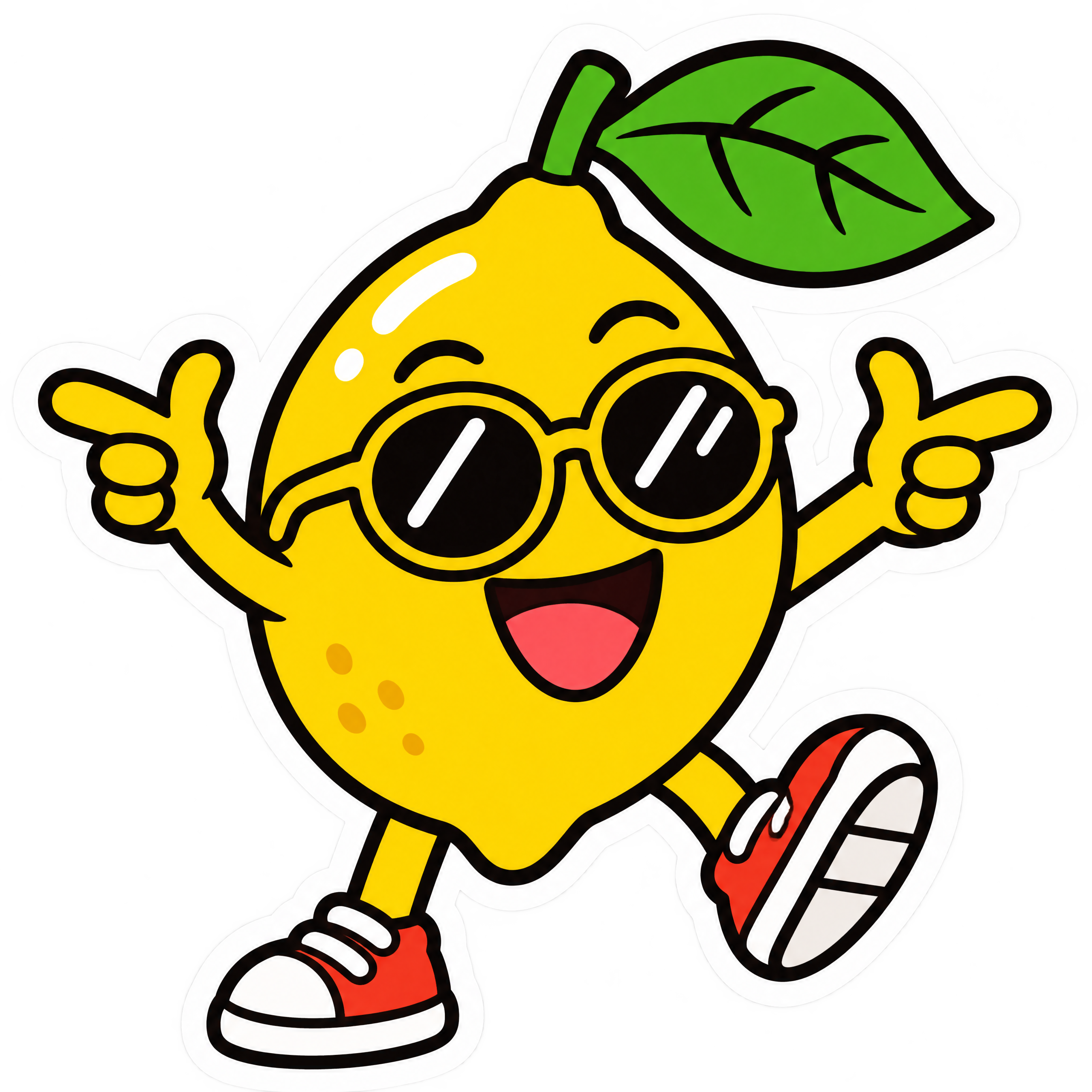
To call GPT Image 2.6 Flare instead, send gpt_image_2_6_flare as the model.
Generation is asynchronous:
- The create request returns a task ID right away, and the image is made in the background.
- Poll
GET /v1/tasks/{id}with backoff until the status isSUCCEEDED,FAILEDorCANCELLED.THROTTLEDmeans the task is waiting in a queue, not rejected. - A
SUCCEEDEDtask carriesoutput, a list with one URL per image. The URLs are temporary, so download the images you keep. See outputs. - The SDKs poll for you.
waitForTaskOutput()andwait_for_task_output()raiseTaskFailedErrorwith the task’s details when it fails. - To use your own rules instead of one fixed model, send a Model Router’s
configIdtoPOST /v1/generate/imagein place of the model.
Why does a GPT Image 2.6 API request fail?
A call to GPT Image 2.6 fails in one of two places: with a validation error when you create the task, or as a task that ends with a failure code. The common ones:
SAFETY.INPUT.*: content moderation rejected an input, the prompt or a reference image. The suffix hints at which one but may not match. The task is charged and shouldn’t be retried as is: change the inputs first.SAFETY.OUTPUT.*: the generated image was rejected by moderation. Change the prompt or references before you try again.ASSET.INVALID: a reference image can’t be used, for example because of its format. Check it against inputs and fix it before retrying.THIRD_PARTY.UNAVAILABLE: the model’s provider didn’t return the image, because of an outage or load. Wait, then retry.- A validation error on
quality: the value was copied from GPT Image 2.5, which takes more quality levels. GPT Image 2.6 takeslow,mediumorhigh. - A validation error on
ratio: the value isn’t in this model’s list, often because it came from another model. Take it from the inputs above. - A validation error on a GIF or SVG request: it carries
referenceImages, a GIF has aratioother thanauto, orframeCountorframeDurationMswas sent without"outputFormat": "gif". - A validation error naming an unrecognized key: the request carries a field
POST /v1/text_to_imagedoesn’t take, such assizeornfrom OpenAI’s own API. UseratioandoutputCountinstead. - An output link that stopped working: output URLs expire. Download the image when the task succeeds.
What does Runway Dev add when you call GPT Image 2.6?
Runway Dev serves GPT Image 2.6 next to Runway’s own models and other labs’ models, behind one API key and one credit balance: you build with a single key and pay a single bill, instead of an account, a key and an invoice per lab.
A coding agent can do the GPT Image 2.6 integration for you on Runway Dev, end to end. Connect the Runway Dev MCP and the agent works from your live account: the models your project can call with their current prices and input limits, your credit balance and the record behind any task. It writes the integration against what the API accepts today, and when a task fails it looks up the reason and fixes it. The Runway Dev skills show the agent how to integrate with the official SDKs and how to build with models, Model Routers, Recipes and Workflows.
With Workflows, GPT Image 2.6 becomes one step of a larger pipeline: cut a product out on a transparent background, place it in new scenes with another image model and animate the pick with a video model, then run the whole pipeline with a single API call. Workflows don’t need to be built by a developer. A creative or marketing teammate builds and tests one visually in the Runway app (how Workflows work), then publishes it as an endpoint that your code calls. When the team updates the workflow, your code keeps calling the same endpoint.
FAQ
How do I get API access to GPT Image 2.6?
Create a Runway Dev account at dev.runway.com, make an API key and add credits. Then send gpt_image_2_6_sunburst as the model to POST /v1/text_to_image, or gpt_image_2_6_flare for Flare. To have a coding agent write the integration instead, connect the Runway Dev MCP and install the Runway Dev skills: the agent builds it from your live account, with the prices and input limits your project has today.
How much does the GPT Image 2.6 API cost?
On Runway Dev, GPT Image 2.6 costs 4 credits ($0.04) per image (Medium, 2K) and 5 credits ($0.05) per image (Medium, 4K), and Flare and Sunburst cost the same. The price table on this page lists the rate for every quality and size. outputCount multiplies the charge, and reasoning effort doesn’t change it. Prices are current as of November 10, 2026.
Is the GPT Image 2.6 API on Runway Dev the official model?
Runway Dev’s GPT Image 2.6 API runs the official GPT Image 2.6 Flare and Sunburst models from OpenAI. You call them with your Runway Dev API key and the model IDs gpt_image_2_6_sunburst and gpt_image_2_6_flare, like every other model on Runway Dev.
How do I generate images with a transparent background using an API?
An image API returns a transparent background when its model can write an alpha channel into a PNG and the request asks for one. On Runway Dev, send "background": "transparent" to POST /v1/text_to_image with gpt_image_2_6_sunburst or gpt_image_2_6_flare as the model, and describe a subject that stands alone, such as a sticker, a logo or a product. The task returns a PNG with clear pixels around the subject.
How do I generate an animated GIF using an API?
An image API returns an animated GIF when its model draws several frames and the request asks for that format. On Runway Dev, send "outputFormat": "gif" and "ratio": "auto" to POST /v1/text_to_image with gpt_image_2_6_sunburst or gpt_image_2_6_flare as the model, and describe a short loop in the prompt. frameCount and frameDurationMs set the number of frames and their speed.
Can I generate SVG files with an AI image API?
An AI image API can return an SVG when its model writes the image as vector paths. On Runway Dev, send "outputFormat": "svg" to POST /v1/text_to_image with gpt_image_2_6_sunburst or gpt_image_2_6_flare as the model and a prompt for a logo, an icon or a flat illustration. The task returns a vector file that scales to any size.
Can GPT Image 2.6 remove the background from an existing photo?
GPT Image 2.6 can return the subject of a photo you already have on a transparent background. Send the photo in referenceImages with "background": "transparent" and a prompt naming the subject to keep. The model redraws that subject on transparent pixels rather than masking the original ones, so check fine details such as text on a label before you ship the cutout.
Can I use GPT Image 2.6 without writing code?
You can use GPT Image 2.6 on Runway Dev without writing code yourself. The playground sends a request from a form and gives it back as code, and a coding agent connected to the Runway Dev MCP writes the integration for you. A creative or marketing teammate can also build a workflow around GPT Image 2.6 in the Runway app and publish it as an endpoint your app calls.
Does the same Runway Dev API key work for GPT Image 2.6 and other models?
One Runway Dev API key calls GPT Image 2.6 Flare, GPT Image 2.6 Sunburst and every other model your project can use, Runway’s own and other labs’, with the same SDKs, task flow and credit balance. Switching models means changing the model field, or the rules of a Model Router.
What are the GPT Image 2.6 model IDs on Runway Dev?
The model IDs are gpt_image_2_6_sunburst for GPT Image 2.6 Sunburst and gpt_image_2_6_flare for GPT Image 2.6 Flare, sent as model to POST /v1/text_to_image. OpenAI’s own API names them gpt-image-2.6-sunburst and gpt-image-2.6-flare, which Runway Dev doesn’t take.
Can GPT Image 2.6 edit images through the API?
GPT Image 2.6 edits images on the same endpoint it generates them on. Send the photo as { "uri": "<image URL>" } in referenceImages on POST /v1/text_to_image and describe the change in promptText. Flare edits the same way, and there is no separate edit endpoint.
What sizes does GPT Image 2.6 support?
GPT Image 2.6 returns square, portrait, landscape and wide images at three sizes, and auto lets the model choose. Each ratio value is a width and height in pixels, and the inputs table on this page lists every one.
Why did my call to GPT Image 2.6 fail with SAFETY.INPUT.TEXT?
SAFETY.INPUT.TEXT means content moderation rejected an input of your request; the suffix hints at the prompt but may not match. The task is charged and shouldn’t be retried as is, so change the prompt or inputs before you send it again.
Can I switch from GPT Image 2.6 to another image model without changing my code?
A Model Router lets you change models without touching your code. Send its configId to POST /v1/generate/image, and change the models it may use, its priority or its cost cap in the router.
Start building on Runway Dev
Related articles
 Model guides
Nano Banana 2 (Gemini 3.1 Flash Image) API: access, pricing and code
Get the official Nano Banana 2 and Nano Banana 2 Lite APIs from Google on Runway Dev: model IDs, price per image, references and code in curl, Node and Python.
 Tutorials
How to let a Model Router choose the right model for each request
Why video and image models are not interchangeable, and how to set up a Model Router on Runway Dev that picks the model for every request.
 Concepts
Can I use AI image and video generation commercially in my product?
Provider terms, copyright, input rights, training and disclosure: what decides whether you can ship AI images and video commercially.