

Seedream 5.5 Layers API: access, pricing, code
Summary
Runway Dev gives you the official Seedream 5.5 Layers API from ByteDance.
Seedream 5.5 Layers splits one image into a base image and a set of transparent PNG layers, one per object.
The base image is the scene with those objects lifted out and the space behind them filled in, and each layer comes with its position and stacking order.
This page covers access, pricing, what a request returns, how to choose the layers, how to put them back together and code.
What is Seedream 5.5 Layers?
Seedream 5.5 Layers is the layer decomposition mode of Seedream 5.5, ByteDance’s image generation and editing model, released in November 2026. It takes one PNG or JPEG image and returns it as separate, editable pieces: a base image and a transparent PNG for each element it finds, such as a piece of furniture, a product, a plant or a frame on a wall.
Seedream 5.5 Layers is built for work that starts from a finished picture and needs to change part of it: move or remove an object, swap a product, restyle a room around the same furniture or hand a design team a layered file instead of a flat one. It splits the image on its own, or follows a prompt that names the elements to separate.

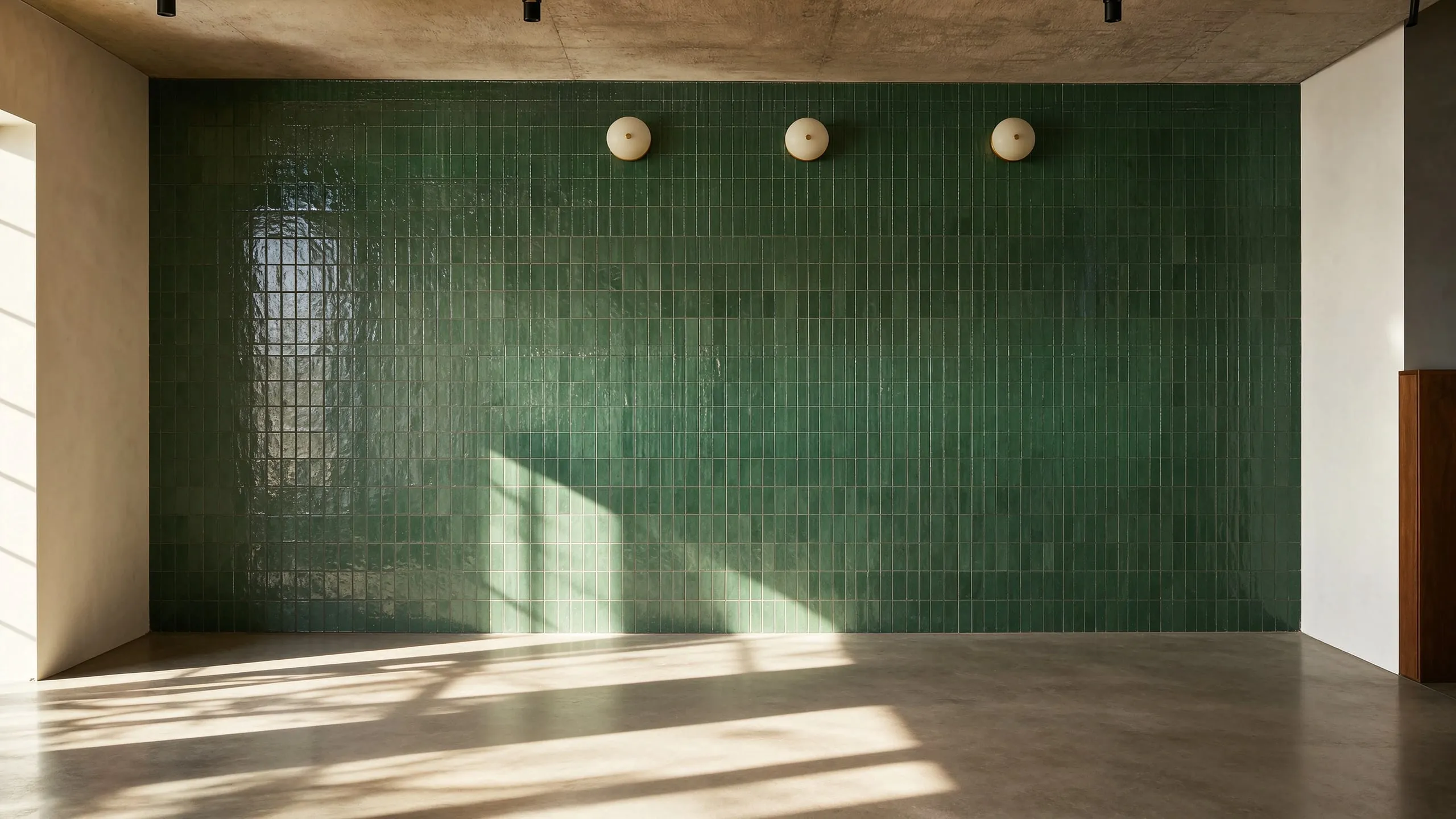
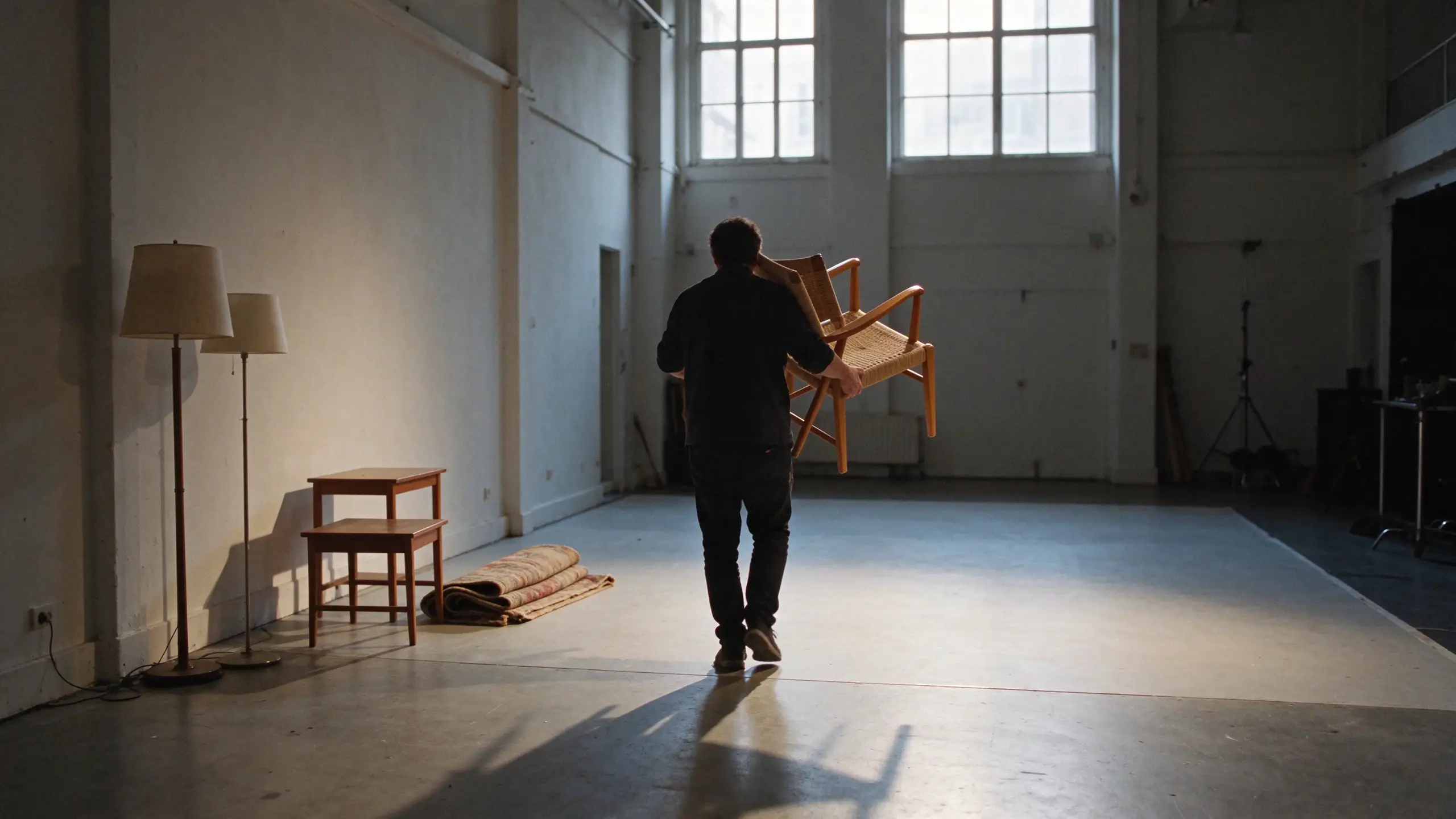
The pair above is one request with no prompt: drag the divider to compare the source image with the base image the task returned, the room with every object it separated taken out.
What are the ways to use Seedream 5.5 Layers on Runway Dev?
You can use Seedream 5.5 Layers on Runway Dev three ways, all from one account:
| Way in | Best for | What you need |
|---|---|---|
| Playground | Splitting an image, then copying the request as code | A Runway Dev account |
| API and SDKs | Calling Seedream 5.5 Layers from your own code | An API key, plus the Node or Python SDK if you want one |
| Coding agent | Having Claude Code, Codex or Cursor build the API integration into your product, tool or pipeline | The Runway Dev MCP and skills, and an API key for live calls |
How do you get API access to Seedream 5.5 Layers?
You get API access to Seedream 5.5 Layers with a Runway Dev account and an API key:
- Create an account at https://dev.runway.com.
- Create an API key in your project’s dashboard.
- Add credits to your project’s balance.
- Store the key in your environment as
RUNWAYML_API_SECRET. - Send a request with
"model": "seedream5.5_layers", one image inreferenceImagesand theX-Runway-Versionheader toPOST /v1/text_to_image. The code below is ready to run.
How much does the Seedream 5.5 Layers API cost?
The Seedream 5.5 Layers API on Runway Dev is billed per image it returns, counting the base image and each layer: 2 credits ($0.02) per image at 1K or 2 credits ($0.02) per image at 1.5K, and 4 credits ($0.04) per image at 2K or with auto.
| Option | Credits | USD |
|---|---|---|
| auto | 4 credits per image | $0.04 per image |
| 1K | 2 credits per image | $0.02 per image |
| 1.5K | 2 credits per image | $0.02 per image |
| 2K | 4 credits per image | $0.04 per image |
- The source image, once per request: +0.8 credits ($0.008).
- Billed for the base image and each layer returned.
- Charged up front for the image cap you set, then refunded for any not returned.
- Each request is rounded up to a whole credit.
Prices current as of November 18, 2026. 1 credit = $0.01.
How the billing works:
- You pay for the images the task returns. A split into a base image and eight layers is billed for nine images, plus the charge for the source image listed under the table.
- Credits are reserved up front for
maxImages, then settled. A task holds credits for the most images it may return, and the images it doesn’t return are refunded when it finishes. A lowermaxImagesreserves less. resolutionsets the rate.auto, the default, sizes the output from your image and bills at the largest size’s rate. Send a smallerresolutionfor the lower rate.- A task that fails input moderation (
SAFETY.INPUT.*) is still charged. See task failures for what each failure means.
Every rate is also listed in the docs pricing guide and on Runway Dev pricing.
What does the Seedream 5.5 Layers API return?
A Seedream 5.5 Layers task returns a base image and a set of layers, all as separate files. The base image is the scene with the separated objects removed and the area behind them filled in. Each layer is one object as a PNG with a transparent background, cropped to that object.
Here are the layers from the kitchen above, laid on a checkerboard that marks the transparent pixels:
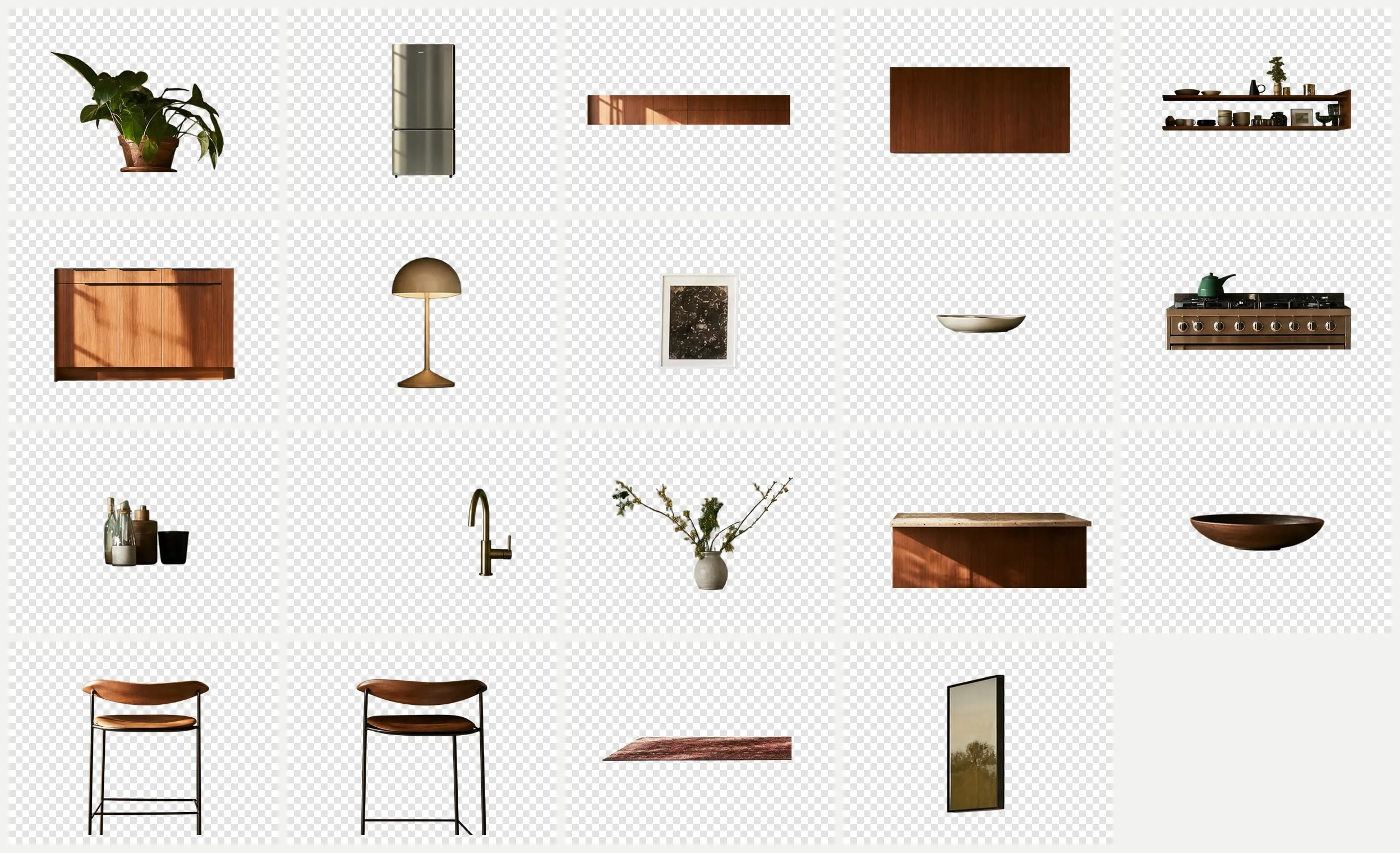
The completed task carries the files in two fields:
outputlists a URL for every image, the base image included.layersdescribes the same images, in the same order. Each entry has the image’suri, aname, azIndexand, for a layer, aboundingBox.
{
  "status": "SUCCEEDED",
  "output": ["https://…/layer-19.png", "…", "https://…/base.png"],
  "layers": [
    {
      "uri": "https://…/layer-19.png",
      "name": "Layer 19",
      "zIndex": 19,
      "boundingBox": {
        "absolute": [2274, 430, 2530, 695],
        "normalized": [888, 299, 988, 483]
      }
    },
    { "uri": "https://…/base.png", "name": "Base image", "zIndex": 0 }
  ]
}
What each field tells you:
zIndexis the stacking order. The base image is0, and a higher number sits in front. Sort byzIndexrather than by position in the list: the base image can come last.boundingBox.absoluteplaces the layer in pixels of the base image, as left, top, right and bottom edges.boundingBox.normalizedgives the same box in thousandths of the image’s width and height, for a canvas of any size.namelabels each image. With no prompt, layers are numbered. With a prompt, each one is named after what it holds, such as “Stainless steel double-door refrigerator”.- The base image follows
outputFormat, PNG by default or JPEG. Layers are always PNG, so their transparency survives.
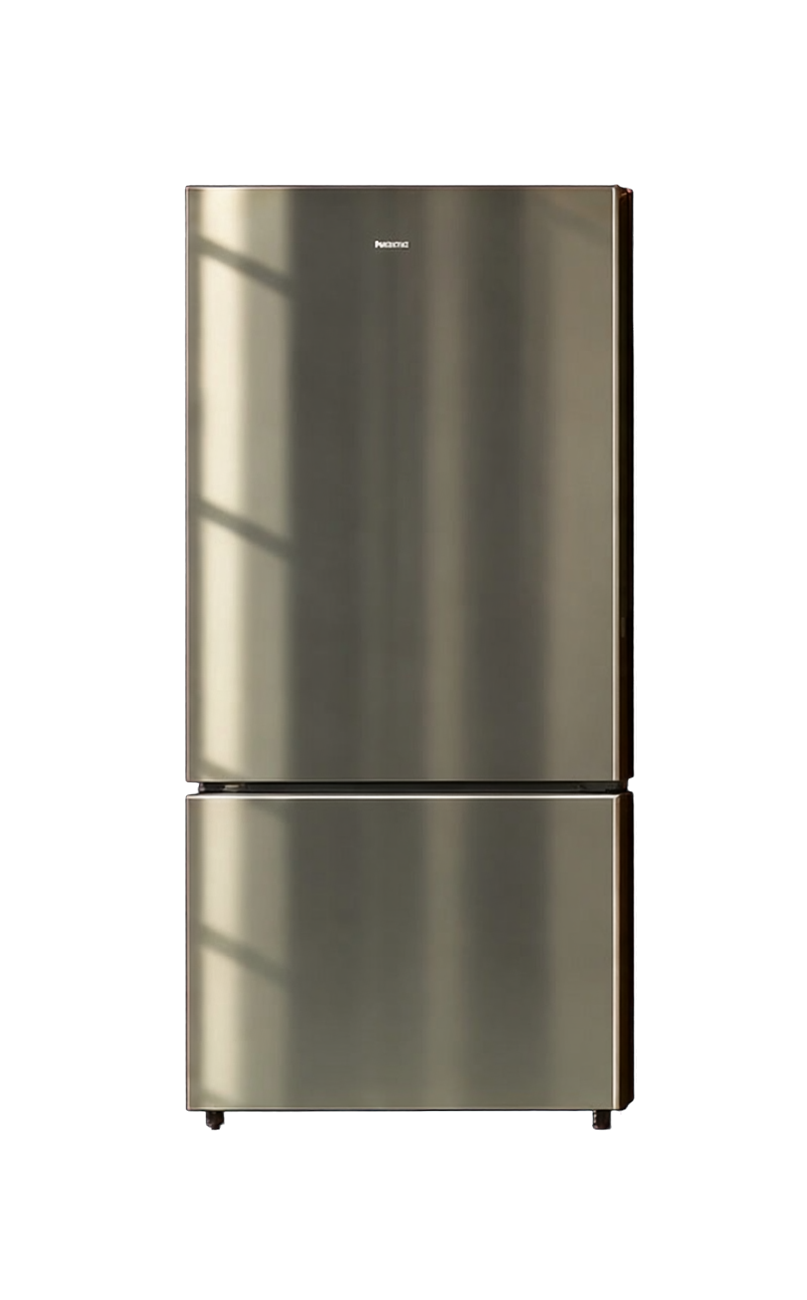
The refrigerator layer as the API returned it keeps its alpha channel, so you can open it in any editor and check the transparency yourself.
What inputs does Seedream 5.5 Layers accept?
Seedream 5.5 Layers accepts one image in referenceImages and an optional prompt, on POST /v1/text_to_image. The image is the picture to split, and it has to be a PNG or a JPEG within the size and shape limits in the layer input requirements.
POST /v1/text_to_image
| Field | Accepts |
|---|---|
model (required) |
seedream5.5_layers |
referenceImages (required) |
A list of up to 1 images |
resolution |
One of auto, 1k, 1.5k or 2k |
outputFormat |
One of png or jpeg |
maxImages |
Whole number from 2 to 100 |
promptText |
Text, 1 to 4,000 characters |
Images go in as an HTTPS URL, a runway:// URI from an upload or a data URI; inputs lists sizes and formats. Each table shows what a field accepts on its own. Rules that combine fields are checked when the task is submitted, and the API reference has them in full.
What each optional field changes:
promptTextnames the elements to separate. Left out, the model decides for itself. The next section shows the difference.maxImagescaps how many images the task returns, the base image included, and with it the credits reserved up front.resolutionsets the output size.auto, the default, sizes it from your image, and the inputs table lists the other values.outputFormatsets the base image’s format:png, the default, orjpeg.
How do you choose which elements become layers with the Seedream 5.5 Layers API?
You choose the elements that become layers on Seedream 5.5 Layers by naming them in promptText. With no prompt, the model separates every element it finds, as in the kitchen above. With a prompt, it separates the ones you name and leaves the rest in the base image, which keeps the task smaller and cheaper. Set maxImages to the number of layers you expect plus the base image, so the task reserves only what it needs.
This request separates only the stools and the refrigerator from the same kitchen:
{
  "model": "seedream5.5_layers",
  "referenceImages": [
    {
      "uri": "https://d3phaj0sisr2ct.cloudfront.net/devportal/learn/images/seedream-5-5-layers-api/kitchen-source-eddc18e9.jpg"
    }
  ],
  "promptText": "Separate the two bar stools and the refrigerator into their own layers",
  "maxImages": 4
}
How do you put Seedream 5.5 Layers back together?
You put Seedream 5.5 Layers back together by drawing the base image first, then each layer in rising zIndex order, scaled to fit its boundingBox.absolute and placed at its top-left corner. Each layer file is cropped to its object and returned at its own size, so resize it to the box rather than drawing it at its native size. Drawn that way, every layer lands where it was in the source image.
Leave a layer out, move its box or swap its file, and you get an edit with the rest of the picture untouched. Here, every layer of the kitchen went back on its base image at its box, except the two stools:
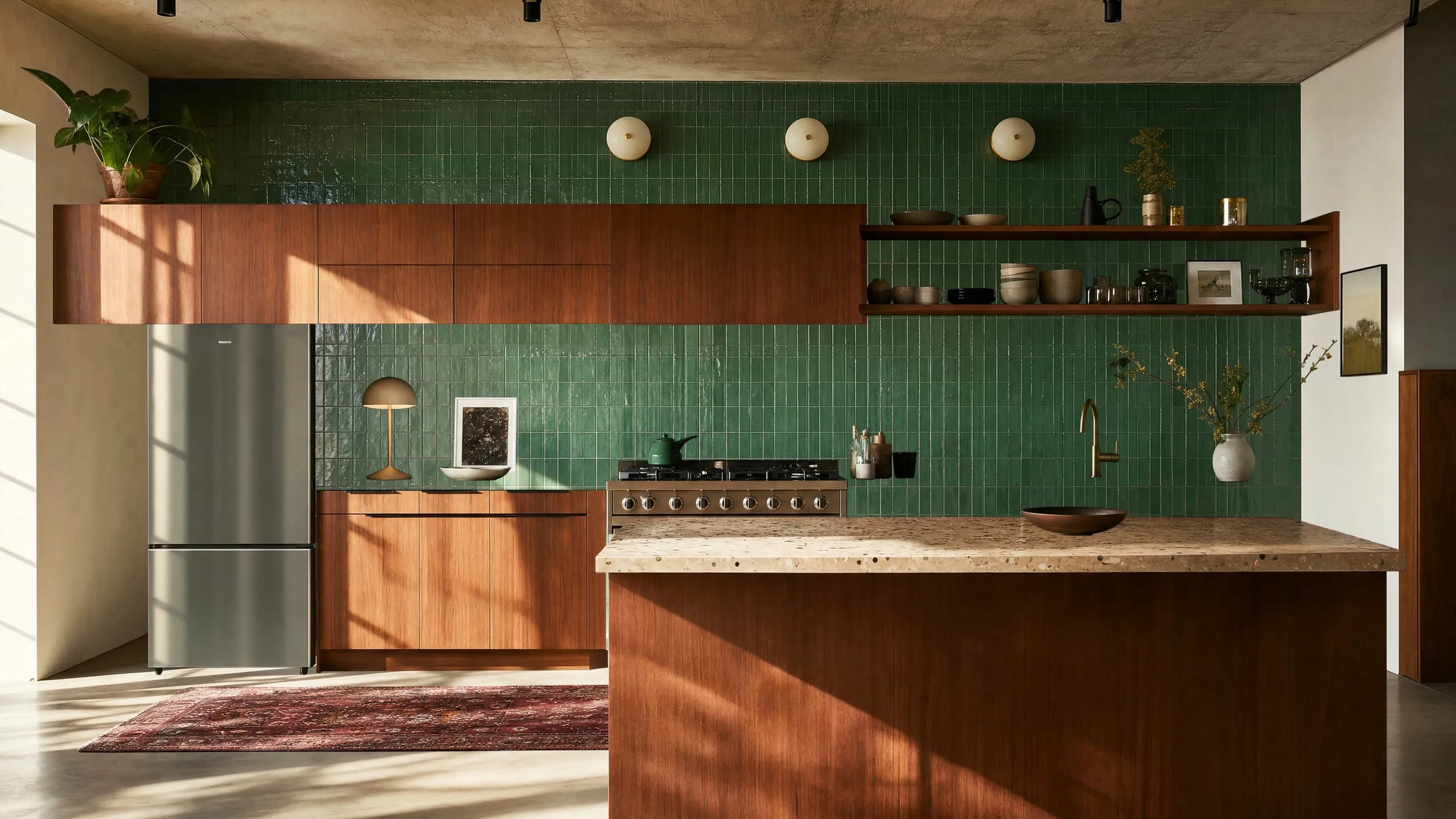
How do you use the Seedream 5.5 Layers API?
You use the Seedream 5.5 Layers API by sending seedream5.5_layers as the model to POST /v1/text_to_image with the image to split in referenceImages. This example request, in curl, Node and Python, splits the kitchen above with no prompt, which is the request that returned its layers:
curl
curl -X POST https://api.dev.runwayml.com/v1/text_to_image \
  -H "Authorization: Bearer $RUNWAYML_API_SECRET" \
  -H "X-Runway-Version: 2024-11-06" \
  -H "Content-Type: application/json" \
  -d '{
    "model": "seedream5.5_layers",
    "referenceImages": [
      {
        "uri": "https://d3phaj0sisr2ct.cloudfront.net/devportal/learn/images/seedream-5-5-layers-api/kitchen-source-eddc18e9.jpg"
      }
    ]
  }'

# The response carries the task id. Poll the task until it finishes:
curl https://api.dev.runwayml.com/v1/tasks/$TASK_ID \
  -H "Authorization: Bearer $RUNWAYML_API_SECRET" \
  -H "X-Runway-Version: 2024-11-06"
Node.js
import RunwayML, { TaskFailedError } from '@runwayml/sdk';

// Reads your API key from RUNWAYML_API_SECRET.
const client = new RunwayML();

try {
  const task = await client.textToImage
    .create({
      model: 'seedream5.5_layers',
      referenceImages: [
        {
          uri: 'https://d3phaj0sisr2ct.cloudfront.net/devportal/learn/images/seedream-5-5-layers-api/kitchen-source-eddc18e9.jpg',
        },
      ],
    })
    .waitForTaskOutput();
  console.log(task.output);
} catch (error) {
  if (error instanceof TaskFailedError) {
    console.error(error.taskDetails);
  } else {
    throw error;
  }
}
Python
from runwayml import RunwayML, TaskFailedError

# Reads your API key from RUNWAYML_API_SECRET.
client = RunwayML()

try:
    task = client.text_to_image.create(
        model="seedream5.5_layers",
        reference_images=[
            {
                "uri": "https://d3phaj0sisr2ct.cloudfront.net/devportal/learn/images/seedream-5-5-layers-api/kitchen-source-eddc18e9.jpg",
            },
        ],
    ).wait_for_task_output()
    print(task.output)
except TaskFailedError as error:
    print(error.task_details)
Generation is asynchronous:
- The create request returns a task ID right away, and the split runs in the background. A layer split takes longer than a single image, so poll with backoff.
- Poll
GET /v1/tasks/{id}with backoff until the status isSUCCEEDED,FAILEDorCANCELLED.THROTTLEDmeans the task is waiting in a queue, not rejected. - A
SUCCEEDEDtask carriesoutputandlayers, as shown above. The URLs are temporary, so download the files you keep. See outputs. - The SDKs poll for you.
waitForTaskOutput()andwait_for_task_output()raiseTaskFailedErrorwith the task’s details when it fails.
Why does a Seedream 5.5 Layers API request fail?
A call to Seedream 5.5 Layers fails in one of two places: with a validation error when you create the task, or as a task that ends with a failure code. The common ones:
- A validation error on
referenceImages: the request sent no image or more than one. Seedream 5.5 Layers splits exactly one image per request. - A rejected source image: it is a WebP, HEIC or another format, or outside the size or shape limits. Convert it to PNG or JPEG and check it against the layer input requirements.
- A request rejected for credits: the balance doesn’t cover the reservation for
maxImages. Add credits, or send a lowermaxImages. - A validation error naming an unrecognized key: the request carries a field Seedream 5.5 Layers doesn’t take, such as
ratio,outputCountorbackgroundfrom Seedream 5.5. UseresolutionandmaxImagesinstead. SAFETY.INPUT.*: content moderation rejected the image or the prompt. The task is charged and shouldn’t be retried as is: change the inputs first.THIRD_PARTY.UNAVAILABLE: the model’s provider didn’t return the layers, because of an outage or load. Wait, then retry.- An output link that stopped working: output URLs expire. Download the base image and layers when the task succeeds.
What does Runway Dev add when you call Seedream 5.5 Layers?
Runway Dev serves Seedream 5.5 Layers next to Runway’s own models and other labs’ models, behind one API key and one credit balance: you build with a single key and pay a single bill, instead of an account, a key and an invoice per lab. The same key calls Seedream 5.5, so one integration can generate an image and split it into layers.
A coding agent can do the Seedream 5.5 Layers integration for you on Runway Dev, end to end. Connect the Runway Dev MCP and the agent works from your live account: the models your project can call with their current prices and input limits, your credit balance and the record behind any task. It writes the integration against what the API accepts today, including the code that places each layer at its box, and when a task fails it looks up the reason and fixes it. The Runway Dev skills show the agent how to integrate with the official SDKs and how to build with models, Model Routers, Recipes and Workflows.
FAQ
How do I get API access to Seedream 5.5 Layers?
Create a Runway Dev account at dev.runway.com, make an API key and add credits. Then send seedream5.5_layers as the model to POST /v1/text_to_image with one image in referenceImages. To have a coding agent write the integration instead, connect the Runway Dev MCP and install the Runway Dev skills.
What does each Seedream 5.5 Layers resolution cost?
On Runway Dev, Seedream 5.5 Layers costs 2 credits ($0.02) per image at 1K or 2 credits ($0.02) per image at 1.5K, and 4 credits ($0.04) per image at 2K, the rate auto bills at, for the base image and for each layer. The source image adds the charge listed in the price table, and credits for maxImages are reserved up front, then refunded for images not returned. Prices are current as of November 18, 2026.
Is the Seedream 5.5 Layers API on Runway Dev the official model?
Runway Dev’s Seedream 5.5 Layers API runs the official Seedream 5.5 model from ByteDance in its layer decomposition mode. You call it with your Runway Dev API key and the model ID seedream5.5_layers, like every other model on Runway Dev.
Is there an API that splits an image into layers?
Seedream 5.5 Layers on Runway Dev splits one image into a base image and transparent PNG layers through an API. Send the image to POST /v1/text_to_image with seedream5.5_layers as the model, and the completed task lists every layer with its position and stacking order.
How do I get transparent PNG layers from a flat image?
Send the flat image to Seedream 5.5 Layers. Every layer it returns is a PNG with an alpha channel, cropped to one object, and the base image holds the scene behind them. The layers field gives each PNG’s box, so you can place it back on the base image exactly.
How many layers does Seedream 5.5 Layers return?
Seedream 5.5 Layers returns as many layers as it finds elements, up to maxImages minus the base image. A busy scene with no prompt can return many, like the nineteen layers of the kitchen on this page, and a prompt that names a few elements returns those.
Can Seedream 5.5 Layers export a PSD file?
Seedream 5.5 Layers returns each layer as its own PNG with its position and stacking order, rather than one PSD. Those three facts are what a layered file holds, so your code or a coding agent can assemble them into a PSD, a Figma file or a canvas in your app.
What is the Seedream 5.5 Layers model ID on Runway Dev?
The model ID is seedream5.5_layers, sent as model to POST /v1/text_to_image. Seedream 5.5, the generation model it comes from, is seedream5.5 on the same endpoint.
Can I use Seedream 5.5 Layers without writing code?
You can use Seedream 5.5 Layers on Runway Dev without writing code yourself. The playground splits an image from a form and gives the request back as code, and a coding agent connected to the Runway Dev MCP writes the integration for you.
Does the same Runway Dev API key work for Seedream 5.5 Layers and other models?
One Runway Dev API key calls Seedream 5.5 Layers, Seedream 5.5 and every other model your project can use, Runway’s own and other labs’, with the same SDKs, task flow and credit balance. Switching models means changing the model field.
Why did my call to Seedream 5.5 Layers fail with a SAFETY.INPUT code?
A SAFETY.INPUT.* failure means content moderation rejected the image or the prompt you sent; the suffix hints at which one but may not match. The task is charged and shouldn’t be retried as is, so change the image or prompt before you send it again.
Start building on Runway Dev
Related articles
 Model guides
Seedream 5.5 API: access, pricing and code
Get the official Seedream 5.5 API from ByteDance on Runway Dev: image generation, reference editing, transparent PNGs, price per image and code.
 Tutorials
How to let a Model Router choose the right model for each request
Why video and image models are not interchangeable, and how to set up a Model Router on Runway Dev that picks the model for every request.
 Concepts
Can I use AI image and video generation commercially in my product?
Provider terms, copyright, input rights, training and disclosure: what decides whether you can ship AI images and video commercially.